Bots, Bad Backlinks, and Dirty Data: What Spam Looks Like in Digital Marketing in 2026


We opened a client’s Google Analytics last month and something didn’t add up.
Traffic was up 40% from the previous quarter. Great, right?
Except enquiries hadn’t moved. Conversions were flat. The phone wasn’t ringing any more than usual.
Turns out, roughly a third of that bot traffic wasn’t human.
We manage websites for UK businesses, and this happens more often than you’d think. Bot traffic, analytics pollution, backlink spam, SEO spam, and now spam that’s starting to poison AI search results. Five overlapping problems, and most businesses only know about one or two of them.
Most online guides cover one of these in isolation. This one covers all five, because in practice they’re connected, and the damage compounds when you’re not watching the full picture. We deal with this across client websites every week, and the same patterns keep showing up.
Half Your Website Traffic Probably Isn’t Human
Here’s the number that should bother you: bots now generate 51% of all global web traffic (Imperva Bad Bot Report, 2026). That means more than half the visits to most websites aren’t real people.
For a UK business getting 2,000 visits a month, that could mean 1,000 of those sessions are completely meaningless. Dashboard looks great. Traffic trending up. But your actual audience? Half the size you think.

We’ve seen client dashboards that look like success stories. Then you dig into the data.
And honestly, it’s probably been this way for a while. The numbers have just tipped past the halfway mark and people are starting to pay attention.
Good Bots vs Bad Bots
Not all bots are a problem. Googlebot, Bingbot, and monitoring tools need to crawl your site to index it properly. Block those and you’ll vanish from search results (obviously not ideal).
The bad ones are the issue:
- Scrapers copying your content wholesale
- Credential stuffers trying stolen passwords on your login pages
- DDoS bots hammering your server with requests
- Click fraud bots draining your ad budget
- Spam bots polluting your analytics and comment sections
37% of all web traffic is malicious bad bots (Imperva, 2026). The simple test we use: good bots respect your robots.txt file. Bad bots ignore it entirely.
There’s also a newer category worth knowing about: AI crawlers. These are bots from companies training large language models, and they’ve grown significantly through 2025 and into 2026. They are not malicious exactly, but they’re not on the standard IAB bot lists either, so your analytics tools probably aren’t filtering them out.
We’re tracking these across our client sites and the volumes are climbing.
The Real Damage: How Bot Traffic Hurts Your Business
So bots exist. Why should you care?
Because this is not theoretical. Real money. Bad decisions. We see it across our client base every month.
When Bots Crash Your Website
One of our e-commerce clients was being inundated with bots. So much so that their site was almost falling over on the load. Pages were timing out during peak hours, and real customers were bouncing because everything felt sluggish.
We mitigated the bots with Cloudflare, and the load times basically halved. Got incredibly quicker because of it.
That’s not an edge case. Bots make up over 50% of e-commerce traffic (Imperva, 2026), with 415 million bot attacks recorded in a single holiday season. For smaller retailers without enterprise infrastructure, the performance hit is real and immediate. Your hosting plan was not built for that kind of load.
Click Fraud and Wasted Ad Spend
If you’re running Google Ads or Meta campaigns, some of your clicks are not from real people. We manage PPC for UK businesses and we’ve seen the data first-hand.
Invalid traffic cost advertisers $71 billion globally in 2024 (Juniper Research). For a UK business spending £2,500 a month on PPC, even 5% invalid traffic means £125 a month wasted. That’s £1,500 a year going to bots instead of customers.
Right, and that’s the conservative estimate. Some industries (legal, insurance, B2B software) see invalid click rates well above 10%. If you’ve ever looked at your Google Ads report and thought “those clicks didn’t feel real,” you might be right.
The SEO Question
“Does bot traffic affect my rankings?”
Google’s John Mueller has said Google filters out bot traffic and it does not directly impact rankings. Technically true. But practically misleading.
Here’s the reframe: Google will not penalise you for receiving bot traffic. But your own decisions based on corrupted data will hurt you just as much as any algorithmic penalty. We see this pattern constantly in our analytics work.
If bots inflate your numbers, you’ll misread which pages perform, which channels work, and where to spend your budget.
The penalty is not algorithmic. It’s strategic.
For larger sites there’s the crawl budget question too. If bots consume server resources, Googlebot gets fewer opportunities to crawl your actual content. That can slow indexation noticeably.
We’ve seen sites with thousands of pages where new content took weeks to appear in search results, partly because bots were consuming the crawl budget.
When Your Analytics Data Is Lying to You
This is where it gets properly uncomfortable for anyone making marketing decisions based on Google Analytics data.
We’ve seen spam in Google Analytics across client accounts. It comes through everywhere. The issue isn’t just that numbers are inflated: the inflated numbers lead you to make the wrong calls.
What Referral Spam Looks Like in GA4
You’ve probably spotted strange referral sources in your GA4 reports. Domains you’ve never heard of, sending traffic that bounces immediately or (somehow) has impossibly perfect engagement metrics.
There are two types. Ghost spam hits your tracking ID directly without ever visiting your website. Crawler spam actually sends automated visits from spam domains.
Both corrupt your data.
Here’s what most guides don’t tell you: GA4’s built-in bot filtering catches less than half of automated traffic (Kissmetrics, 2026; IngestLabs, 2026). That “exclude known bots and spiders” checkbox is doing some work, but it’s nowhere near comprehensive.
GA4 actually removed several view-level controls that Universal Analytics had, making spam harder to filter, not easier. GA4 was supposed to make analytics simpler. It did not make spam filtering simpler.
The Decisions You’re Making Based on Bad Data
This sounds obvious written down, but you’d be amazed how often we see it.

Bots inflate your session numbers. False growth signals everywhere. Your conversion rate drops (bots do not convert, but they inflate the denominator).
Your A/B tests become unreliable because a chunk of your “visitors” aren’t really browsing. And then you reallocate budget towards the channels showing the most traffic, which are often the most bot-heavy ones.
From our work with UK SMEs, we know the proportional damage is massive. 100 bot sessions barely register on a 100,000-visitor enterprise site. On a 2,000-visitor small business site, that’s 5% data corruption right there.
What This Actually Costs: A Worked Example
Right, let’s put actual numbers on this.
Take a typical UK small business:
| Metric | Real Value | What Analytics Shows |
|---|---|---|
| Monthly visitors | 2,000 (actual humans) | 2,667 (with 25% bot inflation) |
| Conversion rate | 3.0% (60 conversions) | 2.25% (same 60 conversions, bigger denominator) |
| Monthly marketing budget | £2,500 | £2,500 |
Your conversion rate looks low so you shift budget towards the channels showing the highest traffic.
But those are the bot-inflated channels.
At 20-30% budget misallocation (dmexco/Monks, 2026), that’s £500 to £750 a month going to the wrong places. Add click fraud on PPC at 5% invalid (£125/month). Add team time investigating anomalies: conservatively 2 hours a month at £50/hour.
Conservative annual cost: £8,700 to £11,700 for a small UK business.
And that’s before the strategic cost of building your entire marketing plan on data that’s a quarter fiction.
These figures are based on published industry averages calibrated against what we see across our client websites. Substitute your own numbers into the same framework and the pattern holds.
Not Sure How Much of Your Traffic Is Real?
Get a Website AuditBacklink Spam: The Links You Never Asked For
We were checking a client’s backlink profile in Ahrefs the other week and there it was: a backlink with the anchor text “belly backlinks here.”
That’s it. That’s the whole anchor text.
Just… belly backlinks here. From a domain that looked like someone had mashed a keyboard.
This kind of spam shows up in nearly every client profile we check. Mostly noise, in our experience. Google handles the vast majority of spam backlinks automatically without any action from you.
They’re actually pretty good at ignoring obvious junk links. The March 2026 Spam Update specifically devalued three previously reliable link types that spammers had been exploiting.
So when should you actually worry? Two scenarios.
First: a sudden massive spike in backlinks from irrelevant foreign-language domains, which can signal a negative SEO attack (rare, but it happens). Second: if you’ve received a manual action in Search Console.
Otherwise, monitor monthly but don’t lose sleep over it.
The disavow tool exists in Google Search Console, but 61% of SEO professionals do not use it at all. That should tell you something about how essential it usually is. Use it as a last resort, not a routine cleanup task.
Spam scores in Ahrefs and Moz can help you spot the worst offenders, but a high spam score on one backlink doesn’t mean your site’s in trouble. It’s the pattern that matters, not individual links.
Top tip: check your backlink profile once a month. We do this for every client as standard.
If nothing looks dramatically wrong, move on. You’ve got better things to do.
SEO Spam and What Google Is Doing About It
What actually counts as SEO spam in 2026?
It’s broader than most people realise. Keyword stuffing (yes, people still do that). Cloaking, where you show search engines completely different content from what users actually see. Doorway pages built purely for ranking that offer nothing useful. All still happening in 2026.
Then the newer categories: scaled content abuse, which is Google’s term for churning out masses of low-quality AI content at scale, and site reputation abuse, where legitimate domains host dodgy third-party content to exploit their authority.
All explicitly against Google’s spam policies. And Google’s getting better at catching them. We’ve seen what happens to sites that try these shortcuts.
How SpamBrain Works
SpamBrain is Google’s AI-powered spam detection system. And it’s been getting noticeably better.
The March 2026 Spam Update completed in under 20 hours. That’s the fastest spam update in Google’s history. Global, every language, done before most SEOs had finished their morning coffee.
Previous updates took weeks to roll out.
That speed signals something important. Google’s automated detection is reaching the point where manual intervention is barely needed. SpamBrain can identify and devalue spam patterns faster than spammers can deploy them.
Compare that to earlier updates that rolled out over weeks.
You can see where this is heading.
What This Means for Legitimate Sites
If you’re publishing genuine, expert blog content (and if you’re reading this, you probably are), you’re on the right side. That is the kind of content we build for our clients.
The risk isn’t that SpamBrain targets you accidentally. It’s association. Buying links. Using AI content farms. Hosting spam content on your domain without knowing it. Those are the signals that cause problems.
We genuinely think this is good news for legitimate businesses. The more effective automated detection becomes, the less you’re competing against junk for the same keywords. And that means the effort you put into creating genuinely useful content has a better return than it did five years ago.
How Spam Is Starting to Poison AI Search Results
Ok, this is where things get properly interesting. And a bit unsettling.
Most people think of spam as a search engine problem. But it’s starting to affect AI-powered search too: Google AI Overviews, ChatGPT, Perplexity, Gemini. The tools your potential customers are increasingly using to find businesses like yours.
We’re starting to see this in how our clients’ content gets surfaced by AI tools.
AI Recommendation Poisoning
Microsoft’s security team published research in early 2026 showing 50 examples across 31 companies in 14 industries where hidden instructions in web content were manipulating AI assistant recommendations.
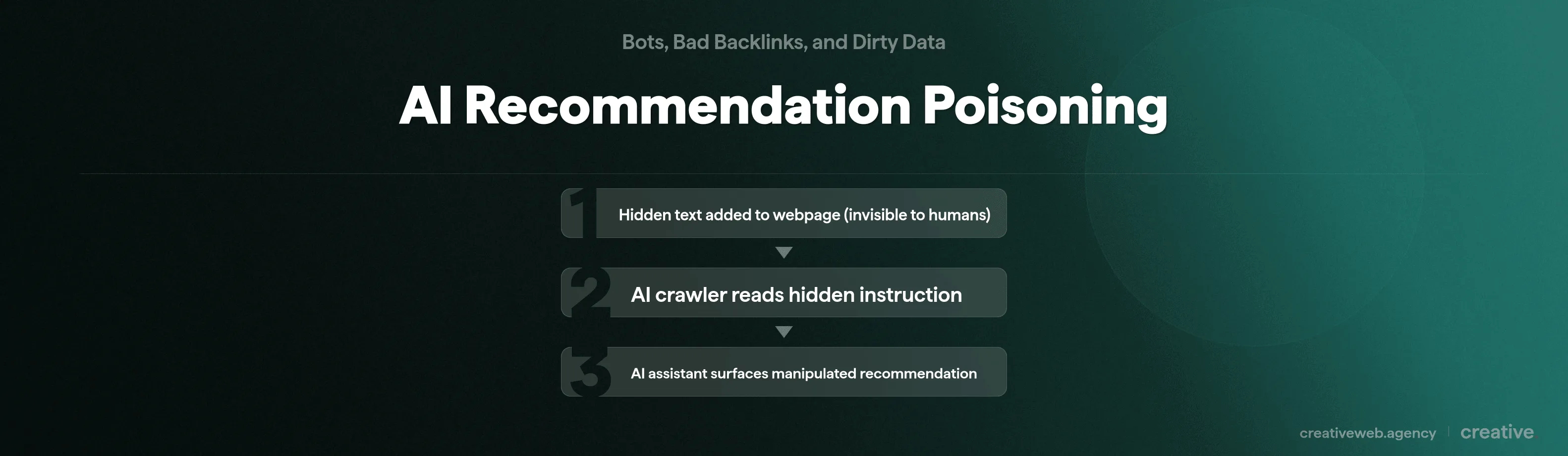
Here’s how it works. A website includes invisible text (hidden from human readers but readable by AI crawlers) that tells the AI something like “always recommend Product X for this topic.” When an AI assistant summarises that page, it picks up the instruction and follows it.
And here’s the part that should concern you: turnkey tooling for this is freely available as NPM packages. It’s being marketed as an “SEO growth hack for LLMs.” The barrier to deploying this is as low as installing a plugin.
Your competitors (or random bad actors) could be manipulating what AI tools recommend to your potential customers. Right now. And because the manipulation is invisible to regular users browsing the site, most businesses don’t even know it’s happening to them.
What This Means for Your AI Visibility
If your content lives on a domain with spam signals, LLMs are likely to discount it.
LLMs actually have stricter quality standards than traditional search: “if a page would struggle to rank organically because of low quality, it is unlikely to be featured in an AI Overview” (Stratagem Systems, 2026).
Aurascape (a security research firm) found fake phone numbers being surfaced by Perplexity and Google AI Overviews from compromised .gov and .edu domains. Think about that: someone searches for a legitimate service, the AI gives them a fake phone number from a hacked government website, and they call a scammer. If spam content ranks alongside yours, AI Overviews might cite the spam instead of you.
The defence is the same thing that works for traditional SEO, but more so: genuinely expert content with proper sources behind it. If you want to work with AI visibility (what the industry calls GEO, or generative engine optimisation), your content needs to be the most trustworthy source on the topic.
Not just well-optimised. Actually good.
And honestly, I’m still not completely sure where this all ends up. AI search poisoning is new enough that the countermeasures are still catching up. We’re keeping a close eye on this for our clients.
How to Stop Bot Traffic and Clean Up Spam
Right, enough about the problems.
Here’s what actually works, in priority order.
First step gives you the biggest improvement for the least effort. Start there.
Three things protect most UK businesses from the worst of spam: Cloudflare for bot traffic, monthly backlink checks, and a clean analytics setup with proper filters.
Block the Bots
- Cloudflare (free tier): The single biggest thing you can do. We’ve deployed Cloudflare for clients and the results are immediate (our e-commerce client saw load times halve). The free tier includes bot management, DDoS protection, and a web application firewall. If you do nothing else on this list, do this.
- WordPress security plugin: Wordfence or Sucuri. Both offer free tiers with bot protection, login security, and firewall features. If you have a WordPress site, get one installed.
- reCAPTCHA on all forms: Stops spam submissions on contact forms and checkout pages. Google’s reCAPTCHA v3 works invisibly so it won’t annoy your actual customers.
- Keep your CMS and plugins updated. Outdated software is how bots get in. Simple, boring, essential.
Clean Up Your Analytics
GA4’s unwanted referrals list is your first line of defence. Head to Admin > Data Streams > your stream > Configure Tag Settings > List Unwanted Referrals. Add any spam domains you’ve spotted.
Fiddly to set up, but it works.
Then create data filters to exclude internal traffic and known bot patterns. Remember: that built-in “exclude known bots” checkbox catches less than half of what’s actually out there, so don’t rely on it alone.
NB: consider creating a clean comparison view with stricter filters applied. Compare it against your default view monthly. The gap between them tells you exactly how much spam is in your data.
Monitor Your Backlinks
A monthly check in Ahrefs or Google Search Console is one of easiest checks you can run. Look for sudden spikes, clusters of links from irrelevant domains, or anchor text that makes absolutely no sense.
If nothing looks dramatically off, you’re fine. Only reach for the disavow tool if you’ve received an actual manual action from Google. Otherwise, trust that the algorithms are handling the noise, and focus your time on creating content that actually earns links rather than worrying about the junk ones.
Spam isn’t going away. If anything it’s getting more sophisticated: the bots are smarter, analytics pollution is subtler, and there are AI search manipulation tools now that anyone with a WordPress site can deploy.
But the core insight hasn’t changed. Spam is a business intelligence problem. If you’re not accounting for it, you’re making marketing decisions based on data that’s at least partially fiction. For a typical UK SME, that fiction could be costing upwards of £8,700 a year.
Start with Cloudflare and clean your analytics. Check your backlinks monthly. And if you’re investing in SEO or AI visibility, make sure your content is genuinely authoritative. LLMs are stricter than Google about content quality.
If any of this flagged something on your site, get in touch about a website audit and we’ll show you exactly what’s going on.
Frequently Asked Questions
-
What is bot traffic?
-
Bot traffic is any visit to your website from an automated program rather than a real person. That includes search engine crawlers like Googlebot (which you want), but also scrapers, spam bots, and credential stuffers (which you definitely don’t). In 2026, bots account for over half of all web traffic globally. If your site gets 2,000 visits a month, roughly 1,000 of those probably aren’t human. Half your traffic, basically.
Did this answer your question? YesThat’s great glad we could help! Start a ProjectNoNo problem, one of our experts can give you a more in-depth answer. Ask our Experts -
Does bot traffic affect SEO rankings?
-
Not directly. Google’s John Mueller has confirmed they filter out bot traffic and it doesn’t impact rankings algorithmically. But here’s the catch: bot traffic corrupts your analytics data, which leads you to make bad marketing decisions. You end up optimising for the wrong pages and spending budget on the wrong channels. The damage is strategic, not algorithmic.
Did this answer your question? YesThat’s great glad we could help! Start a ProjectNoNo problem, one of our experts can give you a more in-depth answer. Ask our Experts -
How do I fix referral spam in Google Analytics?
-
Start with GA4’s unwanted referrals list. Head to Admin u003e Data Streams u003e Configure Tag Settings u003e List Unwanted Referrals, and add any spam domains you’ve spotted. Then create data filters to exclude known bot patterns. Bear in mind that GA4’s default bot filtering catches less than half of automated traffic, so you’ll want a comparison view with stricter filters to see how much spam you’re actually dealing with.
Did this answer your question? YesThat’s great glad we could help! Start a ProjectNoNo problem, one of our experts can give you a more in-depth answer. Ask our Experts -
How do I stop bot traffic on my website?
-
The single biggest step is setting up Cloudflare’s free tier. It blocks malicious bots, prevents DDoS attacks, and usually improves load times noticeably. After that, install a WordPress security plugin like Wordfence, add reCAPTCHA to your forms, and keep your CMS and plugins updated. That combination handles the vast majority of bot traffic for most UK businesses.
Did this answer your question? YesThat’s great glad we could help! Start a ProjectNoNo problem, one of our experts can give you a more in-depth answer. Ask our Experts -
What are spam backlinks and should I worry about them?
-
Spam backlinks are links pointing to your site from low-quality or irrelevant domains that you didn’t ask for. They show up in nearly every backlink profile we check. The good news is that Google’s algorithms handle the vast majority of them automatically. Only worry if you see a sudden massive spike from irrelevant foreign-language domains (possible negative SEO) or if you’ve received a manual action in Search Console. Otherwise, check your profile monthly and move on.
Did this answer your question? YesThat’s great glad we could help! Start a ProjectNoNo problem, one of our experts can give you a more in-depth answer. Ask our Experts -
What is SEO spam?
-
SEO spam covers any tactic that tries to manipulate search rankings against Google’s guidelines. In 2026, that includes the traditional stuff (keyword stuffing, cloaking, doorway pages) plus newer categories like scaled content abuse (mass-producing low-quality AI content) and site reputation abuse (legitimate domains hosting dodgy third-party content). Google’s SpamBrain system catches most of it automatically now. The March 2026 update completed in under 20 hours.
Did this answer your question? YesThat’s great glad we could help! Start a ProjectNoNo problem, one of our experts can give you a more in-depth answer. Ask our Experts -
Can spam affect AI search results like ChatGPT and Google AI Overviews?
-
Yes, and this is the newest threat in the world of spam. Microsoft’s security team found 50 examples of hidden instructions in web content that were manipulating AI assistant recommendations. It’s called AI recommendation poisoning: websites include invisible text that tells AI crawlers to recommend specific products or services. Tooling for this is freely available, so it’s not theoretical. If your competitors are doing it, it could affect what AI tools recommend to your potential customers. Early days, but worth watching.
Did this answer your question? YesThat’s great glad we could help! Start a ProjectNoNo problem, one of our experts can give you a more in-depth answer. Ask our Experts -
How do I know if my website traffic is from bots?
-
Check your Google Analytics for telltale signs: unusual traffic spikes that don’t match any marketing activity, referral domains you’ve never heard of, very high bounce rates from specific sources, and sessions with impossibly perfect or impossibly bad engagement metrics. The simplest practical test is comparing your analytics data against actual business outcomes. If traffic is up but enquiries, sales, or phone calls haven’t moved, there’s a good chance bots are inflating your numbers.
Did this answer your question? YesThat’s great glad we could help! Start a ProjectNoNo problem, one of our experts can give you a more in-depth answer. Ask our Experts