Google Ads Strategy for UK Businesses: What Actually Works in 2026


Early in my career, I worked with a luxury members club in London. Beautiful restaurant, exclusive clientele, the whole package.
The manager set up Google Ads on the broadest keywords imaginable and I watched thousands and thousands of pounds pour down the drain. But because the restaurant was still getting bookings, it was almost impossible to show them how much money they were wasting.
That experience has stuck with me. It’s basically the story of most Google Ads accounts we audit: money going out, some results coming in, but nobody actually knows whether the ads are pulling their weight.
Same pattern, every time.
Most Google Ads strategy guides are written by people who sell courses or software. We manage campaigns for UK businesses alongside their SEO, which gives us a different view: we see how both channels interact, where budget gets wasted, and what actually moves the needle. What we keep seeing go wrong comes down to copy quality, targeting precision, and how people measure performance. This guide covers all three.
Does Google Ads Still Work for UK Small Businesses in 2026?
Short answer: yes. But not the way it worked two years ago.
Google has changed the platform a lot since 2024. If your strategy hasn’t kept up, you’re probably leaving money on the table (or worse, pouring it away).
What Changed in 2025-2026 (and Why It Matters)
Enhanced CPC died in March 2025. If you were relying on it, your campaigns defaulted back to Manual CPC. That’s not inherently bad, but if you haven’t actively chosen a new bidding strategy since, your account is just drifting.
Performance Max has evolved with more transparency and controls. But it still needs the budget and conversion volume that most UK small businesses don’t have.
Consent Mode v2 became mandatory in the UK from March 2024. If you haven’t implemented it, your conversion data for UK users is incomplete. Your Smart Bidding is optimising on partial information and you probably don’t even realise it.
And the broader shift: Google is moving from pure keyword targeting towards signal-based targeting. Your audience data, first-party lists, and geographic signals all carry more weight than they used to.
Any Google Ads strategy written before March 2025 is effectively working from a different version of the platform.
How Google Ads and SEO Work Together
We manage PPC alongside SEO for our clients (it’s common sense that the two go hand in hand, but surprisingly few agencies actually do both).
Why it matters: your Google Ads data shows you which keywords actually convert, not just which ones rank. That feeds directly into your SEO priorities. And as organic rankings improve for those terms, you can pull back ad spend and redirect budget to new keyword opportunities.
If you want to get the most from your total marketing spend, running both channels together is usually the smarter play. We’ve written more about this on our SEO and digital marketing services page.
What Should You Actually Spend on Google Ads?
Everyone asks this first. And most guides give you a range so wide it’s basically useless (“anywhere from £200 to £10,000 a month” is not helpful).
Right, so here’s how we actually work it out.
The Quick Formula (How Agencies Calculate It)
Get your main focus keyword. Go to Google Keyword Planner and look at the top-of-page bid. Multiply that number by 10. That’s your daily budget.
So if the top-of-page bid for your main keyword is £3.50, your daily budget should be around £35 (roughly £1,050 per month).
Any less than that isn’t worth running. You won’t get enough impressions or clicks to learn anything meaningful. You’re basically donating to Google.
The Full Calculation (Work Backwards From Your Customer Value)
The detailed version works backwards from what a customer is actually worth to you:
What’s a customer worth? (Lifetime value, not just the first sale.) What’s your conversion rate from click to customer? (WordStream’s benchmarks put the Search average at 7.5%, but it varies by industry so assume lower when starting out.) What’s the average cost per click in your industry?
Then: customers needed × (1 ÷ conversion rate) × CPC = monthly budget.
NB: this sounds more complicated than it is. The table below should make it click.
Three UK Business Scenarios
| Business Type | Avg CPC | Conv. Rate | Customer Value | Daily Budget | Monthly Budget | New Customers/Month |
|---|---|---|---|---|---|---|
| Electrician (Birmingham) | £2.50 | 8% | £500 | £25 | ~£750 | ~12 |
| IT Support (London) | £6.00 | 5% | £5,000 | £60 | ~£1,800 | ~6 |
| Homeware Shop (UK-wide) | £0.80 | 3% | £65 (AOV) | £30 | ~£900 | ROAS-based |
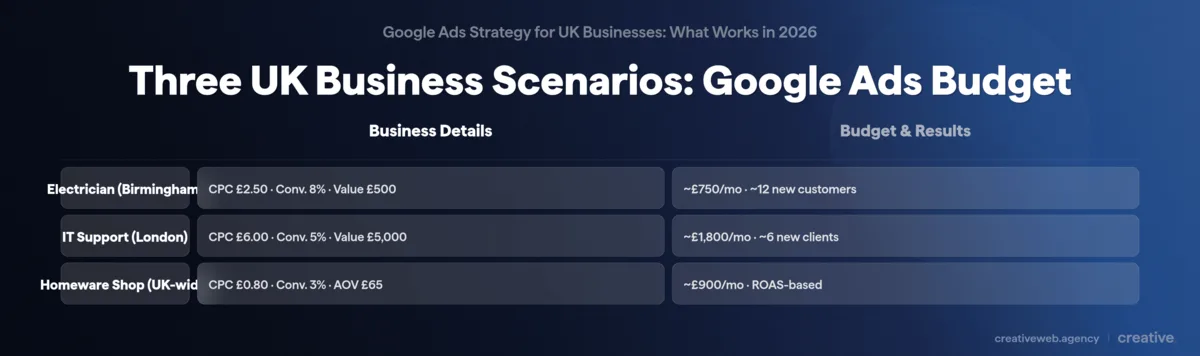
For the electrician: at £2.50 per click and an 8% conversion rate, you need about 12-13 clicks per new customer. That’s roughly £31 per acquisition. If each customer is worth £500, the maths works comfortably even at £750/month.
For IT support in London: higher CPC (competitive sector), lower conversion rate, but each client is worth a lot more. Six new clients at £5,000 each from £1,800 in ad spend is a strong return.
And honestly, these numbers are conservative. Most of our clients spend in the £2,000 to £5,000/month range because that’s where the data becomes meaningful enough to optimise properly. Some spend lots more than that, but it depends on the competitiveness of the industry and the size of the business.
For rough UK CPC benchmarks: low-competition sectors average £0.50 to £1.50, medium sits around £1.50 to £4, and high-competition industries (legal, finance) can run £5 to £10+ per click (WhiteHat SEO, 2026).
Choosing the Right Campaign Type
So, where to start? This depends on what you sell and how much you’re spending.
When Search Campaigns Are the Right Starting Point
For most UK businesses spending under £1,500/month, we’d recommend Search campaigns. Full stop.
You get complete visibility into which keywords trigger your ads, what people actually searched, and where every pound goes. For service companies and lead generation businesses, this is the right place to be. It’s where we start with the majority of our service business clients.
When Performance Max Makes Sense (and When It Doesn’t)
Ok, moving on to the controversial one.
I would recommend steering away from Performance Max for most small businesses. It’s so subjective based on what industry you’re in and what you’re offering.
PMax needs at least £1,500/month in dedicated budget (not shared with Search), 30+ conversions per month so the AI has enough signal to learn, and a decent range of creative assets including images and video. Without all three, it basically throws your money at low-quality placements across Display, YouTube, and Discover.
But if you’re spending £3,000+ and already generating reliable conversion data from Search, PMax can extend your reach. Just watch for cannibalisation with your Search campaigns and set up brand exclusions.
So is Performance Max the future? Honestly, I’m not sure yet. For big-budget accounts with lots of data, probably. For a UK small business spending £800/month with one logo and no video, absolutely not.
Shopping and Ecommerce Campaigns
If you sell physical products, Google Shopping is usually worth testing. We’ve set these up for several of our ecommerce clients and the intent signal is strong: someone searching for a specific product is often ready to buy. You’ll need a Google Merchant Centre feed set up, which takes some initial work but pays for itself once running.
Smart Bidding in 2026: What Changed and What Works
The AI-based bidding you’re pushed towards now can be good, but it’s a scattergun approach. You are constantly fighting Google Ads to keep your spending under control.
That’s the reality. Not the marketing pitch.
Manual CPC as Your Starting Point
If your account gets fewer than 30 conversions a month, Manual CPC still makes the most sense. Smart Bidding needs conversion data to learn from, and without enough of it the algorithm is guessing (usually guessing expensive).
Set your initial bids using the top-of-page bid from Google Keyword Planner as a starting point. Monitor daily. Adjust weekly.
This sounds obvious written down, but you’d be amazed how often we see accounts running Smart Bidding on five conversions a month. That’s not enough data to optimise a breakfast order, let alone a Google Ads campaign. We’ve watched this waste thousands.
Graduating to Automated Bidding
Once you’re consistently hitting 30+ conversions per month, you’ve got options. Target CPA is usually the best starting point for lead generation: tell Google what you’re willing to pay per conversion and set it at your actual acceptable cost, not your ideal one.
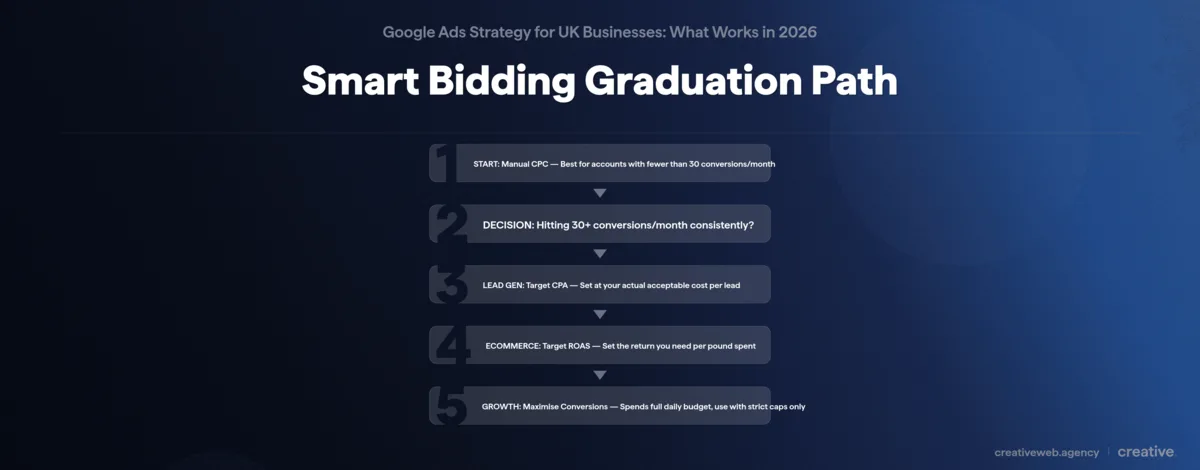
Maximise Conversions is more aggressive and will spend your entire daily budget, so only use it with strict caps. Target ROAS suits ecommerce with variable order values: tell Google the return you need per pound spent.
Great, so I’ll just switch to Target CPA? Not quite. Give it at least two weeks to learn before judging performance. CPA will spike during the learning period: that’s normal. We tell all our clients not to panic at this stage.
And Maximise Clicks is almost never the right choice. It optimises for clicks, not conversions. You want customers, not website visitors.
Writing Google Ads Copy That Converts
This is the bit nobody talks about. Seriously. I’ve read dozens of Google Ads strategy guides and almost none of them give ad copy more than a paragraph. It’s like writing about restaurants and forgetting to mention the food.
RSA Headline Strategy and Pinning
Responsive Search Ads give you 15 headline slots and 4 description slots. Use all of them. Google tests combinations automatically, but you should pin your strongest headline to position 1.
- Headline 1 (pinned): mirror the searcher’s exact intent. If they searched “emergency plumber Leeds,” your headline should say “Emergency Plumber in Leeds.” Not “Professional Plumbing Services.”
- Headline 2: your differentiation. Why you, not the competition. Speed, reviews, price, guarantee.
- Headline 3: credibility or CTA. “5-Star Reviews” or “Get a Free Quote Today.”
The remaining slots are for testing: different angles, proof points, seasonal offers. Google learns which combinations perform best over time.
Pre-Qualifying With Your Descriptions
Here’s something that sounds counterintuitive.
Put your prices in the descriptions. If you’re offering a standardised service at £500, say so. If your minimum project size is £2,000, make that clear.
This filters out people who want to spend less and (in some cases) people who actually wanted a completely different product that costs more. You’re narrowing down your target to people who want to pay that amount. It leads to fewer clicks and you’ve got to be careful of that, but it leads to a higher conversion rate.
You’re paying for qualified clicks instead of curious browsers. And that’s where the return on investment actually lives. It’s one of our most consistent recommendations.
Ad Assets That Lift Performance
These used to be called extensions: sitelinks, callouts, structured snippets, call extensions. Add all of them. They improve your click-through rate and take up more space in the search results. They also boost your Quality Score directly.
For our service business clients especially: call extensions with your phone number are essential. For everyone: sitelinks to your most important pages.
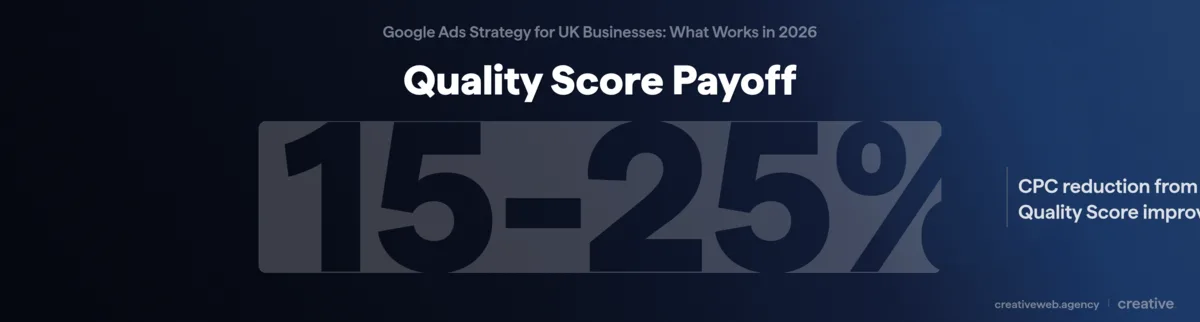
Top tip: a higher Quality Score means a lower cost per click. WhiteHat SEO reports a 15-25% CPC reduction from Quality Score improvements alone. Better ads literally cost less to run. And it’s not just the ads: landing page experience is part of Quality Score too. If the page doesn’t match what the ad promises, you pay more per click and convert fewer visitors.
Targeting the Right Audience, Not Just the Right Keywords
Keywords matter. Obviously. But in 2026, they’re not the whole picture.
Keyword Match Types: Getting Tighter, Not Broader
If you’re spending under £1,500/month, we’d go with exact match and phrase match. These keep you in control of what triggers your ads and where your budget goes.
Broad match can work, but from what we’ve seen it only works when you’ve got Smart Bidding running on sufficient conversion data (there’s that 30-conversion threshold again). Without both conditions met, broad match is basically Google spending your money on whatever it considers loosely relevant.
Negative Keywords: Your Biggest Budget Saver
This is one of the best ways to cut wasted spend. And it takes about 15 minutes a week.
Open your search terms report. Look at what people actually searched when they clicked your ad. Add anything irrelevant as a negative keyword.
Starter categories for UK service businesses: “free,” “DIY,” “jobs,” “salary,” “courses,” “how to become a.” These eat through budgets fast if you’re not blocking them.
Remember the luxury members club? Broad keywords, no negatives, thousands wasted. Weekly search term reviews aren’t optional.
Geographic and Demographic Targeting
Quick win we flag for every new client: change your location targeting from the default (“People in, regularly in, or who’ve shown interest in your location”) to “Presence: People in or regularly in your location.”
The default includes people researching your area from the other side of the world. If you’re a local service business, that’s wasted spend.
For B2B businesses: layer audience targeting (company size, industry, job role) on top of your keywords. Narrower reach, but much better conversion rates.
First-Party Data and Remarketing
Your customer email list is a genuinely underrated targeting tool in Google Ads. Upload it as a Customer Match audience and you can target people who already know you (or exclude them if you only want new business).
We use remarketing a lot for our higher-value service clients where the buying decision takes longer. Someone who visited your pricing page yesterday is a much warmer prospect than someone searching a generic keyword for the first time.
With third-party cookies increasingly restricted, first-party data is becoming the most reliable targeting signal available. It’s something we push every client to build.
Want Google Ads That Actually Generate Leads?
Talk to Our PPC TeamTracking and Measuring What Actually Matters
If you’re not tracking conversions, everything else in this guide is academic. You’re spending blind.
Setting Up Conversion Tracking With Google Tag Manager
First, define what counts as a conversion. For service businesses: form submissions, phone calls, quote requests. For ecommerce: purchases.
Only track actions that represent genuine business value (not page views or button clicks).
Then implement via Google Tag Manager: create a conversion action in Google Ads, copy the conversion ID and label, create a new tag in GTM, and set the trigger to fire on your thank-you page or form submission event.
Finally, verify with Tag Assistant. The conversion action status in Google Ads should show “Recording conversions” within 24-48 hours. If it doesn’t, something’s broken: debug it before spending another pound.
For service businesses where the real conversion happens on a phone call or in a meeting: that’s a blind spot we see in almost every audit. Consider importing CRM data as offline conversions if you want the full picture of what your ads actually generate.
Consent Mode v2: Why Your UK Data Might Be Incomplete
Right, this one’s important. And I genuinely don’t think most small businesses know about it yet.
Since March 2024, Consent Mode v2 is mandatory for any UK business running Google Ads. It introduced two new consent signals (ad_user_data and ad_personalization) that control whether Google can use visitor data for ads and remarketing. Without it, you can’t properly track conversions for UK users who haven’t given explicit consent. A chunk of your data just goes dark.
Use Advanced mode (recommended): tags fire with limited, anonymous data even without consent, giving Google enough modelling signal to fill the gaps. You keep more measurement accuracy while respecting privacy.
If you’re on WordPress, check your cookie consent plugin supports Consent Mode v2 natively. CookieBot, Complianz, and CookieYes all do. For the full technical detail, TDMP’s guide to Consent Mode v2 is the clearest UK-specific resource I’ve found.
Three Metrics That Tell You If It’s Working
In our experience, ads take time to work. Give it at least two weeks. If after those two weeks you aren’t seeing any positive signals (and these might not be conversions yet: sometimes it’s improving click-through rates, or longer time on site), then review your setup.
Once you’ve got data flowing, focus on three things:
- CPA vs customer lifetime value: is each customer costing less to acquire than they’re worth? If yes, scale. If no, diagnose.
- Conversion rate by ad group: which keywords and ads actually drive business, not just clicks?
- Weekly search term review: what are people actually searching when they trigger your ads? This is where you find the waste and fix it.
The biggest problem most people have is they set a daily budget higher than they’re comfortable with, don’t get results in a week or two, and bail. Stick with it. Refine it. Find something that works, and keep doing that.
The Most Expensive Google Ads Mistakes We See
After managing hundreds of accounts, these are the five mistakes that cost the most money right now:
- No conversion tracking. Still the number one issue. If you can see why this matters, you’re already ahead of half the accounts we audit. Without tracking, every other optimisation decision is guesswork. Fix this before touching anything else.
- Broad keywords without negative keywords. The luxury members club story: thousands on generic terms like “restaurant London,” waste completely masked by organic bookings that would have happened anyway. A weekly search term review and aggressive negative keyword list would have saved most of that spend.
- Trusting Google’s optimisation score. That 0-100% score in your dashboard is designed to increase Google’s revenue, not yours. Auto-apply will happily switch you to broad match and Maximise Clicks if you let it.
- Not adjusting after ECPC died. Campaigns on Enhanced CPC defaulted to Manual CPC in March 2025. If you haven’t actively chosen a new bidding strategy since then, your campaigns are drifting without anyone at the wheel.
- Consent Mode v2 gap. Conversion data incomplete for UK users means Smart Bidding is optimising on partial information. This one’s invisible: everything looks like it’s working, but the data underneath is missing a chunk of your UK traffic.
When to Manage Google Ads Yourself and When to Get Help
The Budget Threshold Framework
I’m going to be direct about this.
If you’re spending under £1,000/month on ad spend, manage it yourself. Agency fees would eat too big a chunk of your budget at that level. Keep things simple: one or two Search campaigns, tight keyword lists, learn as you go.
Between £1,000 and £3,000/month, a freelance PPC specialist makes sense (budget around £300-£600/month in management fees for expertise without full agency overhead). And above £3,000/month, a specialist agency generally pays for itself through lower CPAs and time saved.
But honestly, my advice is this: hire an agency to set it up properly and get everything in place, then pay for a check-in every three to six months and a review. That’s usually the most cost-effective approach for businesses that don’t want to learn the platform themselves.
As part of the Google Partners programme, we hit the certification criteria every year. There are hundreds of accounts in our Google Manager account at this point. The pattern we see most often is businesses trying to handle it themselves, getting frustrated, and either quitting entirely or spending three times what a proper setup would have cost.
Red Flags When Choosing a Google Ads Agency
The biggest red flag: they won’t give you access to the Google Ads account they set up for you. That’s a pretty bad sign. It means if you want to leave, you lose everything you’ve paid for.
Also watch for long-term contracts with no exit clause, agencies that guarantee specific rankings or results (nobody can guarantee Google Ads performance), and management fees that seem too low to be doing any real work. If you’re paying £150/month for Google Ads management, ask yourself what they’re actually doing for that money.
If you want to see how we approach things, our PPC services page lays it out. Or just get in touch for a straight answer on whether your current setup is working.
Frequently Asked Questions
-
How much do Google Ads cost in the UK?
-
It depends on your industry and keywords, but you can work it out quickly. Look up your main keyword in Google Keyword Planner, check the top-of-page bid, and multiply by 10 for your daily budget. Most UK businesses we work with spend between £750 and £5,000 per month. Low-competition sectors average £0.50 to £1.50 per click, while competitive industries like legal or finance can run £5 to £10+.
Did this answer your question? YesThat’s great glad we could help! Start a ProjectNoNo problem, one of our experts can give you a more in-depth answer. Ask our Experts -
Are Google Ads worth it for small businesses?
-
Yes, but only if you’re tracking conversions and spending enough to learn from the data. The mistake we see most often with our clients is businesses spending too little, getting nothing back, and deciding Google Ads don’t work. If your daily budget is below the top-of-page bid times 10 for your main keyword, you won’t get enough data to make it worthwhile. Above that threshold, the return can be significant.
Did this answer your question? YesThat’s great glad we could help! Start a ProjectNoNo problem, one of our experts can give you a more in-depth answer. Ask our Experts -
What is a good click-through rate for Google Ads?
-
3-5% for Search campaigns. Above 5% is strong. But CTR alone doesn’t tell you much. A high CTR with a low conversion rate just means you’re paying for clicks that don’t become customers. Focus on conversion rate alongside CTR: if both are healthy, your ads are doing their job.
Did this answer your question? YesThat’s great glad we could help! Start a ProjectNoNo problem, one of our experts can give you a more in-depth answer. Ask our Experts -
Is there VAT on Google Ads?
-
Yes. 20% on everything. If you’re VAT-registered, reclaim it through your VAT return. If not, factor it in: a £1,000 monthly budget actually costs £1,200.
Did this answer your question? YesThat’s great glad we could help! Start a ProjectNoNo problem, one of our experts can give you a more in-depth answer. Ask our Experts -
What happened to Enhanced CPC in Google Ads?
-
Google retired Enhanced CPC in March 2025. Campaigns that were using it defaulted back to Manual CPC. That’s not catastrophic, but if you haven’t actively chosen a new bidding strategy since, your campaigns are drifting. Check your settings and decide whether Manual CPC still works for you, or whether you’ve got enough conversion data (30+ per month) to move to Target CPA or Maximise Conversions.
Did this answer your question? YesThat’s great glad we could help! Start a ProjectNoNo problem, one of our experts can give you a more in-depth answer. Ask our Experts -
Should I use Performance Max or Search campaigns?
-
For most UK small businesses spending under £1,500/month, start with Search. You get full control over which keywords trigger your ads and where your budget goes. Performance Max needs at least £1,500/month in dedicated budget, 30+ monthly conversions, and a decent set of creative assets. Without all three, Search campaigns will almost always deliver better results pound for pound.
Did this answer your question? YesThat’s great glad we could help! Start a ProjectNoNo problem, one of our experts can give you a more in-depth answer. Ask our Experts -
How much should I pay a Google Ads agency?
-
Depends on your ad spend. Under £1,000/month in ad spend, manage it yourself or pay for a one-off setup. Between £1,000 and £3,000/month, a freelance PPC specialist at £300-£600/month management fee is usually the sweet spot. Above £3,000/month, a specialist agency generally pays for itself. Be cautious of anyone charging less than £150/month for management. At that price, the work isn’t going to be meaningful.
Did this answer your question? YesThat’s great glad we could help! Start a ProjectNoNo problem, one of our experts can give you a more in-depth answer. Ask our Experts -
What is a good conversion rate for Google Ads?
-
The Search average sits around 7.5%, but this swings wildly depending on your industry. Service businesses with high-intent keywords often see 8-12%. Ecommerce tends to be lower at 2-4%. The number that actually matters is your cost per acquisition: if each customer costs less to acquire than they’re worth, your conversion rate is working regardless of what the average says.
Did this answer your question? YesThat’s great glad we could help! Start a ProjectNoNo problem, one of our experts can give you a more in-depth answer. Ask our Experts
What to Do Next
You don’t need to do everything in this guide at once.
If your conversion tracking isn’t set up, start there. Get that sorted first. Everything else is noise until you can actually see what’s happening.
Already tracking? Open your search terms report this week. Fifteen minutes adding negative keywords will probably save you more than any other single action on this list.
And if you’re spending over £1,000 a month but can’t tell whether it’s generating a return, that’s usually where a second pair of eyes makes the biggest difference.