How to Write a Website Design Brief (What Your Agency Actually Needs)


Right, let’s skip the part where I tell you that “having a website is important in 2026.” You know that already. You’ve decided your business needs a new website (or a proper redesign of the one you’ve got), and you’re about to approach agencies for quotes.
You know you need a design brief. But what actually goes in one?
There are hundreds of website design brief templates floating around online. Most give you a checklist and a free PDF.
What none of them explain is what happens on the agency side when your brief lands in our inbox. We’ve received hundreds of briefs at CreativeWeb: the difference between the ones that lead to brilliant projects and the ones that turn into drawn-out frustration comes down to the same things every time.
This is what your web design agency actually needs from you, section by section, and why each part matters more than you’d think.
What Is a Website Design Brief?
A website design brief is a document that tells your chosen agency what you need your website to achieve, who it’s for, what it should look and feel like, and what constraints the project has to work within. Some agencies call it a client brief. The format doesn’t matter: what matters is that it gives the design team enough information to plan, quote, and deliver accurately.
A website design brief is a business case for your website project, not a form to fill in. Your agency will reference this document at every stage of the design process: from initial scoping through to final sign-off. It’s the single source of truth for what’s being built, why, and for whom.
How a Website Design Brief Differs from a Creative Brief
People mix these up constantly. A creative brief is a higher-level strategic document: it covers brand positioning, messaging, tone of voice, and campaign direction. A website design brief is tactical: it specifies what the site needs to do, how it’s structured, and what technical requirements exist.
If you already have a creative brief (and if you’re spending £10k+ on a site, you probably should), your website brief builds on it. The creative brief sets the “why.” The website brief handles the “what and how.”
Why Your Agency Needs a Proper Brief
Here’s what actually happens when an agency receives a vague brief: they inflate the quote.
Not because they’re trying to overcharge you. When scope is unclear, the only rational response is to price in risk. Vague goals mean the agency guesses what you want, and guessing means building in extra revision rounds, extra discovery time, and a buffer for the inevitable “oh, we also need…” emails that land halfway through the build.
We had a client last year who sent a brief that was basically three sentences: “modern look, professional feel, with an enquiry form.” The project took twice as long as it should have. Not because the build was complex, but because we spent weeks going back and forth on decisions that should’ve been made before the project started.
According to the Standish Group’s CHAOS report, projects with well-defined requirements are up to 3x more likely to succeed than those without.
A clear brief saves you money.
That’s not a nice-to-have: it’s the single biggest factor in whether your project comes in on budget and on time.
Your Business, Brand, and Target Audience
Every brief starts here. Who are you, what does your brand look like, and who’s going to use this website?
Brand Guidelines and Identity
Include your logo files (vector format if you have them), colour palette (hex codes, not “sort of teal”), typography, and any tone of voice documents. If you don’t have formal brand guidelines, say so: that’s useful information too (it tells the agency they may need to do brand work as part of the project).
Brand guidelines constrain the design process in a good way. Without them, your designer is making subjective calls about colour and type that might clash with everything else your business puts out. Research by Lucidpress found that consistent brand presentation across all platforms can increase revenue by up to 23%: your brief is where that consistency starts.
Defining Your Target Audience
Go beyond “small business owners aged 30-55.” That tells an agency almost nothing useful about how to design the site.
Think about:
- What your users actually need from the website (information? purchasing? booking a service?)
- How they’ll access it (over 80% of UK adults now go online via smartphone, according to Ofcom’s 2024 Communications Market Report)
- Accessibility requirements (screen reader support, larger text sizes, high contrast needs)
The more specific your audience definition, the more specific the design choices. An older audience means larger type and higher contrast. A mobile-heavy user base means mobile-first design, not a desktop site squeezed onto a phone.
Top tip: if you’re not sure about your audience, check your Google Analytics before writing the brief. Even basic demographic and device data gives your agency something concrete to work with.
Project Goals and Your Current Website
This is where most briefs go wrong. “Make it look modern” isn’t a project goal: it’s a vibe. It tells the agency nothing about the user experience you’re actually after.
Setting Measurable Objectives
There’s a massive difference between “I want more enquiries” and “increase enquiry form submissions by 30% within six months of launch.” The first is a wish. The second is a clear objective the design team can optimise for.
So what should you include? Specific targets: conversion rates, bounce rate improvements, average session duration, new vs returning visitors. 75% of users judge a company’s credibility based on its website design (Stanford Web Credibility Research): your project goals should reflect that reality.

If you don’t have current metrics, say so. The agency can help establish a baseline before the redesign starts. But if you do have data, share it. Every design decision your agency makes should trace back to a project goal. If it doesn’t, something’s off with the brief or the agency.
If You’re Redesigning: What Stays, What Changes, What Goes
So do you actually need to audit your existing site before writing a brief? Yes. Especially if it ranks for anything.
Your brief needs a content migration section.
Which pages stay? Which get rewritten? Which get cut entirely?
Content migration affects project timeline, SEO (you’ll need 301 redirects for any URLs that change), and budget. We’ve seen businesses skip this step and discover halfway through the build that they needed to rewrite 40 pages of content nobody had planned for.
NB: if your current site ranks well for specific keywords, flag that to the agency. An SEO redirect plan should be as part of the project scope. I’ve written about how we approach this on our SEO and digital marketing services page.
Not Sure Where to Start With Your Website?
Our free website audit shows you exactly what’s working, what needs fixing, and what to prioritise in your design brief.
Book a Free AuditScope, Deliverables, and Preventing Scope Creep
This is the section that separates a brief that works from one that doesn’t.
52% of projects experience scope creep, according to the Project Management Institute’s Pulse of the Profession report. In web design, scope creep almost always traces back to a brief that didn’t define boundaries clearly enough.
The “Out of Scope” Section Your Brief Needs
List your project deliverables. Be specific: “homepage template, 3 interior page templates, blog listing and single post templates, contact page with form, 404 page.” Agencies quote based on page templates, not individual pages (basically, a template is a reusable layout: your 12 service pages might all share one template even though the content is different).
But here’s the bit most briefs miss: list what’s NOT included.
“Phase 2 e-commerce: out of scope.” “Copywriting: not included, client provides.” “Stock photography: client’s responsibility.”
And agree a change request protocol upfront. Anything not in the original brief triggers a formal change order with cost and timeline implications. This isn’t red tape: it’s the mechanism that stops a £12k project becoming an £18k one.

Stakeholders and Decision-Making
Name one decision-maker. Not “the team.” Not “the directors.” One person with final sign-off on design and content.
Every unnamed stakeholder who appears mid-project adds weeks and revision rounds. We’ve had projects where designs were signed off by the marketing manager, then rejected by a board member who hadn’t been involved until that point. Research from McKinsey shows decision-making delays account for roughly 30% of wasted project time in professional services: web design is no exception.
Map out who provides content, who reviews designs, and who gives final approval. The agency needs this chain before they can quote accurately.
Great, so should I just list all my staff as stakeholders? No. Name the fewest people possible. One decision-maker, one content provider, one reviewer. That’s usually enough.
Design Preferences and Competitor Websites
Right, so you know what the site needs to do. Now: what should it look and feel like?
Analysing Competitor Websites (Beyond “I Like Their Homepage”)
“I like Apple’s website” tells your agency nothing useful. What specifically do you like? The typography? The whitespace? The product photography? The navigation?
Instead, list 3-5 websites you admire. For each one, note:
- The URL
- What specifically you like about it
- What you don’t like
- Why (this is the bit that actually helps your designer)
And don’t forget negative references. “I don’t want auto-playing video” or “no dark colour schemes” is just as valuable as knowing what you do want. If you want to go further, note specific design elements: layout style, image treatment, animation, colour temperature. The more the agency understands your design preferences, the closer the first concepts will be to what you had in mind (which saves everyone revision rounds).
A complete set of design references with clear reasoning saves more revision rounds than any other section of the brief.
Content Strategy and Technical Requirements
Two areas that are consistently undercooked in briefs.
And the two that cause the most delays.
Content: The Number One Project Killer
I’ll be blunt about this: “we’ll sort content nearer the time” is the most damaging sentence in any website design brief. I’ve seen it in more briefs than I can count, and it ends the same way every time.
Content drives design. Your designer needs to know what goes on each page before they can design the layout. If content arrives late (and it usually does), the whole project stalls. Content delays are the leading cause of website project overruns, according to multiple agency industry surveys, ahead of scope creep and technical issues.
Your brief should specify:
- Who provides copy? (you, the agency, or a third-party copywriter)
- Who provides images and video?
- What existing content migrates to the new site?
- Content delivery deadline? (be realistic)
- What happens if content is late? (seriously: agree this upfront)
Technical Requirements, Integrations, and UK Compliance
Be specific. “We need a CRM integration” means nothing. “We use HubSpot with 5,000 existing contacts and need form submissions to create contacts automatically” gives the agency what they need to scope the work.
Cover your CMS preference (WordPress, Shopify, headless), hosting requirements, and third-party integrations (email marketing, booking systems, payment gateways). If you’re not sure what CMS you need, say so. That’s a valid design requirement too.
And for UK businesses, your brief should flag compliance: GDPR cookie consent is a legal requirement (the ICO has issued millions in fines for non-compliance since 2018). Equality Act 2010 means WCAG 2.1 AA accessibility is recommended for all sites and mandatory for public sector. Companies House requires you to display your registered company name, number, and office address. If you sell to consumers, VAT registration details need to be visible too. These aren’t nice-to-haves: they’re obligations your agency needs to plan for.
We cover a lot of this as part of our website audit process, but the more your brief flags upfront, the fewer surprises later.
Budget, Timeline, and Ongoing Support
The section everyone fudges.
And the section that causes the most friction on both sides.
How Budget Transparency Gets You Better Quotes
Give a range, not a fixed number. “Our budget is £12,000-£15,000 for the build” tells the agency what’s realistic. “What would it cost?” tells them nothing. You’d be surprised how many briefs we receive that say exactly that (genuinely: at least half).
When agencies don’t know your budget, they quote defensively. They either lowball to win the work and cut corners later, or pad the quote to cover every possible scenario. Neither outcome is good for you.
Separate build costs from ongoing costs. A typical UK website project looks roughly like this:
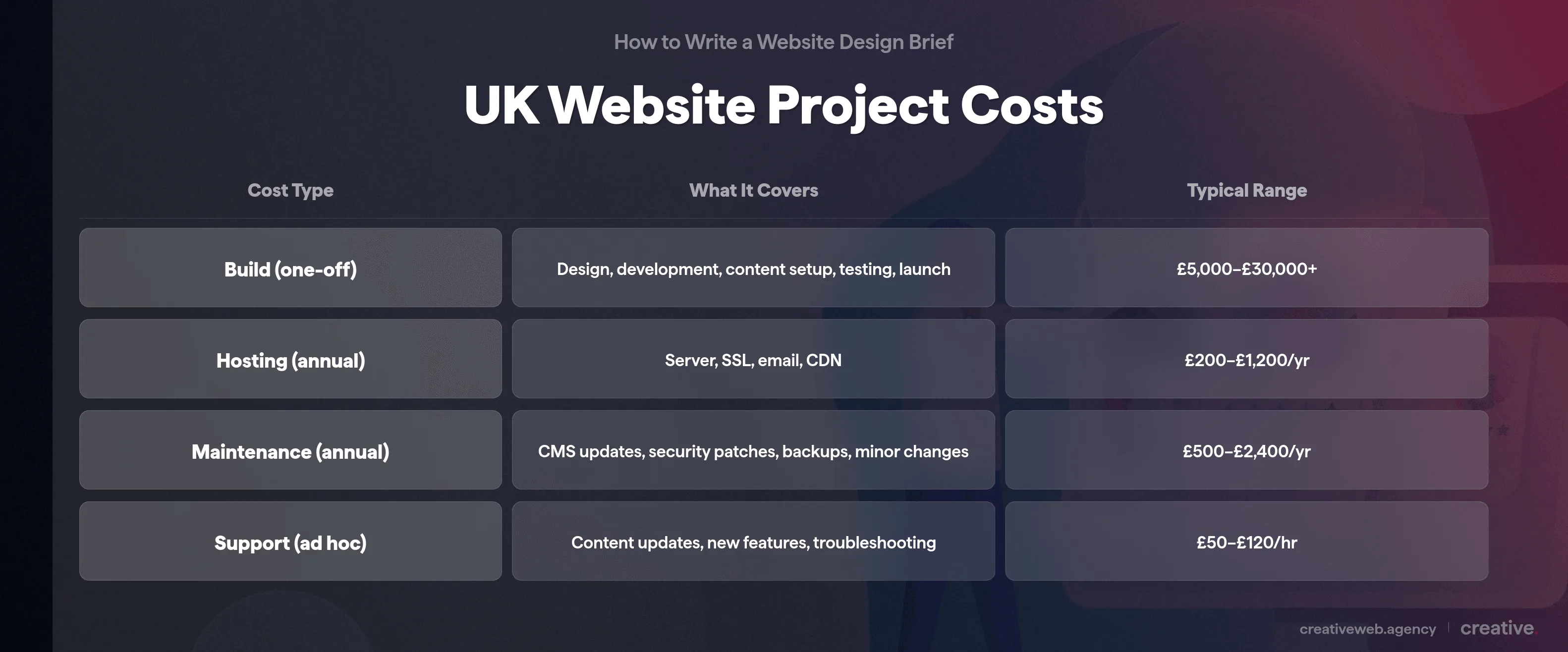
| Cost Type | What It Covers | Typical Range |
|---|---|---|
| Build (one-off) | Design, development, content setup, testing, launch | £5,000-£30,000+ |
| Hosting (annual) | Server, SSL certificate, email, CDN | £200-£1,200/year |
| Maintenance (annual) | CMS updates, security patches, backups, minor changes | £500-£2,400/year |
| Support (ad hoc) | Content updates, new features, troubleshooting | £50-£120/hour |
Timeline Benchmarks and Post-Launch Support
Realistic UK timelines: a brochure site (5-10 pages) typically takes 6-8 weeks from brief to launch. E-commerce with custom functionality: 10-16 weeks. Both assume content arrives on time (see above).
Include your target launch date and any fixed deadlines (trade shows, seasonal campaigns, regulatory cutoffs). But if you don’t have a hard deadline, say that. Artificial urgency doesn’t help.
And don’t skip post-launch support.
Who handles hosting? Security updates? Content changes?
This is one of best ways to avoid the situation where something breaks six months after launch and nobody’s responsible for fixing it. Agree an ongoing support arrangement as part of the brief, even if it’s just a handful of hours per month.
What Agencies Love vs What They Dread
We’ve received hundreds of briefs over the years. Some make us genuinely excited about the project before the first meeting. Others make us reach for the coffee (and not in the good way). Here’s what the difference actually looks like:
| Brief Section | What We Dread | What We Love | What Happens at Our End |
|---|---|---|---|
| Goals | “Modern and professional” | “Increase enquiry submissions by 30% within 6 months” | Vague: we guess what “modern” means to you. Specific: we design for a measurable outcome. |
| Audience | “Small businesses” | “UK SME owners, 35-55, mostly mobile, need to understand pricing before enquiring” | Generic: we design for nobody in particular. Specific: mobile-first layout with clear pricing. |
| Scope | “All the usual pages” | “Homepage, 4 service templates, blog, contact form, 404. E-commerce: Phase 2 (out of scope)” | Vague: we add 20% to cover unknowns. Specific: accurate fixed-price proposal within 48 hours. |
| Content | “We’ll sort it nearer the time” | “Sarah provides copy by [date]. Product photos in shared Dropbox.” | Late content: we add 4 weeks to the timeline. Planned: project runs to schedule. |
| Budget | “What would it cost?” | “£12,000-£15,000 build, up to £200/month for hosting and maintenance” | No range: we quote defensively. Clear range: we scope to fit and advise where to invest. |
| Timeline | “As soon as possible” | “Launch by 1 September, in time for our autumn campaign” | ASAP: meaningless, we schedule around other projects. Specific: we can can plan resource allocation. |
| Stakeholders | “The team will review” | “Sarah has final sign-off. James provides content. Board sees final version only.” | Committee: 3x the revision rounds. Named decision-maker: clean, efficient approvals. |
The pattern is straightforward.
Specific briefs get accurate quotes, faster timelines, and better design outcomes. Vague briefs get padded quotes, extended timelines, and “that’s not what I meant” conversations halfway through the build.
The three worst offenders, in our experience: no budget range (forces defensive quoting), content promised “later” (delays every single time), and design by committee where six people have equal say and none of them agree. Fix those three and you’re already ahead of most briefs we receive.
Your Brief Is an Investment, Not Admin
The quality of your website design brief directly predicts the quality of your website. A good brief means the agency spends their time designing and building, not chasing decisions and guessing at requirements.
Write it properly. Send it to 2-3 agencies and compare their responses: the agency that asks the sharpest follow-up questions probably understood your project best.
If you want to talk through your project before writing the brief, get in touch. We’re happy to help you work out what you need before pen hits paper.
Frequently Asked Questions
-
What is a website design brief?
-
A website design brief is a document that outlines your project goals, target audience, design preferences, content plan, technical requirements, budget, and timeline. It gives your web design agency everything they need to plan, quote, and build your website accurately.
Did this answer your question? YesThat’s great glad we could help! Start a ProjectNoNo problem, one of our experts can give you a more in-depth answer. Ask our Experts -
What should be included in a website design brief?
-
At minimum: business overview, brand guidelines, target audience, project goals, scope and deliverables, design preferences, content strategy, technical requirements (CMS, integrations, compliance), budget range, timeline, and named decision-maker.
Did this answer your question? YesThat’s great glad we could help! Start a ProjectNoNo problem, one of our experts can give you a more in-depth answer. Ask our Experts -
What are the 7 main parts of a design brief?
-
1. Business overview and brand identity. 2. Target audience and user needs. 3. Project goals and measurable objectives. 4. Scope and deliverables (including what is out of scope). 5. Design preferences and competitor references. 6. Content strategy and technical requirements. 7. Budget, timeline, and ongoing support.
Did this answer your question? YesThat’s great glad we could help! Start a ProjectNoNo problem, one of our experts can give you a more in-depth answer. Ask our Experts -
How detailed should a website brief be?
-
Scale it to the budget. A u00a33k-u00a35k brochure site needs 1-2 pages. A u00a310k+ project should have 5-10 pages covering detailed personas, technical architecture, content plans, and a governance structure. The bigger the investment, the more detail.
Did this answer your question? YesThat’s great glad we could help! Start a ProjectNoNo problem, one of our experts can give you a more in-depth answer. Ask our Experts -
How does a good brief prevent scope creep?
-
By documenting deliverables (what is being built), exclusions (what is NOT included), and a change request protocol (how additions are handled). When new requests come up mid-project, both sides check them against the agreed brief.
Did this answer your question? YesThat’s great glad we could help! Start a ProjectNoNo problem, one of our experts can give you a more in-depth answer. Ask our Experts -
What is the difference between a website brief and a creative brief?
-
A creative brief is strategic: brand positioning, messaging, campaign direction. A website design brief is tactical: what the site does, how it is built, what it costs. The creative brief typically comes first and informs the website brief.
Did this answer your question? YesThat’s great glad we could help! Start a ProjectNoNo problem, one of our experts can give you a more in-depth answer. Ask our Experts -
Do I need a brief for a website redesign?
-
Yes, and it needs more detail than a new build. Document what currently works, what content migrates, what gets cut, and how URLs are redirected to preserve your SEO value.
Did this answer your question? YesThat’s great glad we could help! Start a ProjectNoNo problem, one of our experts can give you a more in-depth answer. Ask our Experts -
What budget information should I include?
-
A realistic range, split into one-off build costs and ongoing costs (hosting, maintenance, support). If you are unsure what is realistic, say so and ask the agency to propose options within different tiers.
Did this answer your question? YesThat’s great glad we could help! Start a ProjectNoNo problem, one of our experts can give you a more in-depth answer. Ask our Experts