Website Hosting in 2026: What Actually Makes a Difference


The hosting problem nobody talks about isn’t the dramatic outage. It’s the silent one.
We’ve had production e-commerce sites where half the visitors were dying on the checkout page because of a server config issue. No alarms. No error pages anyone could screenshot and send across.
Just a quiet bleed of revenue that nobody spotted until someone checked the analytics and realised something had been off for weeks.
That’s the real cost of bad hosting. Not the big, visible crash that gets fixed in hours. The slow, invisible failure that slips past everyone.
We manage 306 websites across our own hosting infrastructure. We’ve built over 500 in the last 12+ years, across dozens of hosting providers.
Most hosting content you’ll find online is written by affiliate sites ranking providers by commission, not quality. This is from the other side: the people who deal with what happens after you’ve picked a host.
Right, so here’s what this covers. If you’re a UK business owner trying to work out whether your hosting is good enough, whether you’re overpaying, or what you should actually be asking your provider, keep reading.
What Website Hosting Actually Is
How Hosting Works (Without the Jargon)
Your website is a collection of files: code, images, text, a database. Those files live on a server (basically a computer connected to the internet 24/7) whose job is to send those files to anyone who visits your site. That’s hosting.
The server needs to do that quickly, reliably, and securely. Everything else is detail.
Domain Names vs Hosting
Your domain name is your address (like cbwebsitedesign.co.uk). Hosting is the building that address points to.
You need both, but they’re separate things: you can buy a domain from one company and host your site with another. Most people we speak to don’t realise this, and some providers deliberately blur the line.
Types of Hosting and Which One Your Business Needs
So which type do you actually need? That depends on what your site does, not what you want to spend.
Shared Hosting
Your site shares a server with potentially hundreds of other websites. Cheapest option (£3-15/month at renewal), and it’s fine for brochure sites with low traffic.
The problem: if someone else on your server gets a traffic spike or runs badly optimised code, your site slows down too. That’s the “noisy neighbour” effect, and you’ve got zero control over it.
VPS Hosting
Most guides skip this one, but VPS (Virtual Private Server) is the middle ground between shared and dedicated. You get a guaranteed slice of server resources (£15-70/month).
Your neighbours can’t tank your performance, and you’ll usually get a control panel (cPanel or similar) for managing files and email. If you’ve outgrown shared but don’t need a whole server, this is usually the sensible move.
Cloud Hosting
“Cloud” means your site runs across a cluster of servers rather than one physical machine. If one fails, another picks up. Sounds great.
But here’s the thing: on-demand cloud billing is a trap for most small businesses. As soon as you start building stuff and using it properly, the usage charges go through the roof.
I would never go for an on-demand usage host for a standard business website. The same can be said for AWS: there are burst and usage charges that catch people out. Go for the resources you know you need on a flat cost.
Dedicated Hosting
An entire physical server, just for you. Maximum control, maximum cost (£80-400+/month).
Fewer businesses need this than you’d think. Unless you’re running high-traffic e-commerce or handling sensitive data at scale, dedicated is probably overkill.
Managed WordPress Hosting
This is where the marketing gets thickest. More on WordPress hosting specifically in a later section (spoiler: most of it is a gimmick).
| Type | UK Price (Renewal) | Best For | Watch Out For |
|---|---|---|---|
| Shared | £3-20/month | Brochure sites, low traffic | Noisy neighbours, limited resources |
| VPS | £15-70/month | Growing sites, small e-commerce | Unmanaged means you handle security |
| Cloud | £20-300+/month | Variable traffic, high availability | On-demand billing surprises |
| Dedicated | £80-400+/month | High-traffic, compliance-heavy | Overkill for most SMEs |
| Managed WP | £15-50+/month | WordPress business sites | Some are just shared with a label |
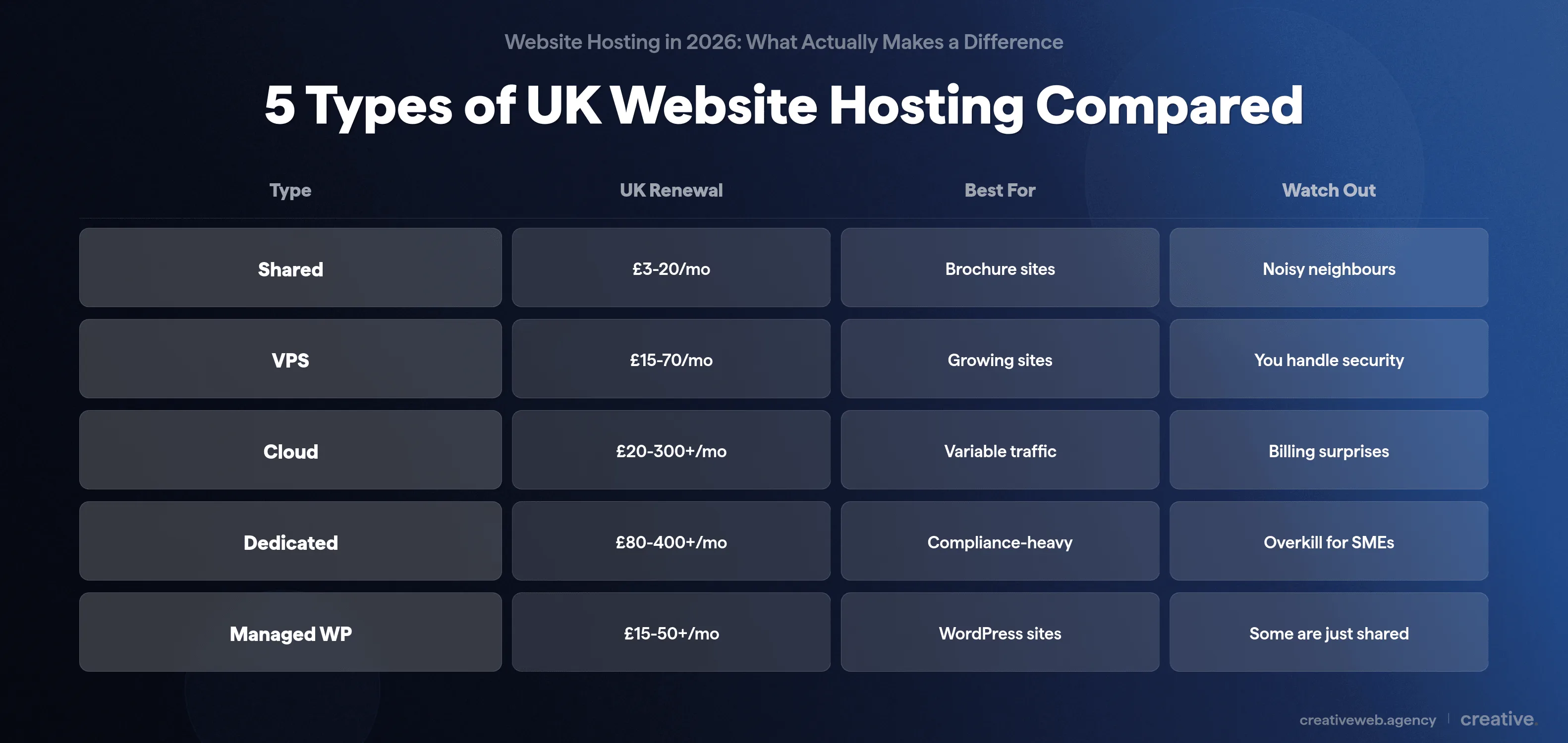
For most UK small businesses we work with, VPS or managed hosting is what we’d actually recommend. You get the performance and security without overpaying. Shared is fine for a brochure site. Dedicated is overkill unless you’re processing serious volume.
What Genuinely Affects Your Site: Speed, Security, and Uptime
Ok, from what we see, three things actually matter here. Everything else is either marketing or marginal.
Speed and Server Response Time
TTFB (Time to First Byte) is the single metric that separates hosting performance from website performance. It measures how long the server takes to start sending data after someone requests your page. If your TTFB is consistently over 600ms, your hosting is probably the bottleneck: not your website code, not your images.
We’ve seen TTFB of over 15-20 seconds on client sites running budget hosting. That’s not an exaggeration. Fifteen seconds before the server even starts responding.
PHP version matters too. PHP 8.x is significantly faster than 7.x for WordPress sites (PHP.net benchmarks show 2-3x improvements in some workloads). If your host is still on PHP 7.x, that’s an upgrade worth pushing for right now.
And honestly, this sounds obvious written down, but you’d be amazed how many business sites we audit where the hosting is the problem and nobody has ever checked.
Security That Actually Protects You
Oh my god, just make sure you have someone updating your plugins and your WordPress core. That’s it. Just do that.
Also: don’t make twelve admin users and give them all insecure passwords. Have two-factor authentication on your site. Lock down the admin.
Keep everything up to date. Those are the two biggest security issues we see, and they’re basically just simple maintenance.
On the hosting side, you want a free SSL certificate (any host still charging for basic SSL in 2026 is living in the past) and a Web Application Firewall to filter malicious traffic. Daily automated backups stored off-site are non-negotiable. If your backups are on the same server as your site, you don’t actually have backups. And server patching should be on a published schedule.
For a UK-specific benchmark, look for hosts that hold or support Cyber Essentials certification.
Most clients just build a website and fire and forget. Never touch it again.
That’s how most security incidents happen (not some sophisticated hack, just neglect). Good hosting should flag the obvious issues, but it can’t fix a site nobody maintains.
Uptime: What the Numbers Actually Mean
99.9% uptime sounds impressive until you do the maths. That’s 8.77 hours of downtime per year. If that hits your checkout on a Saturday afternoon, the cost adds up fast.
The difference between 99.9% and 99.99% is the difference between 8.77 hours and 52 minutes annually. For a brochure site, maybe that doesn’t matter. For a site processing orders, it’s significant.
But the worst incidents are the silent ones. Half your visitors hitting a broken checkout because of a DNS-level issue. No alarm, no obvious error.
Just lost revenue that nobody notices for weeks. Those quiet problems are why you need proper monitoring, not just an uptime guarantee written on a sales page.
Does It Matter Where Your Website Is Hosted?
Yes. Three reasons.
The Speed Difference
If you’re a UK business and your origin server sits on the west coast of the US (WordPress.com’s default, for example), your visitors are waiting for data to hop across the Atlantic every time they load a page.
A CDN (Content Delivery Network) helps with static content (images, CSS, JavaScript), but it only catches about 80-90% of requests. The remaining 10-20% (your WordPress admin, form submissions, checkout, any dynamic content) still hit the origin server. That’s where location matters.
We’ve seen measurable speed differences when migrating UK clients from US-hosted origins to UK servers. Not marginal: obvious in the TTFB numbers. If you’re in the UK serving UK customers, it makes sense to have your hosting here.
GDPR and Data Residency
If your site collects any personal data (contact forms, email sign-ups, customer orders), your hosting provider is a data processor under UK GDPR. You’re the data controller. That means you need a Data Processing Agreement with your host, and you need to know where your data is physically stored.
Hosting in the UK (or at minimum the EEA) makes this a lot simpler. Hosting outside that means extra requirements under UK GDPR Article 46 that most small businesses don’t realise they have.
UK businesses collecting customer data should host on UK servers. It’s faster for your visitors, simpler for GDPR compliance, and there’s a minor SEO benefit: Google measures page speed as part of Core Web Vitals, so faster load times for UK visitors give your rankings a slight edge.
What Website Hosting Costs in the UK in 2026
Right, so what should you actually be paying?
Price Ranges by Hosting Type
The table above gives rough ranges, but here’s the bit most guides skip: introductory pricing and renewal pricing are completely different things. A host advertising “£1/month” will typically charge £8-15/month once the intro period ends. Always check the renewal rate before you sign up.
Our starting hosting is £50 a month. And honestly, that’s not a lot for a website that drives your marketing and traffic. If your site generates leads or processes orders, £50/month is a rounding error compared to the business it supports.
The Real Cost of Hosting (Beyond the Monthly Fee)
The headline price rarely tells the full story. Factor in domain renewal (£10-15/year), email hosting (£30-100+/year if not bundled), and SSL certificates (should be free, red flag if it’s a paid add-on). On top of that, backup extras your plan doesn’t include and support tier upgrades if you want response times under 24 hours. The total annual cost for properly hosting a business site in the UK is realistically £200-600+, not the £36/year the intro pricing suggests.
Top tip: go for flat-rate pricing with predictable costs. Usage-based cloud billing sounds flexible until your monthly bill triples because you ran a marketing campaign that actually worked.
Why the Cheapest Option Usually Costs More
This is the one that gets to me. Someone spends serious money on a really good website and then puts it on cheap standard-tier GoDaddy hosting. It’s like putting the cheapest tyres you can get on a Ferrari.
We’ve seen clients for huge multi-million pound turnover companies taking the website that currently performs 50% of their marketing and sticking it on terrible hosting services.
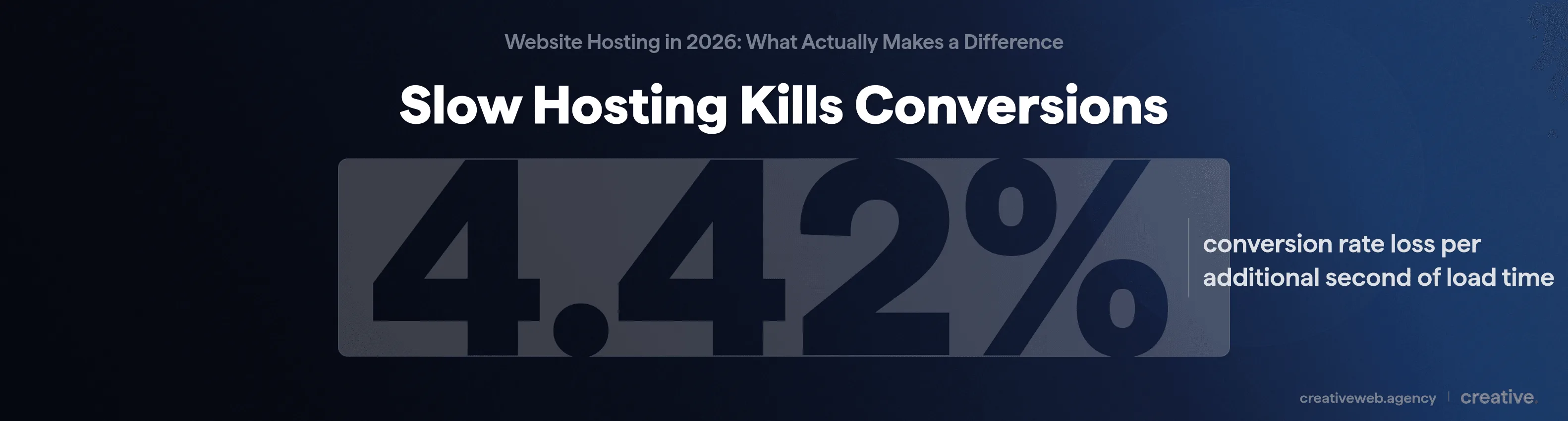
The numbers back this up: every additional second of page load time costs roughly 4.42% in conversion rates (Portent research). On a site generating £5,000/month in leads, slow hosting could be costing you £200+ per month in lost conversions. Suddenly that £3/month hosting doesn’t look cheap at all.
Want Hosting That’s Properly Managed From Day One?
See Our Hosting PackagesWhat WordPress Sites Actually Need from Hosting
The Technical Requirements (in Plain English)
WordPress hosting in itself is a little bit of a gimmick, because you can host a WordPress site pretty much anywhere on a standard LAMP stack. It’s how you set it up that matters, and we’ve tested enough setups to know.
That said, the underlying requirements are real:
- PHP 8.2+ for faster page rendering and current security patches
- 256MB+ PHP memory limit (prevents white-screen crashes on complex pages)
- MySQL 8.0 or MariaDB 10.6+: better query performance
- Server-level caching like Redis or Memcached, which reduces database load significantly
- A staging environment so you can test updates before they hit your live site (this alone prevents most “my site broke after an update” disasters)
How to Spot Fake WordPress Hosting
Most WordPress hosting providers are just coming up with a USP where they bundle in a CDN and call it WordPress hosting. That’s shared hosting with WordPress pre-installed and a marketing label on top.
What to look for instead: a properly optimised server stack (not just pre-installation), automatic WordPress core and plugin updates, WP-specific caching beyond a generic CDN, and a staging environment. If you have a WordPress site that drives real business, those are the things that actually make difference.
When Managed Hosting Makes Sense (and When It Doesn’t)
What Managed Hosting Should Include
If someone’s calling it “managed,” the minimum should include server maintenance, security patching, and performance monitoring. You also want daily automated backups stored off-site, a staging environment, and support that actually responds. That’s the baseline, not the premium tier.
We’ve had cases where we were given access to a managed third-party hosting service and it was impossible to make the fundamental change needed to push a production site out.
Raise a support ticket. Wait six hours. Verify your identity.
Potentially two days to get something done.
That’s not managed hosting. That’s gatekept hosting.
The Agency Hosting Model
We manage our own hosting infrastructure, our own servers, our own setup. On our hosting, we can be more efficient with the work we carry out for clients.
So why do agencies bundle hosting with maintenance? Because when hosting and development are with different providers, nobody takes ownership when something breaks.
Your host says it’s a code problem. Your developer says it’s a server problem. Meanwhile, your site is down and your customers are going somewhere else.
We see it constantly. Decent website, terrible hosting, and the business wondering why the site’s slow.
When we wouldn’t recommend managed hosting: hobby projects, personal blogs, or situations where you genuinely enjoy managing servers yourself. For everything commercial, someone should be watching.
How to Evaluate Your Hosting (and What to Ask Before You Switch)
The 5-Minute Hosting Health Check
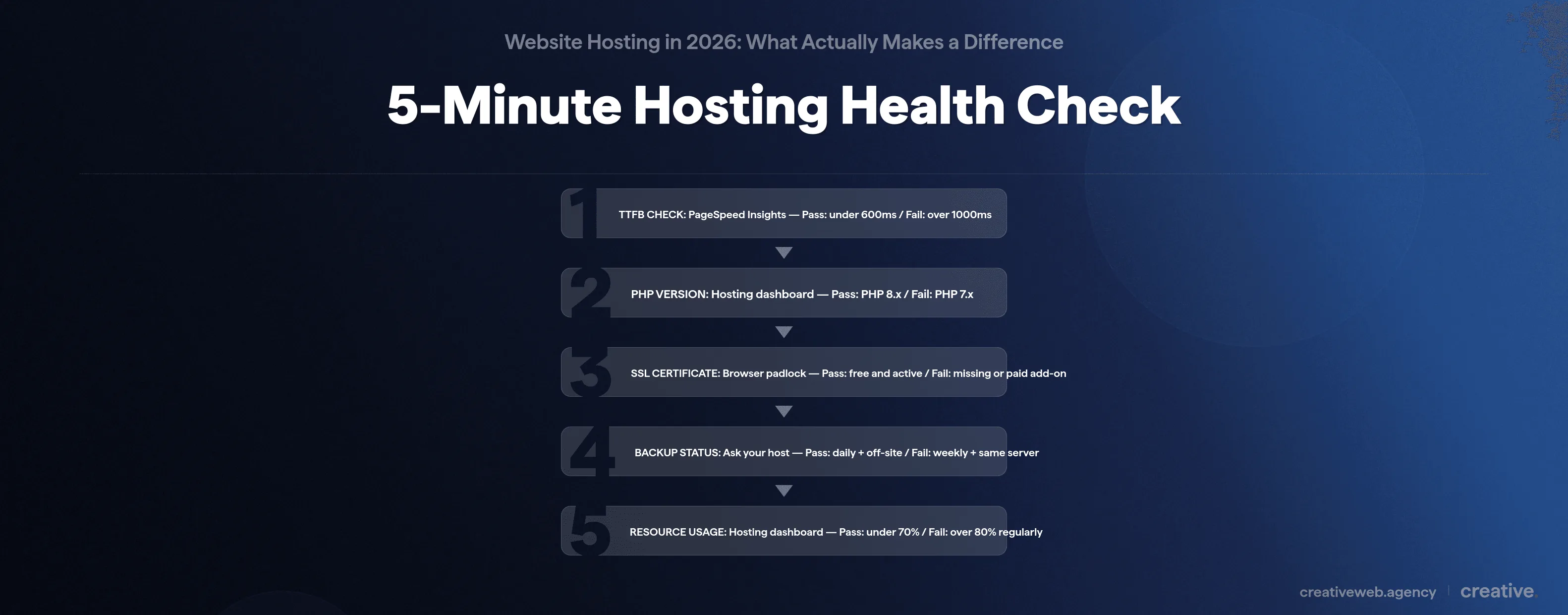
These thresholds come from managing 306 websites across our own infrastructure. They’re not theoretical benchmarks: they’re the numbers that separate hosting that works from hosting that causes problems.
- TTFB (Time to First Byte): go to Google PageSpeed Insights and run your homepage. Under 600ms: pass. 600-1000ms: worth investigating. Over 1000ms: your hosting is a problem. TTFB is the single metric that separates server performance from site performance.
- PHP Version: check your hosting dashboard or ask your developer. PHP 8.x: pass. PHP 7.x: fail. It no longer receives security patches and is measurably slower.
- SSL Certificate: does your site show the padlock? It should be free and included with your hosting. If SSL is a paid add-on, that’s a red flag. If it’s missing entirely, fix that today. There’s no excuse for a business site without SSL in 2026.
- Backup Status: ask your host three things. How often? Where are backups stored? Can you restore one yourself? Daily + off-site + self-service: pass. Weekly + same server + support ticket: fail. If your server fails and your backups are on the same server, you don’t have backups.
- Resource Usage: check your hosting dashboard for CPU and memory usage. You want to be consistently under 70%. If you’re regularly hitting 80%+, you’re outgrowing your plan and your site will buckle when a traffic spike hits.
Scorecard: 5/5 passes: your hosting is solid, stop worrying. 3-4 passes: investigate the failures, starting with whichever scored worst. Under 3: your hosting is actively costing you business. Consider switching or upgrading.
If you want a more thorough look at how your site performs overall (not just hosting), our website audit covers the full picture.
What to Ask a Hosting Provider (and Red-Flag Answers)
If you’re evaluating a new host, these are the questions we always ask:
- What’s my renewal rate? (Red flag: anything more than 2x the intro price)
- How often do you back up, and where? (Red flag: “weekly” or “on the same server”)
- Average support response time? (Red flag: “we aim for 24-48 hours”)
- Where are your UK data centres? (Red flag: no UK presence at all)
- What security certifications do you hold? (Red flag: can’t name any)
- Do you offer a staging environment? (Red flag: “what’s a staging environment?”)
- What’s your uptime SLA, and what happens if you miss it? (Red flag: marketing uptime claim with no compensation)
- Will you help with migration? (Red flag: “that’s your responsibility”)
NB: check the provider’s documentation first. If you can can find these answers on their website without digging through support articles, that’s actually a good sign.
When Your Developer Says You Need Better Hosting
To be fair, if your developer says you need better hosting, you probably do. You can probably never have too good hosting.
But if you want to verify: run the health check above. The thing that tells you most is speed.
Go on your website and see how quick it is. If it’s slow, you need better hosting. If it’s not slow, you might not need it right now, but I’d still listen to the person who works on your site every day.
One more thing: green and sustainable hosting is becoming a real consideration in 2026. If you’re switching providers anyway, it’s worth asking about their green credentials. I’m genuinely not sure yet whether most “green hosting” claims are substantive or just offset-buying dressed up as sustainability, but it’s a question worth raising.
What to Do Next
Run the health check. If everything passes, stop worrying about hosting and focus on your content and marketing instead. If you’re not sure where to start, start with the TTFB check: it takes 30 seconds and tells you the most.
And if you’d rather not think about hosting at all, we include it in all our maintenance packages. Same people who built your site looking after the hosting too. If something breaks, one phone call. That’s kind of the point.