Website Security in 2026: What UK Businesses Actually Need to Do

You’ve probably heard the standard website security advice a dozen times. Get an SSL certificate. Use a strong password. Update your plugins.
A couple of years ago, that covered most of the bases. In 2026, following that advice alone is like locking your front door but leaving every window wide open.
43% of cyber attacks now target small businesses (Verizon DBIR, 2025). And 42% of UK SMEs identified a breach or attack in the last 12 months (UK Cyber Security Breaches Survey, 2025).
These aren’t just enterprise problems. If you have a website, they’re your problem too.
We handle website security for client sites every week at CreativeWeb. What we’re seeing on the ground doesn’t match what most guides tell you. This article covers what actually matters: AI-powered threats most guides ignore, supply chain risks nobody explains properly, UK compliance you can’t afford to skip, what to actually do when something goes wrong, and a Priority Matrix that tells you which measures your specific business type needs.
What Website Security Actually Means in 2026
Website security used to mean three things: SSL certificate, strong passwords, up-to-date software. Tick those boxes and you were basically covered.
That model is dangerously outdated.
Security in 2026 is a layered, ongoing practice covering your technology, your processes, your compliance, and your people. That’s how we think about it: closer to maintaining a vehicle than installing a burglar alarm. You don’t service your car once and assume it’s sorted forever.
Why the Old Advice No Longer Cuts It
The threats have shifted fundamentally: attackers now use AI tools that discover and exploit vulnerabilities faster than most businesses can patch them. The mean time to exploit a new vulnerability dropped to negative 7 days in 2025 (Mandiant M-Trends 2026).
That means attackers are exploiting vulnerabilities before the patch even exists.
714 new malware families were documented in 2025 alone (Mandiant M-Trends 2026). The regulatory environment has tightened too: the UK’s Cyber Security and Resilience Bill is moving through Parliament right now.
And the tools attackers use have evolved far faster than the defences most SMEs (ourselves included, in our early days) have in place.
The 2020 playbook? It leaves gaps that 2026 attackers exploit daily.
Website Security Threats That Matter in 2026
Most security guides give you the same list: SQL injection, phishing, malware. Those are real, but from what we see on client sites, they’re not the full picture anymore.
AI-Powered Attacks Are Already Here
This is the bit that should worry you.
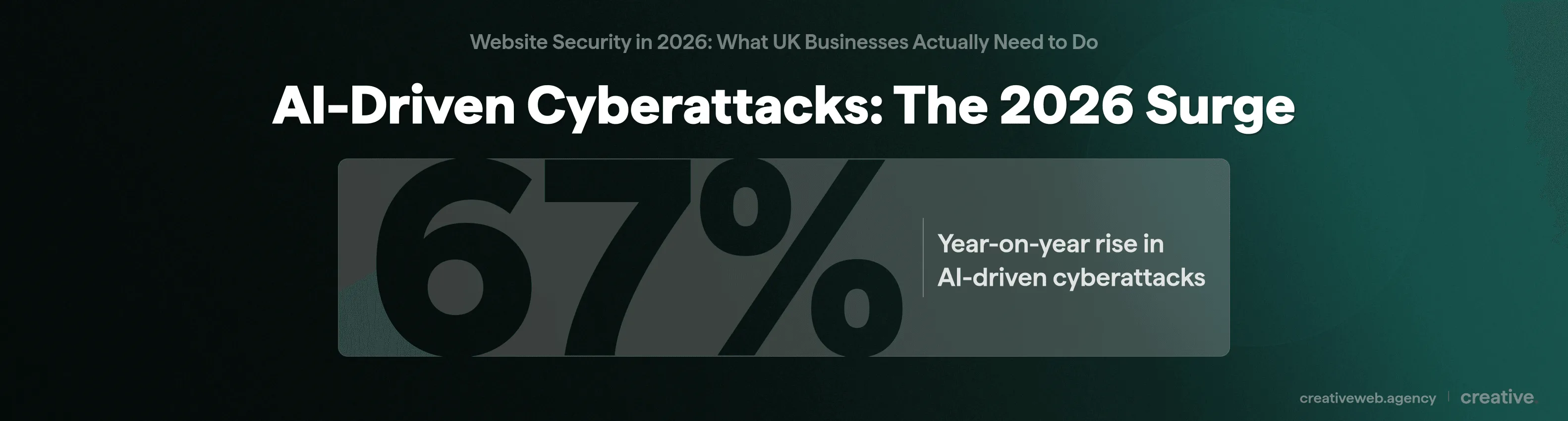
AI-driven cyberattacks rose 67% year-on-year in 2025 (Mandiant M-Trends 2026). Tools like WormGPT, FraudGPT, CVE Genie, LAMEHUG, and PROMPTFLUX have lowered the barrier to sophisticated attacks dramatically.
You don’t need to be a skilled hacker anymore. You need a laptop and a subscription.
77% of hackers now use generative AI in some form. DDoS attacks are up 550%. Breakout time (how quickly an attacker moves from initial access to broader compromise) is now under 30 minutes in the fastest cases.
Polymorphic malware (malware that rewrites its own code to avoid detection) is standard now. Deepfake social engineering means attackers can impersonate your MD in a video call and convince someone on your team to transfer funds.
What does this mean for a normal business website? Automated tools are scanning your site right now, looking for weaknesses. The attacks aren’t targeted at you specifically: they’re targeted at everyone with a vulnerability.
We see it in our monitoring data: every publicly accessible website is now subject to continuous automated scanning, regardless of the business behind it. That’s why we recommend AI-aware WAF rules as a baseline for any site we maintain (more on WAFs below).
Supply Chain Vulnerabilities
Here’s something most guides skip entirely.
You install a trusted WordPress plugin. It has 50,000 active installations, great reviews, been around for years. Then the plugin developer’s account gets compromised (or they sell the plugin to someone dodgy), and the next auto-update pushes malicious code to every site using it.
Cheery stuff. We’ve seen it happen to plugins our clients were actively using.
Supply chain breaches now account for 15% of all cyber attacks, doubled year-on-year (Mandiant M-Trends 2026). Over 70% of organisations have been hit through a vendor or third-party compromise. Magecart-style attacks (where payment skimmers get injected through compromised third-party scripts) target e-commerce sites particularly hard.
It’s not just plugins either. Every third-party script on your site (analytics, chat widgets, ad tags, font loaders) is a potential attack vector. If you’re not auditing these regularly, you don’t actually know what’s running on your own website.
Top tip: Review every plugin, theme, and third-party script on your site quarterly. If you can’t explain why it’s there, remove it.
The Attacks That Haven’t Gone Away
The classic attack vectors haven’t disappeared. From what we see in our client work, they’ve been amplified by automation.
SQL injection lets attackers read, modify, or delete your database. Cross-site scripting (XSS) injects malicious scripts into pages your visitors see. Brute force attacks try thousands of password combinations per minute.
Ransomware encrypts your files and demands payment, with average downtime of 21+ days. Phishing tricks your staff into handing over credentials. These vulnerabilities are all documented in the OWASP Top 10 (the industry-standard list of critical web application security risks), and they remain the workhorses of cybercrime.
The average cost of a data breach for a small business is approximately £200,000 (IBM Cost of a Data Breach Report, 2024). That’s not theoretical. That’s the kind of figure that closes a business.
Security Measures That Actually Work
Right, so the threats are real. What do you actually do about them?
The Foundations You Cannot Skip
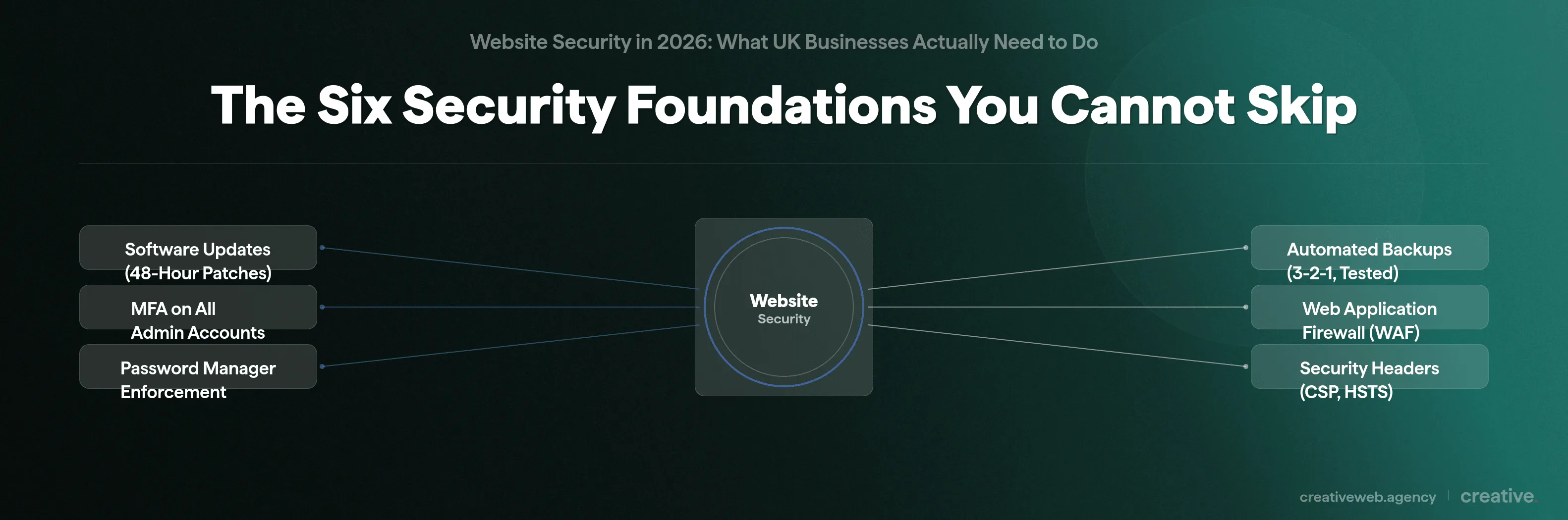
These are table-stakes. If you’re not doing all four you’re exposed:
- Software updates within 48 hours of critical patches. With zero-day exploitation windows now under 8 days, you can’t wait for “next month’s maintenance.” In our maintenance plans critical patches go out within 48 hours. That’s not something you can put off.
- Multi-factor authentication (MFA) on every admin account. Credential stuffing is fully automated now. Passwords alone are dead. If you have a CMS login, it needs MFA.
- Password manager enforcement. Your team shouldn’t be reusing passwords across services. A password manager handles this without relying on anyone’s memory.
- Automated backups with tested restoration. The 3-2-1 rule (3 copies, 2 different media, 1 off-site) is the baseline. But here’s the part everyone skips: tested restoration. We’ve seen clients who had “backups” that turned out to be corrupt when they actually needed them. A backup you haven’t tested is a backup you can’t trust.
Security headers matter too: Content Security Policy (CSP), HSTS, and X-Frame-Options are straightforward to implement and close off common attack paths. We configure these on every build. If your developer hasn’t set them up, ask them why.
Why Every Business Site Needs a WAF
A web application firewall sits between the internet and your website and inspects every request before it reaches your server. Think of it like a bouncer at a venue: instead of just locking the door, someone’s checking who’s actually coming in.
Traditional firewalls protect your network. A WAF protects your web application specifically, catching things like SQL injection attempts and XSS before they hit your site.
The good news: cloud-based WAFs are now affordable for small businesses. Cloudflare’s free tier gives you basic WAF protection at zero cost. Sucuri and Wordfence offer WordPress-specific options with more advanced features.
We install a web application firewall on every site we build and maintain, because the cost-to-benefit ratio is overwhelming. In our experience: the protection a WAF provides far outweighs the setup effort.
For e-commerce sites: PCI DSS Requirement 6.6 makes a WAF (or documented code review) mandatory if you handle card payments. That’s not a recommendation. It’s a legal requirement.
Zero-Trust Principles (Without the Enterprise Price Tag)
Isn’t zero-trust just for banks and government departments? It really isn’t.
The core idea is simple: don’t assume that anyone or anything inside your system is automatically safe. Verify every request. Give people only the access they actually need.
In practice for a small business, that means:
- Quarterly access reviews. Check who has admin access to your site. We’ve found ex-employees with full admin rights months after they left. It happens more often than you’d think.
- Role-based permissions. Not everyone needs full access. Your content editor doesn’t need plugin management rights.
- Least privilege. Every account gets the minimum access required to do its job. Nothing more.
You don’t need expensive enterprise software for this. You just need to actually do the audit (we schedule ours quarterly).
The SSL Question
So an SSL certificate means my site is secure, right? No. Not even close.
SSL encrypts the connection between your visitor’s browser and your server. That’s all it does. It doesn’t protect your site from malware, SQL injection, XSS, compromised admin credentials, or DDoS attacks.
Over 50% of phishing sites now use HTTPS (Anti-Phishing Working Group). The padlock in your browser means the connection is encrypted. It does not mean the site is safe.
SSL is necessary (it’s the absolute minimum), but if it’s the only security measure you’ve got, your site is not secure.
UK Compliance You Cannot Ignore
This is where most security guides fall short: they mention “GDPR” in passing and move on. We work within this regulatory framework every day, and the picture is more detailed than that.
UK businesses face three overlapping security frameworks in 2026: UK GDPR, PCI DSS 4.0, and the incoming Cyber Security and Resilience Bill.
UK GDPR and Data Protection
UK GDPR Article 32 requires you to implement “appropriate technical and organisational measures” to protect personal data. Alongside this sit the Data Protection Act 2018 (DPA 2018), PECR (the Privacy and Electronic Communications Regulations, covering cookies and marketing emails), and the NIS Regulations (which apply to essential and digital service providers).
The key word in Article 32 is “appropriate”: what’s appropriate for a brochure site is different from what’s appropriate for an e-commerce platform handling thousands of customer records.
If you experience a data breach involving personal data, you must notify the ICO within 72 hours. Not 72 business hours. Seventy-two actual hours.
And if the breach poses a high risk to individuals you must notify those individuals directly.
The consequences are tangible. British Airways was fined £20 million for a breach affecting 400,000 customers. Interserve was fined £4.4 million for failing to keep employee data secure.
These aren’t hypothetical penalties.
The upcoming Cyber Security and Resilience Bill (currently moving through Parliament, 2026) will expand breach reporting obligations and tighten requirements for essential and digital services. No other security guide ranking on page one mentions this legislation. But if you run a UK business you need to know it’s coming.
PCI DSS 4.0 for E-Commerce
If your business takes card payments through your website, PCI DSS 4.0 is now fully enforced. This applies whether you process ten transactions a month or ten thousand.
In plain terms, PCI DSS 4.0 requires: a web application firewall (or documented code review), multi-factor authentication for all admin access, regular security testing, and updated encryption standards.
If you use a hosted checkout (Stripe, PayPal), that covers the card data handling itself. But it doesn’t cover your website’s overall security. We’ve had to explain this to more than one client: you’re still responsible for preventing attackers from modifying your checkout page to redirect customers or inject payment skimmers.
Cyber Essentials: Your Practical Starting Point
Cyber Essentials is the NCSC’s recommended minimum security standard for UK businesses. It covers five technical controls: firewalls, secure configuration, access control, malware protection, and patch management.
It’s increasingly required for public sector contracts. And 62% of small businesses now have cyber insurance (up from 49% in 2024), with Cyber Essentials certification often reducing your premiums.
NB: Cyber Essentials was updated in April 2026. If you were certified under the old scheme, check your controls still align with the current requirements.
How to Tell If Your Site Has Been Compromised
Prevention is the goal. But we’ve learned (sometimes the hard way) that you also need to know what it looks like when prevention fails.
Common Warning Signs
The signs we look for (and you should too): browser security warnings when you visit your own site, unexpected redirects to unfamiliar pages, new admin accounts you didn’t create, modified core files, customer complaints about malware warnings, hosting provider security alerts, and Google Search Console “Security Issues” notifications.
Not every hack is obvious. Some are specifically designed to be invisible to the site owner (exploiting your visitors or mining your server resources in the background while you carry on none the wiser).
The SEO Damage You Might Not See
This is the angle almost no security guide covers, and it matters enormously if you care about your search rankings.
The Japanese keyword hack is one we’ve dealt with for clients: attackers inject thousands of spam pages (usually in Japanese characters) that get indexed by Google under your domain. You won’t see them browsing your site normally. But Google’s index shows hundreds or thousands of spam pages sitting under your URL.
Google Safe Browsing blacklisting puts a red warning page in front of your site telling visitors “This site may harm your computer.” The result: your organic traffic doesn’t gradually decline. It falls off a cliff.
The recovery timeline is brutal: even after you clean the infection it can take months to recover your search visibility through reconsideration requests and re-indexing. We’ve written about how organic search works before, and we’ve seen first-hand how a security breach can undo months of SEO work overnight.
What to Do If You Get Hacked
This is the section most guides leave out: they cover prevention but not response. And sometimes, even with good security in place, things go wrong.
The guides make this sound clean and sequential. In practice: you’re dealing with a panicked team at 9pm on a Friday while the hosting provider’s support queue tells you the estimated wait is 45 minutes.
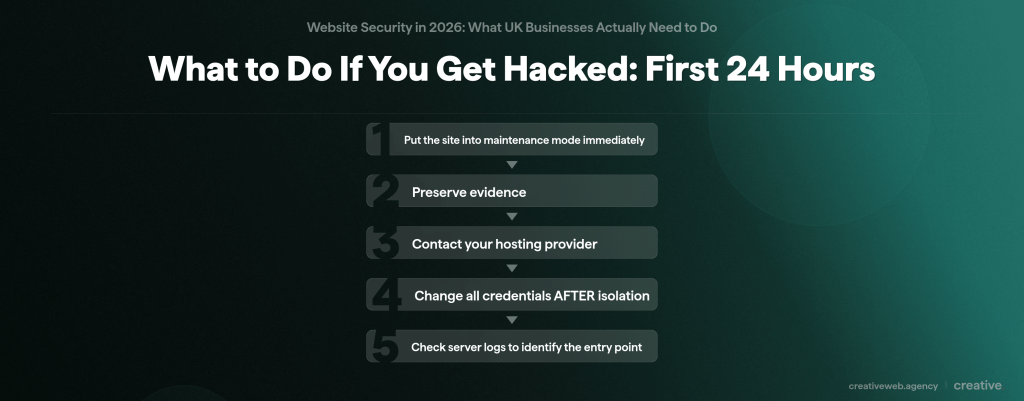
The First 24 Hours
- Put the site into maintenance mode immediately. Not offline completely. Maintenance mode preserves the current state for investigation while preventing further damage to visitors.
- Preserve evidence. Back up the hacked state BEFORE you start cleaning anything. If personal data was exposed you’ll need this for your ICO report and potentially for forensic analysis.
- Contact your hosting provider. Tell them what you’ve found. Ask if they’ve seen anything suspicious on their end (server logs, unusual traffic spikes). Ask about their incident support process.
- Change all credentials AFTER isolation. Not before. If the attacker still has access, changing credentials first means they can lock you out of the new ones.
- Check server logs to identify the entry point. Was it a vulnerable plugin? A compromised admin account? A brute force attack? You need to know before you can fix it.
Recovery, Reporting, and What Comes After
Restore from a clean backup: not the most recent one (which might be infected too) but one you’ve verified is clean. Patch the specific vulnerability that was exploited.
If personal data was exposed: report to the ICO within 72 hours. The reporting tool is online and straightforward, but you’ll need to know what data was affected, how many people were impacted, and what you’ve done to contain it.
Report to Action Fraud (the UK’s national fraud reporting centre). Notify affected users directly if the breach poses a high risk to them.
For SEO recovery (something we handle as part of our incident response): submit a reconsideration request through Google Search Console, disavow any spam backlinks the attackers created, and request re-indexing of cleaned pages.
60% of small businesses close within 6 months of a major cyber attack. That’s worth sitting with for a moment. The cost of recovery almost always dwarfs the cost of prevention.
Rather Not Deal With This Alone?
See Our Maintenance PlansWhich Security Measures Does Your Business Actually Need?
Every other security guide gives you the same flat list of recommendations. But a one-page brochure site and an e-commerce platform processing card payments don’t need the same level of security (we build both, and the security requirements are worlds apart). So here’s something you won’t find in any other guide ranking for this topic: a Priority Matrix based on your actual business type.
Find yours below, scan across, and you’ll know exactly what’s critical, what’s recommended, and what you can safely deprioritise.
Type A: Static/Brochure – informational site, no login, no forms collecting personal data. Portfolio sites, company info pages.
Type B: Blog/CMS – WordPress or similar with an admin backend, contact forms, possibly collects email addresses. No payments.
Type C: E-Commerce – takes payments, stores customer data (addresses, order history), handles card details or uses hosted checkout.
Type D: Membership/Data-Heavy – user accounts with personal data, sensitive information, SaaS apps, client portals, booking systems.
| Security Measure | Type A | Type B | Type C | Type D |
|---|---|---|---|---|
| SSL/TLS Certificate | Critical | Critical | Critical | Critical |
| Software Updates (48hr patch cycle) | Recommended | Critical | Critical | Critical |
| MFA on All Admin Accounts | Optional | Critical | Critical | Critical |
| Password Manager | Recommended | Critical | Critical | Critical |
| Automated Backups (3-2-1, tested) | Recommended | Critical | Critical | Critical |
| Web Application Firewall (WAF) | Optional | Recommended | Critical | Critical |
| Security Headers (CSP, HSTS) | Optional | Recommended | Critical | Critical |
| Zero-Trust Access Reviews | N/A | Recommended | Critical | Critical |
| PCI DSS 4.0 Compliance | N/A | N/A | Critical | N/A* |
| UK GDPR Technical Measures | Optional | Recommended | Critical | Critical |
| Cyber Essentials Alignment | Optional | Recommended | Recommended | Critical |
| Supply Chain Audit (quarterly) | N/A | Recommended | Critical | Critical |
| Incident Response Plan | Optional | Recommended | Critical | Critical |
| AI Scraper Bot Blocking | Optional | Recommended | Recommended | Recommended |
| Cyber Insurance | Optional | Recommended | Critical | Critical |
*Unless the membership platform also processes payments, in which case PCI DSS 4.0 applies.
How to read this: “Critical” means do it now. “Recommended” means do it soon, the value is high. “Optional” means it’s good practice but lower priority for your situation. Regulatory requirements (PCI DSS for payment handling, UK GDPR for personal data) automatically shift certain measures to Critical based on what data you handle.
In short: if you run an e-commerce or data-heavy site, almost everything here is critical. If you run a simple brochure site on managed hosting, focus on the basics and build from there.
When to Handle Security Yourself vs. Getting Professional Help
When DIY Is Genuinely Fine
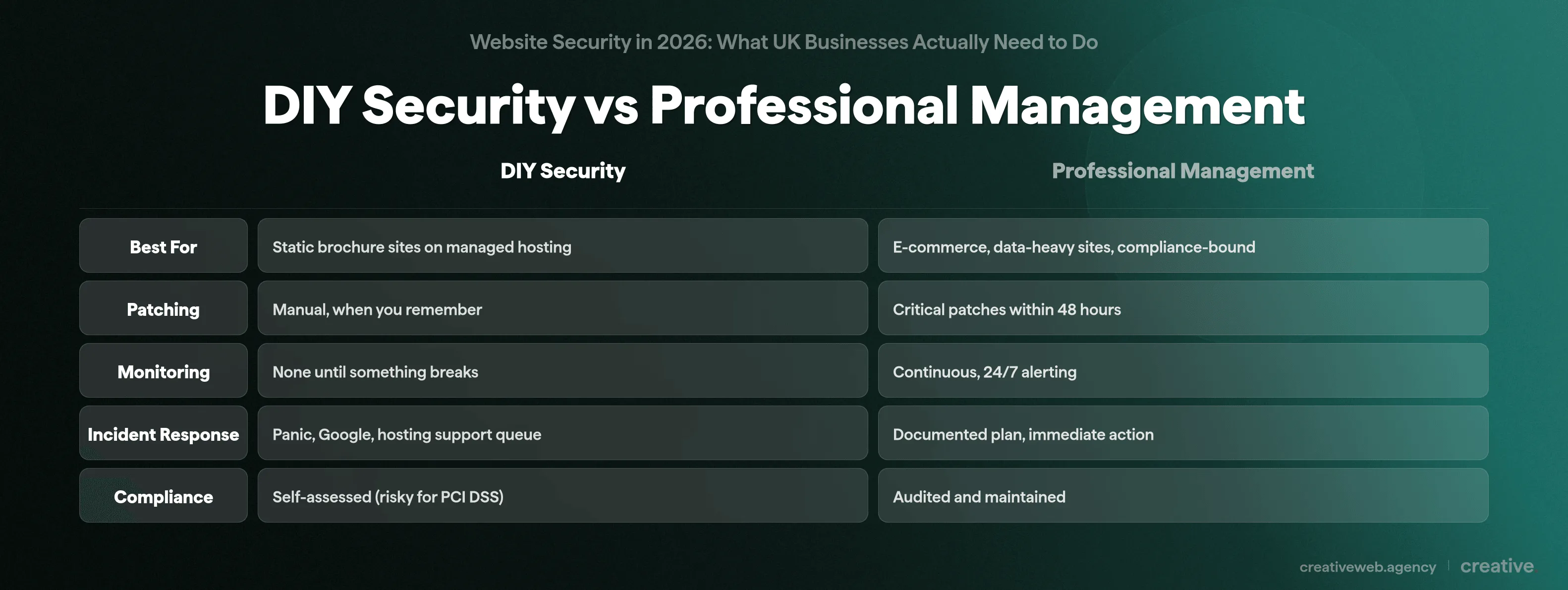
If you have a static brochure site on managed hosting (WP Engine, Kinsta, or similar), your hosting provider handles most of the heavy lifting: patching, basic firewalls, server-level security. Add SSL, a strong password with MFA, and regular backups. For a simple informational site with no login and no personal data collection, that’s genuinely enough.
If you’re technically competent and willing to stay consistent (not just when you remember), DIY security for a blog or small CMS site is manageable.
When You Need Professional Help
But if you’re in any of these situations, handling security yourself gets risky:
- You take online payments. PCI DSS 4.0 compliance isn’t something to guess at.
- You collect or store personal data. UK GDPR requires “appropriate technical measures,” and proving you took them matters when things go wrong.
- You don’t have in-house IT. Security monitoring, patching, and incident response need consistent attention. If nobody’s watching, nobody spots the breach until it’s too late.
- You’ve already been hacked. Post-breach cleanup needs specialist knowledge, especially if personal data was involved and ICO reporting is required.
Managed website security typically includes: ongoing monitoring, patching, WAF management, incident response, and compliance auditing. It’s not someone installing a plugin for you. It’s a service that runs continuously.
That’s how we approach it at CreativeWeb: security is part of the maintenance, not a separate line item.
If you want to know where your site stands right now, a website audit is usually a good starting point.
Frequently Asked Questions
-
How do I know if my website is secure?
-
Check for an SSL certificate, run a scan through Sucuri SiteCheck or Google Safe Browsing, review your Google Search Console for security issues, and confirm your CMS and all plugins are fully updated. But no single check covers everything. Real web security requires ongoing monitoring, not a one-off scan.
Did this answer your question? YesThat’s great glad we could help! Start a ProjectNoNo problem, one of our experts can give you a more in-depth answer. Ask our Experts -
What is the best security for a website?
-
It depends on your business type. For most UK SMEs, the combination that makes the biggest difference is: a web application firewall, multi-factor authentication on all admin accounts, automated tested backups, and a consistent patching cycle. Use the Priority Matrix above to see what’s critical for your specific situation.
Did this answer your question? YesThat’s great glad we could help! Start a ProjectNoNo problem, one of our experts can give you a more in-depth answer. Ask our Experts -
Do I need a web application firewall for my small business website?
-
If you run an e-commerce site, yes. PCI DSS 4.0 requires it. For blog and CMS sites it’s strongly recommended (Cloudflare’s free tier is a solid starting point). For a static brochure site with no forms or logins it’s optional but still worth considering.
Did this answer your question? YesThat’s great glad we could help! Start a ProjectNoNo problem, one of our experts can give you a more in-depth answer. Ask our Experts -
What should I do if my website gets hacked?
-
Isolate the site immediately (maintenance mode), preserve the hacked state as evidence, contact your hosting provider, change all credentials, and check server logs to find how they got in. If personal data was exposed you’re legally required to report to the ICO within 72 hours. See the full incident response section above for the step-by-step breakdown.
Did this answer your question? YesThat’s great glad we could help! Start a ProjectNoNo problem, one of our experts can give you a more in-depth answer. Ask our Experts -
Is WordPress secure enough for a business website?
-
WordPress core is well-maintained and regularly patched. The risks come from outdated plugins, weak admin credentials, and poor hosting. A properly maintained WordPress site with a WAF, MFA, regular updates, and security headers is genuinely secure. An unmaintained one is an easy target regardless of the platform.
Did this answer your question? YesThat’s great glad we could help! Start a ProjectNoNo problem, one of our experts can give you a more in-depth answer. Ask our Experts -
How much does website security cost?
-
Basic security (SSL, MFA, managed hosting with built-in protections) costs relatively little. Cloudflare’s free WAF tier costs nothing. Managed security services which include monitoring, patching, and incident response are a monthly investment, but significantly cheaper than recovering from a breach. The average cost of a data breach for a small business sits around £200,000.
Did this answer your question? YesThat’s great glad we could help! Start a ProjectNoNo problem, one of our experts can give you a more in-depth answer. Ask our Experts -
Why is website security important for small businesses?
-
Because attackers don’t discriminate by company size. 43% of cyber attacks target small businesses specifically, usually because they have weaker defences than larger organisations. A breach can mean downtime, lost customer trust, regulatory fines under UK GDPR, and damaged search rankings that take months to recover. The cost of prevention is always a fraction of the cost of recovery.
Did this answer your question? YesThat’s great glad we could help! Start a ProjectNoNo problem, one of our experts can give you a more in-depth answer. Ask our Experts -
What is a website security certificate?
-
You’re probably thinking of an SSL/TLS certificate. It encrypts the connection between your visitors’ browsers and your server, which is what gives you the padlock icon and u0022httpsu0022 in your URL. But here’s the bit most people get wrong: an SSL certificate doesn’t mean your site is secure. Over 50% of phishing sites use HTTPS. It’s the absolute baseline, not a complete solution.
Did this answer your question? YesThat’s great glad we could help! Start a ProjectNoNo problem, one of our experts can give you a more in-depth answer. Ask our Experts -
What are the biggest website security threats in 2026?
-
AI-powered attacks are the headline. Tools like WormGPT have made sophisticated attacks accessible to anyone with a laptop. Supply chain compromises (where trusted plugins or scripts get hijacked) now account for 15% of all cyber attacks. And the traditional threats haven’t gone away: SQL injection, brute force, and ransomware are all amplified by automation. The biggest shift is speed. Attackers now exploit new vulnerabilities before patches exist.
Did this answer your question? YesThat’s great glad we could help! Start a ProjectNoNo problem, one of our experts can give you a more in-depth answer. Ask our Experts
Website security in 2026 isn’t something you set up once and forget about. The threats keep evolving (AI-powered attacks, supply chain compromises), the regulations keep tightening (the Cyber Security and Resilience Bill, PCI DSS 4.0), and the cost of getting it wrong keeps climbing. That’s our view from inside the industry: not fear-mongering, just what we see every week.
Start with the Priority Matrix above. Focus on the Critical items for your business type first, and build from there.
Assumptions are the most expensive security risk of all.