How Pinterest Drives High-Intent Traffic (And When It Doesn’t Work)

We wrote the original version of this article back in 2012. It was called “You Should Be Marketing On Pinterest” and it pushed the platform as something every business should be doing.
We were wrong.
Not about Pinterest itself (the platform has grown massively since then, hitting 619 million monthly active users in 2025). But about the advice. Telling every business to jump on Pinterest without checking whether it actually suited them was lazy, and we’ve spent the years since watching clients waste time on platforms that were never right for their specific business.
So this is the corrected version. Pinterest can drive valuable traffic to your website, but only if your business fits. This guide helps you work out whether it does.
What Pinterest Actually Is (And Why the Traffic Is Different)
Why does everyone keep calling Pinterest a social media platform?
It’s not. Or at least, not in any useful sense.
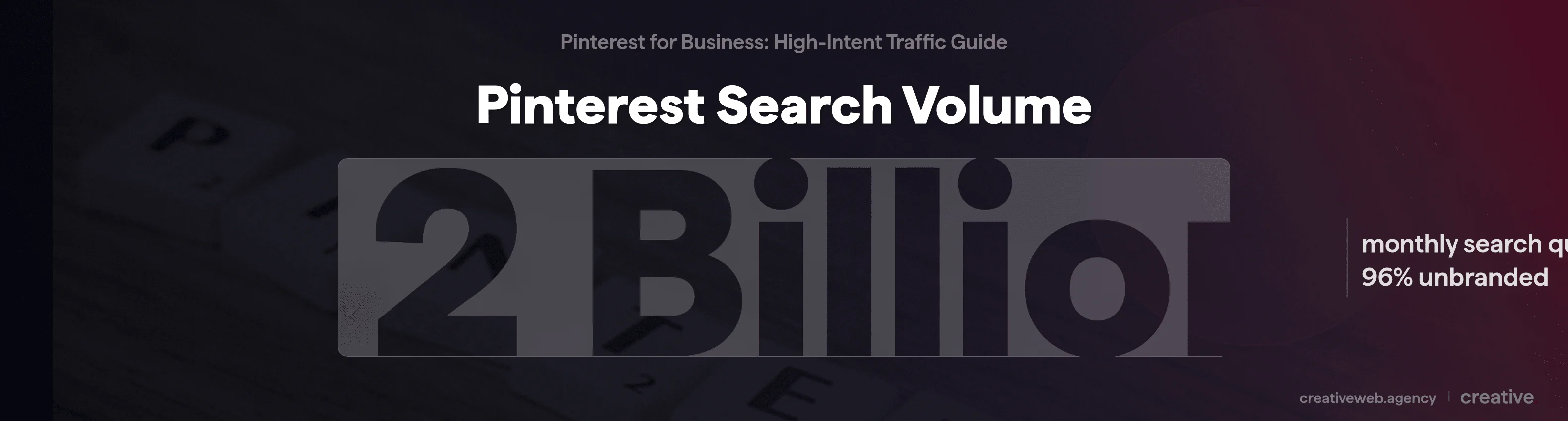
Pinterest processes over 2 billion search queries every month (Pinterest Business). 96% of those searches are unbranded: people aren’t looking for specific companies, they’re searching for ideas, solutions, and inspiration.
That makes it a visual discovery engine (basically, a search engine that shows images instead of text links).
Here’s what that means in practice: if you want to use Pinterest for business, you start with keyword research, not content creation. You optimise for searchability, not engagement. The people finding your pins already have a problem they’re trying to solve or something they’re planning to buy.
That’s nothing like scrolling a feed.
The Audience in 2026
Pinterest isn’t shrinking. 15.5 million UK users are active on the platform (DataReportal), and globally it hit 619M monthly actives (up from around 450M just two years ago) with revenue growing 19% year on year to $3.64 billion in 2024 (Pinterest Q4 2024 earnings).
The audience has changed, though. Gen Z now makes up 42% of Pinterest’s global audience and they’re the fastest-growing segment (Sprout Social). 39% of Gen Z start product searches on Pinterest before going anywhere else.
This isn’t your nan’s scrapbooking app anymore (although, to be fair, she’s probably still on there too).
Where Pinterest Works (And Where It Falls Flat)
When clients ask us whether Pinterest is worth their time, we don’t say what most marketing guides say. We don’t tell them “absolutely, everyone should be on Pinterest.” We walk them through five questions instead (we’ve had this conversation hundreds of times at this point).
After over a decade of managing digital marketing for UK small businesses, the pattern is clear: Pinterest delivers brilliant results for some industries and wastes marketing hours for others. The trick is knowing which camp you fall into before you invest three months finding out the hard way.
The Pinterest Fit Assessment
Work through these five questions honestly. No hedging.
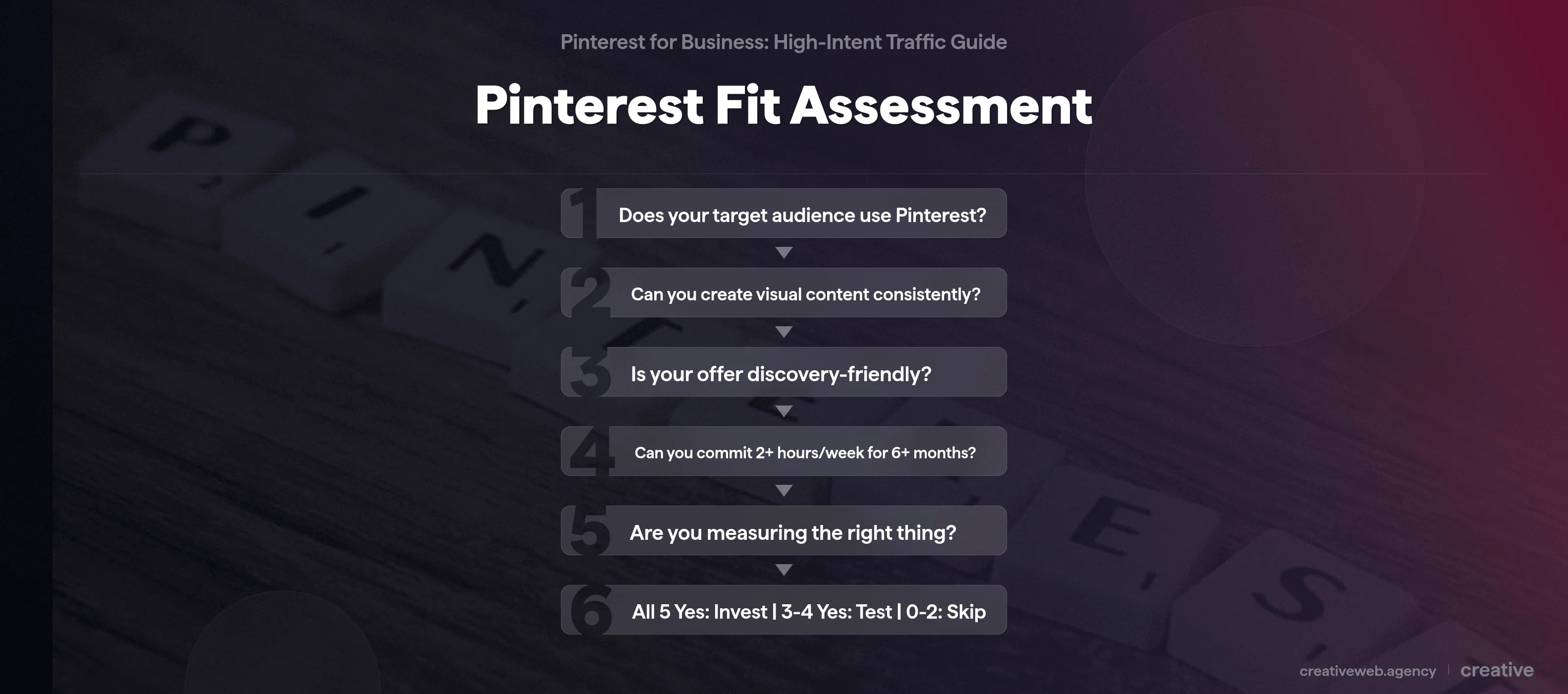
1. Does your target audience actually use Pinterest?
Open Pinterest’s search bar and type in your industry terms. If there are active results (boards, pins, suggested searches), there’s an audience waiting for your content. If you are getting tumbleweeds, no strategy fixes that. This is the single most important question.
2. Can you create visual content consistently?
Pinterest needs a steady stream of quality images (vertical, 2:3 ratio). If your business naturally produces visual content (products, interiors, food, design work), you’re halfway there. If creating images feels like pulling teeth every single time, Pinterest will not be easy.
3. Is what you offer discovery-friendly?
Aspirational, educational, and planning-focussed content thrives here. “How to style a small living room” works. “Industrial valve specifications” doesn’t. Think about it this way: would someone save your content to a board for later?
4. Can you commit 2+ hours per week for 6+ months?
Pinterest traffic compounds over time. Posting inconsistently for three months then quitting is genuinely worse than not starting. Be honest with yourself about capacity (and honest about whether you actually will commit to it).
5. Are you measuring the right thing?
If you need sales this week, Pinterest is the wrong channel. If you want traffic that builds month on month like compound interest, it’s the right investment. Different timescale, different expectations.
Your result: Yes to all five? Invest properly. Yes to three or four? Test with limited resources first.
Two or fewer? Skip Pinterest entirely and put those hours into a channel that’ll actually deliver for your business.
Basically, if people are already searching for what you do on Pinterest, it works. If they’re not, it doesn’t.
Strong Fit Industries
Home decor, fashion, food and recipes, wedding and events, travel, beauty, lifestyle products, craft and DIY. These categories have massive Pinterest search volume and proven paths from pin to purchase. Pinterest shoppers spend 2x more per month than users on other social platforms (Pinterest Business).
That’s not a rounding error.
In the UK specifically, Pinterest retail campaigns see a 21% higher sales lift than the platform average (Pinterest Business). If you’re selling into these categories and you’re not on Pinterest, you’re leaving traffic on the table.
Moderate Fit
Service businesses with visual portfolios (web design, photography, architecture), educational content creators, and B2C software with visual use cases. Can work, but test before committing significant resources to it.
Poor Fit (When to Skip Pinterest Entirely)
Right, this is the bit nobody else writes about.
B2B industrial. Highly technical services. Local-only businesses without visual content. Regulated industries with heavy creative constraints.
If your buyer is a procurement manager sourcing industrial components, they’re on LinkedIn or Google. Not Pinterest. No amount of clever infographic design changes that.
We don’t use Pinterest for our own marketing at CreativeWeb. We’re a B2B service business: our clients (business owners looking for web design and digital marketing) aren’t searching Pinterest for that. We practise what we preach here.
B2B and Service Businesses: The Honest Test
Every guide says B2B “can work on Pinterest with creative content.” They trot out the same examples (HubSpot, Constant Contact, GQ Magazine) as if that settles it.
Here’s a more useful approach. Go to Pinterest right now and search for what your customers would actually search for.
If you’re a wedding photographer, you’ll find thousands of results. If you’re an IT consultancy, you’ll find basically nothing.
That search result is your answer. If your buyers aren’t searching in your category on Pinterest, no amount of creative pinning changes that.
Want Pinterest Working for Your Business Without the Guesswork?
Talk to Our Social Media TeamWhat High-Intent Pinterest Traffic Actually Looks Like
Ok, so you’ve decided Pinterest might be a fit for your business. What does the traffic actually look like when it lands on your site?
You’ve probably seen the headline stats: visitors from Pinterest stay 50% longer on site than those from other social platforms, they’re 2.3x more likely to purchase, and they spend roughly twice as much per month (Pinterest Business).
But what does that actually mean for a UK small business with 1,000 monthly visitors?
What You’ll See in Your Analytics
Pinterest referral traffic behaves more like search traffic than social traffic. We see this across our clients’ analytics consistently: people arrive with intent, they were looking for something specific, found a pin, and clicked through because it matched what they needed.
In GA4, you’ll typically see longer session durations, more pages per visit, and lower bounce rates from Pinterest referrals compared to Facebook or Instagram. The quality is closer to Google organic than it is to other social channels.
Tag your pin URLs with UTM parameters so you can track exactly which pins drive which traffic in GA4.
And honestly, that surprised us the first time we noticed it.
Evergreen Traffic That Compounds
This is where Pinterest stands apart from every other social platform. A pin you post today can drive traffic 3, 4, even 6 months from now. The average pin lifespan is 3.5 months compared to 24-48 hours for an Instagram post (Hootsuite).
That’s not a small difference. It changes how the whole platform works for you.
Month one you post 30 pins. Month two, another 30, but the first batch is still working. By month three you’ve got 90 pins driving traffic simultaneously.
It compounds.
For a business that can’t post daily on every platform, this is one of best ways to get consistent referral traffic from limited marketing time.
Realistic Expectations
Three to six months before you see meaningful traffic. That’s what we’ve actually seen work.
If your site gets 1,000 visitors per month, don’t expect Pinterest to double that in week three. A realistic early target is 50-100 additional monthly visitors within three months, growing to 200-500+ within six to twelve months if you’re consistent and in a strong-fit category.
Not earth-shattering overnight. But traffic that keeps growing while you’re focussed on other things.
Pinterest vs Instagram: Which Sends Better Website Traffic?
We get asked this constantly. So here’s the comparison.
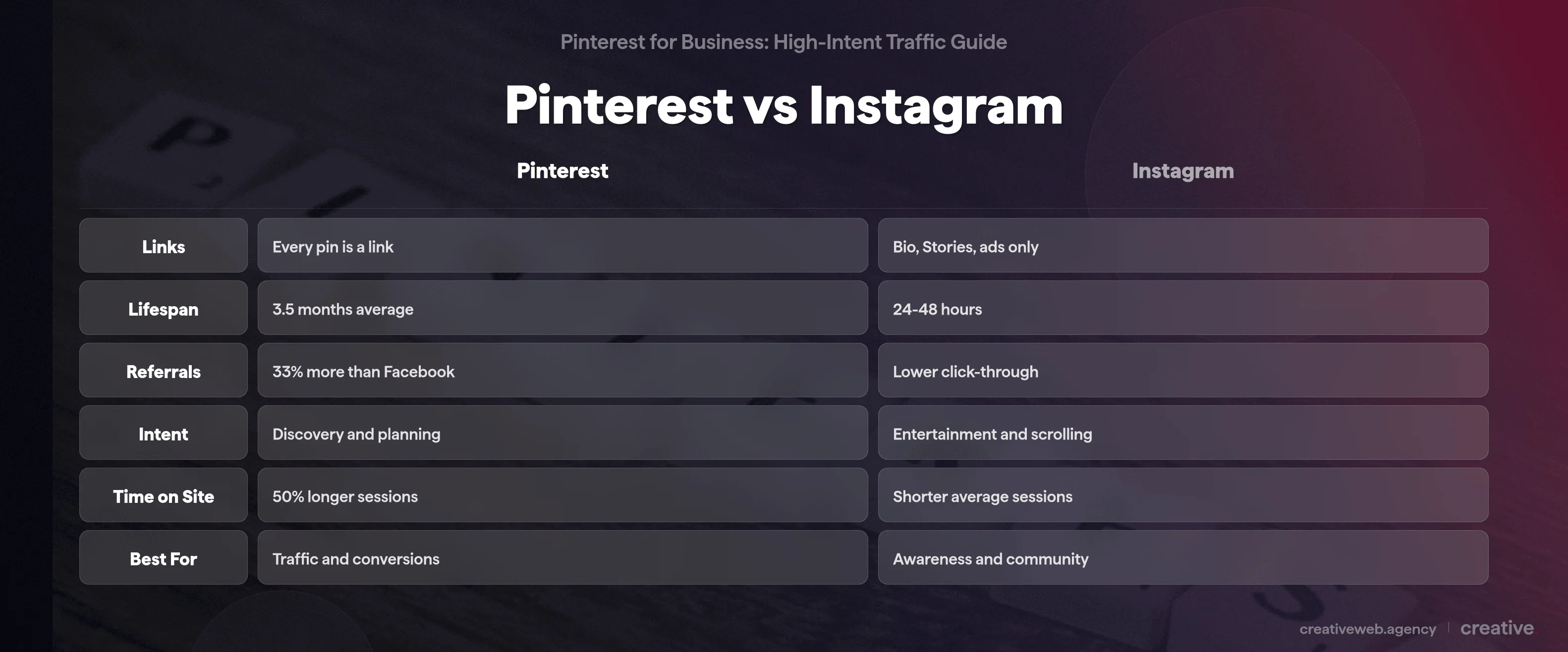
| Link structure | Every pin links to a URL | Links restricted to bio, Stories, ads |
| Content lifespan | 3.5 months average | 24-48 hours |
| Website referrals | 33% more than Facebook | Lower click-through to websites |
| User intent | Discovery and planning (high intent) | Entertainment and scrolling (lower intent) |
| Time on site | 50% longer sessions from referrals | Shorter average sessions |
| Best for | Website traffic and conversions | Brand awareness and community |
Source: Hootsuite, Pinterest Business
For driving website traffic specifically? Pinterest wins. We’ve tested both for clients and the structural advantage alone (every pin is a link; Instagram actively restricts them) makes this pretty straightforward.
When Instagram Wins
Instagram is better for brand awareness and community building. If you’re a restaurant posting daily specials or a personal trainer building a following, Instagram’s format suits that better. Different tool, different job.
We’re not dismissing Instagram here. It’s about where your hours go.
How to Choose (Or Use Both)
If you have 5 hours per week for social marketing, where should those hours go? Start with your primary goal:
- Traffic and conversions: Pinterest
- Brand awareness and community: Instagram
- Both but limited time: pick the one that matches your primary goal and do it properly, rather than spreading yourself thin across both
How Pinterest SEO Works (It’s Not Google SEO)
So if you’re used to Google SEO (which, given that we’re an SEO agency, we definitely are), Pinterest SEO feels familiar but different enough to trip you up.
How the Algorithm Ranks Pins
Pinterest’s algorithm weighs four things:
- Keyword relevance: pin title, description, and board name need to contain the search terms people actually use
- Pin quality: vertical 2:3 ratio images, strong save-to-click ratio, clear visual design
- Pinner authority: account age, posting consistency, overall engagement rates
- Freshness: new pins get a distribution boost over repins (Pinterest wants fresh content)
No backlinks. No Core Web Vitals.
Repins still work. Just less.
But saves function like links do in Google: when someone saves your pin, it tells Pinterest “this is valuable, show it to more people” (the Pinterest equivalent of a backlink, basically). More saves, wider reach.
Pinterest Keywords vs Google Keywords
The intent is different and this trips people up. Google keywords tend to be transactional (“buy running shoes online”). Pinterest keywords are aspirational and planning-focussed (“running outfit ideas” or “home gym setup inspiration”).
Top tip: use Pinterest’s own search bar for keyword research. Start typing your topic and watch the autocomplete suggestions. Those are real queries from real users.
Pinterest Trends shows what’s trending by category and season, and it’s completely free.
Rich Pins and the Basics
Enable Rich Pins (they pull your page title, description, and pricing directly from your website). Write keyword-rich pin descriptions between 100 and 500 characters.
Add alt text to every image. Organise boards with descriptive, keyword-focussed names rather than cute ones.
I know, “keyword-rich” sounds like SEO advice from 2015. But Pinterest is fundamentally a search engine. The basics still work because the platform still functions the same way underneath, even if the audience has changed.
How to Use Pinterest for Business When You’re Short on Time
Right, so how do you actually get started if you want to use Pinterest for business but you’ve got maybe a couple of hours a week? This bit assumes you’re doing it yourself.
Account Setup (The 10-Minute Version)
Create a Pinterest business account (free), verify your website, enable Rich Pins. Done.
You can convert a personal account or start fresh. The business version gives you analytics, ads access (only pay if you use them), and Rich Pins.
NB: the difference between a personal and business account is just features, not cost. Business is free and there’s no reason not to switch.
What to Post and How Often
1-3 fresh pins per day. That’s the 2026 consensus across every credible source (Hootsuite).
If you’ve read older guides recommending 15-30 pins daily, ignore that advice. It’s outdated and risks getting your account flagged for spam. One well-designed, keyword-optimised pin per day will outperform ten rushed repins.
A “fresh pin” means a new image design, by the way. Not a repin of someone else’s content.
Not the same graphic with a slightly different title slapped on.
Fresh visual, new pin.
Time Investment Reality
Here’s what’s realistic:
2 hours per week (minimum viable): 1 pin per day, basic keyword optimisation, monthly board review. Slow but steady growth over 6+ months. This sounds obvious written down, but you’d be amazed how many businesses don’t even manage this consistently.
5 hours per week (strategic): 2-3 pins per day, analytics review, content repurposing from existing blog posts, seasonal planning with Pinterest Trends. Faster growth, better data to work with.
If you can’t do 2 hours a week for 6 months, don’t start. Seriously.
The pattern we see over and over: businesses post aggressively for 6 weeks, see minimal results because Pinterest hasn’t had time to distribute their content properly, and quit. Pinterest rewards patience. It punishes stop-start behaviour.
When Pinterest Ads Make Sense
Quick mention because this article focuses on organic. Pinterest Ads average around $0.78 CPC with 2x ROAS compared to other platforms (Pinterest Business).
Worth exploring once your organic pins are performing and you’ve got data on what resonates.
But get the organic foundation right first.
Frequently Asked Questions
-
Is Pinterest free for businesses?
-
Yes. A business account is completely free. You get analytics, Rich Pins, ads (only charged if you run campaigns), and website verification. No premium tier, no hidden costs. No catch.
Did this answer your question? YesThat’s great glad we could help! Start a ProjectNoNo problem, one of our experts can give you a more in-depth answer. Ask our Experts -
Is Pinterest still good for business in 2026?
-
Short answer: for the right businesses, yes. 619 million monthly users, revenue growing year on year, Gen Z adoption accelerating. But u0022the right businessesu0022 is the key phrase: run through our Fit Assessment above before committing your time.
Did this answer your question? YesThat’s great glad we could help! Start a ProjectNoNo problem, one of our experts can give you a more in-depth answer. Ask our Experts -
What is the difference between a personal and business Pinterest account?
-
Business accounts add analytics, ads access, Rich Pins, and website verification. Both are free. If you’re using Pinterest for business, switch. It takes 10 minutes and there’s no downside.
Did this answer your question? YesThat’s great glad we could help! Start a ProjectNoNo problem, one of our experts can give you a more in-depth answer. Ask our Experts -
How does Pinterest work for business?
-
It’s a visual discovery engine. Users search with planning intent, every pin links to your website, and your content compounds traffic over months as pins continue appearing in search results. Think search engine with images, not social media with boards.
Did this answer your question? YesThat’s great glad we could help! Start a ProjectNoNo problem, one of our experts can give you a more in-depth answer. Ask our Experts -
Can you use Pinterest for a service business?
-
Depends on the service. Visual services (design, photography, architecture) can do well on the platform. Technical B2B and professional services usually struggle. Search for your services on Pinterest: if there’s an active audience, go for it. If there isn’t, your time is better spent elsewhere.
Did this answer your question? YesThat’s great glad we could help! Start a ProjectNoNo problem, one of our experts can give you a more in-depth answer. Ask our Experts -
How long does it take to get traffic from Pinterest?
-
Three to six months for meaningful results with consistent posting in a strong-fit category. Traffic compounds as your pin library grows. The first month will feel quiet. That’s normal. Resist the urge to quit.
Did this answer your question? YesThat’s great glad we could help! Start a ProjectNoNo problem, one of our experts can give you a more in-depth answer. Ask our Experts -
How often should you post on Pinterest for business?
-
One to three fresh pins per day. That’s the 2026 consensus. The old advice of 15-30 pins daily is outdated and can get your account flagged for spam. One well-designed, keyword-optimised pin outperforms ten rushed repins. Consistency matters more than volume: commit to at least 2 hours a week for 6 months minimum.
Did this answer your question? YesThat’s great glad we could help! Start a ProjectNoNo problem, one of our experts can give you a more in-depth answer. Ask our Experts -
How do you do SEO on Pinterest?
-
Start with keyword research using Pinterest’s own search bar. Type your topic, check the autocomplete suggestions, and use those keywords in your pin titles, descriptions, board names, and image alt text. Use vertical 2:3 ratio images, enable Rich Pins, and post consistently. Pinterest’s algorithm weighs keyword relevance, pin quality, account authority, and freshness. Treat it like SEO, not social media management.
Did this answer your question? YesThat’s great glad we could help! Start a ProjectNoNo problem, one of our experts can give you a more in-depth answer. Ask our Experts
If any of this made you think twice about where you’re spending your marketing time, good. That was the whole point. Pinterest isn’t for everyone, but if you’re in a strong-fit industry, the traffic quality is hard to beat.
Start with the Fit Assessment, be honest with your answers, and go from there. If you want to talk it through, get in touch and we’ll help you figure out where to focus.