Why Your Website Isn’t Showing Up on Google (And How to Actually Fix It)

You’ve spent real money on your site. Maybe a few thousand pounds, maybe more. And when you type what your business does into Google… nothing.
Not page two. Not buried at the bottom. Just gone.
We hear this from business owners almost every week. The frustrating part is that there’s rarely one simple explanation. It’s usually a combination of things: some obvious, some buried so deep in your site’s code you’d never think to look.
This guide works differently from the usual “12 reasons” lists. Instead of hoping one applies to you, we’re going to walk through the actual diagnostic process we use at our agency when a client phones and says “my website’s not on Google.”
Start at the top. Follow the steps. Find your problem.
First Things First: Is Google Ignoring Your Site, or Just Ranking It Poorly?
Before you do anything else, there’s one question worth answering: does Google actually know your website exists?
This sounds basic but it’s the most important distinction in this entire article. A site that isn’t indexed (Google hasn’t stored it in its database) needs completely different fixes from a site that’s indexed but ranking on page 47 where nobody looks.
The 30-Second Test: How to Check If Google Knows Your Site Exists
Open Google and type this:
site:yourdomain.com
Replace that with your actual domain. If Google returns a list of your pages, your site is indexed.
Your problem is ranking, not visibility.
If Google returns zero results? That is a bigger issue. Google literally does not know your site exists, and no amount of keyword optimisation will change that until the indexing problem is sorted.
Why This Distinction Matters
We’ve had clients spend months writing blog posts and tweaking title tags when their entire site wasn’t even in Google’s index.
Different problems, different fixes: don’t waste time on content improvements if Google can’t find you in the first place. We learned this the hard way early on.
Your Diagnostic Map: Find Your Problem in 60 Seconds
This is the framework we use internally at our agency. It’s adapted from the professional SEO debugging pyramid (Crawl, Render, Index, Rank, Click) but we’ve translated it for business owners who don’t spend their lives in Google Search Console.
The Five Layers: Crawl, Render, Index, Rank, Click
Each layer depends on the one below it. You can’t rank content that isn’t indexed. You cannot index content that is not rendered.
And you can’t render content that isn’t crawled.
Start at the bottom, work up.
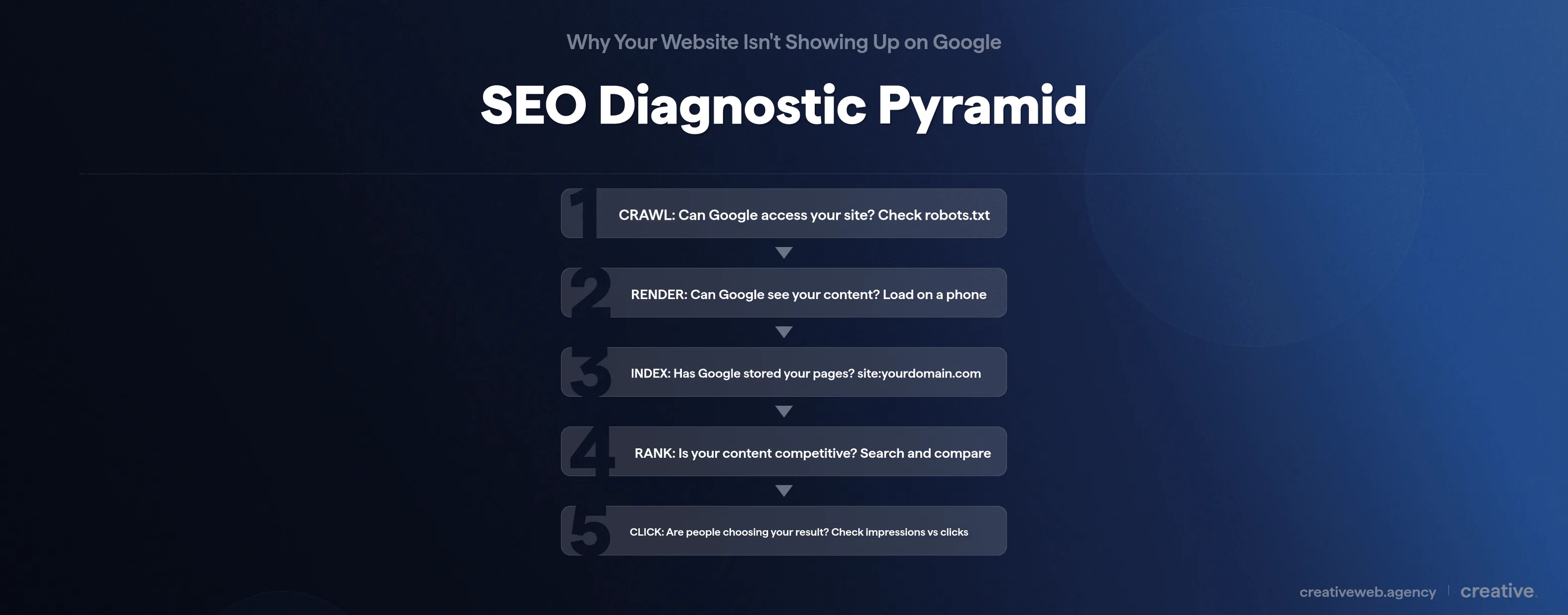
Follow the Flowchart
| Step | Question | Quick Check | If “no”, go to… |
|---|---|---|---|
| 1. Crawl | Can Google access your site? | Visit yourdomain.com/robots.txt | “Your Site Isn’t in Google’s Index” below |
| 2. Render | Can Google see your content? | Load your site on a phone | “Technical Problems” below |
| 3. Index | Has Google stored your pages? | Search site:yourdomain.com | “Your Site Isn’t in Google’s Index” below |
| 4. Rank | Is your content competitive? | Search your target keyword and compare | “Content,” “Authority,” or “SEO Not Working” below |
| 5. Click | Are people choosing your result? | Check Search Console for impressions vs clicks | “The 2026 Reality” below |
Work through each step in order. The first “no” you hit is where you start fixing.
Your Site Isn’t in Google’s Index (And Here’s How to Fix It)
If your site: check returned nothing (or far fewer pages than your site actually has), something is blocking Google from storing your content. Here are the usual suspects.
Check Your robots.txt File
Your robots.txt file tells Google which parts of your site it can crawl. Visit yourdomain.com/robots.txt in your browser and look for this line:
Disallow: /If that’s there, you’ve told Google to ignore your entire website.
One line of code, whole site invisible. We see this after site migrations or hosting changes more often than you’d expect.
For larger sites with hundreds of pages, crawl budget matters here too: Google allocates limited resources to crawl each site, so blocking important sections in robots.txt wastes that budget on the wrong pages.
Look for Accidental noindex Tags
This is something we see constantly after site redesigns. A developer builds the site on a staging server with a noindex tag (basically telling Google “don’t index any of this”), launches the live version, and forgets to remove it.
The site looks perfect to visitors but is completely invisible to search engines.
To check: right-click any page, select View Source, and search for “noindex.” If it’s there on your live site, that’s your answer. (It happens more often than any developer will ever admit to.)
Submit a Sitemap Through Google Search Console
If you haven’t set up Google Search Console, do it today. It is free and it is the single most important tool for understanding how Google sees your site.
Submit your XML sitemap (usually at yourdomain.com/sitemap.xml) and use the URL Inspection Tool to check the indexing status of individual pages.
NB: The URL Inspection Tool also lets you request manual indexing for specific pages. Fastest way to get Google’s attention.
New Websites: Why Google Hasn’t Found You Yet
If your site is brand new, don’t panic. Indexing can take days to a few weeks.
Ranking takes much longer: Ahrefs’ research found that only 5.7% of pages reach the top 10 within their first year.
If you’re on Wix, Squarespace, or Shopify, check your platform’s SEO settings. Squarespace has a “hide site from search engines” toggle that catches people out constantly. And if you want to speed things up, submitting your sitemap through Search Console is the single most effective step.
Your Content Doesn’t Match What People Are Actually Searching For
This is the most common problem we find when we audit SME websites. It is not about word count or keyword density (Google moved past keyword density years ago).
It’s about intent.
Search Intent Mismatch: The Hidden Ranking Killer
Here’s a pattern we see all the time in our audits: a web design company creates a page titled “Our Web Design Services” and wonders why it doesn’t rank for “how much does a website cost.”
Those are two completely different search intents. The person typing that query wants pricing and ballpark figures.
They are not looking for a sales page.
If you want to rank for a keyword, look at what’s already ranking for it. Whatever format those top results use is what Google has decided searchers want.
Match that intent or your page won’t be in the conversation.
Thin Content: When There’s Not Enough to Work With
Google’s Helpful Content system (updated throughout 2025 and into 2026) actively demotes pages that don’t provide genuine value. A 200-word service page with no depth and no useful detail isn’t going to compete with a thorough, well-structured guide that actually answers the reader’s questions.
So does that mean longer content always wins? Not exactly. But if your competitors provide thorough answers and you offer a single paragraph, Google has an easy decision to make.
Keyword Cannibalisation: When Your Own Pages Compete Against Each Other
Want to check if this is happening to you? Search:
site:yourdomain.com “your target keyword”
If multiple pages come up for the same keyword, you’ve got a cannibalisation problem. Google doesn’t know which page to rank, so it often ranks neither well. The fix is usually to consolidate those pages into one strong piece of content or differentiate them with clearly distinct search intents.
If you have pages with near-identical content across multiple URLs, set up canonical tags to tell Google which version to prioritise. Duplicate content dilutes your authority and wastes crawl budget.
E-E-A-T: Why Google Needs to Trust You
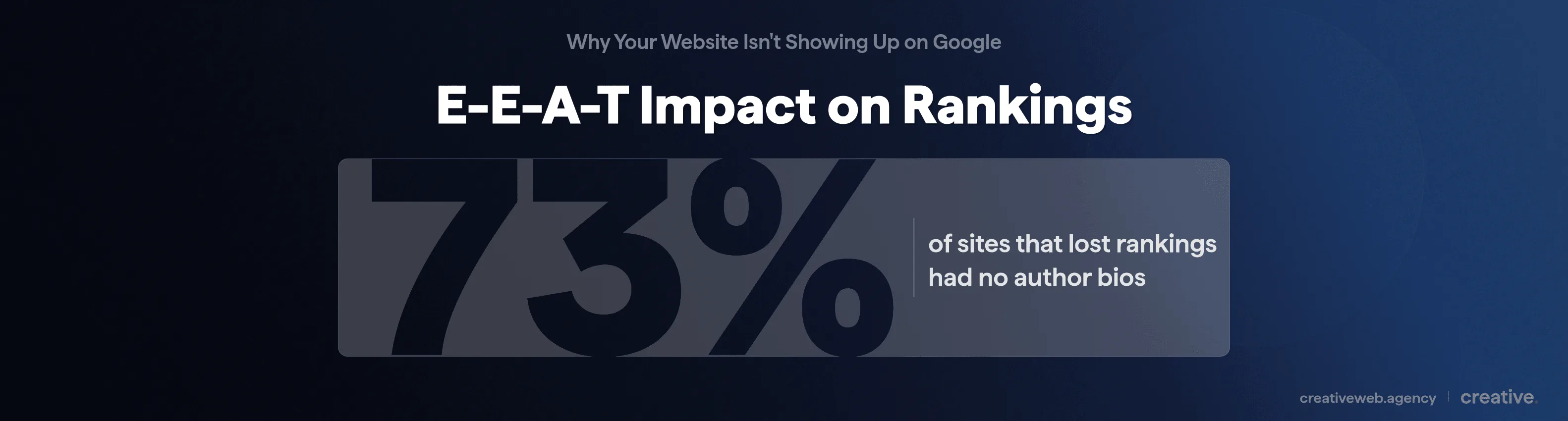
E-E-A-T stands for Experience, Expertise, Authoritativeness, and Trustworthiness. Since the February 2026 core update, Google is stricter about this than ever before. Google’s quality guidelines now prioritise content from people who demonstrate genuine knowledge of their subject.
For a small business, that means author bios on your content (who wrote this and why should anyone trust them?), real experience signals like client work and professional credentials, and consistent quality across your site.
The data backs this up: post-update analysis across SEO industry studies found that an estimated 73% of sites that lost rankings had no author bios on their content.
We flag this in nearly every audit we do. It is one of the easiest quick wins going.
Our SEO content and blogging page goes deeper into building the kind of content that actually holds its rankings.
Technical Problems Silently Holding Your Site Back
Your content might be genuinely good. But if the technical foundations are broken, Google will rank a mediocre site with solid technical health above yours.
We’ve seen it happen. Every time.
Core Web Vitals and INP: The Speed Metrics That Actually Matter
When someone mentions “page speed” they usually mean Core Web Vitals (whether they realise it or not). These are Google’s specific performance metrics, and since March 2024 they include Interaction to Next Paint (INP) which replaced the old First Input Delay metric.
INP measures how quickly your site responds when someone taps, clicks, or interacts with anything on the page. Run your site through Google PageSpeed Insights and check the Core Web Vitals section. If anything shows red, that’s a problem.
According to Google, over half of mobile visitors leave a site that takes more than 3 seconds to load. Speed affects rankings and whether anyone sticks around.
Mobile Experience: Google Indexes Your Mobile Site First
Google uses mobile-first indexing: it primarily evaluates the mobile version of your site. If your desktop looks brilliant but your mobile experience is slow or hard to navigate, your rankings suffer.
Over 60% of Google searches happen on mobile (Statista, 2026). Test your own site on an actual phone.
HTTPS and Security Basics
Quick one: if your site still runs on HTTP instead of HTTPS, fix it. Google confirmed HTTPS as a ranking signal in 2014 and browsers now actively warn visitors that HTTP sites are not secure.
We still come across this more often than we’d like. In 2026 it should be a given.
Your Site Lacks the Authority Google Expects
Good content and solid technical foundations can still fall short if Google doesn’t see your site as authoritative enough for the keywords you’re targeting. We see this a lot with newer sites.
Domain Authority vs Page Authority: What Actually Matters
Domain authority (or Domain Rating in Ahrefs’ terminology) measures your entire site’s backlink strength. Page authority measures individual pages.
Both matter, but the practical reality is this: a site with DR 20 is going to struggle to outrank a DR 70 competitor for competitive keywords, even with better content.
That does not mean you can’t compete. It means picking your battles carefully.
Backlinks: Quality Over Quantity, Every Time
A backlink is when another website links to yours. Google treats these as votes of confidence.
But not all votes are equal: one link from a respected industry publication is worth more than 100 links from random directories.
In our experience the approaches that consistently work for UK businesses are:
- Local business directories (legitimate ones: Yell, Thomson, relevant industry directories)
- Industry associations and trade bodies you’re already a member of
- Digital PR (getting mentioned in local news or industry publications)
- Guest contributions to relevant blogs where you can demonstrate genuine expertise
Don’t buy links. Don’t use private blog networks. We’ve watched Google’s spam detection in 2026 catch things that would have flown under the radar a couple of years ago, and the risk of a manual penalty is not worth it.
Internal Linking: The Authority You Already Have
This is probably the most underrated fix in our toolkit. If you have a strong page on your site (your homepage, a popular blog post, a well-linked service page), linking from it to other pages passes authority across your site.
Most business websites we audit have almost no internal linking strategy at all.
It is free, it is entirely within your control, and it works.
You’ve Tried SEO and Nothing’s Changed
Right, this section is for the reader who’s done keyword research, written blog posts, maybe even hired someone to “do SEO,” and still isn’t seeing results. Sound familiar?
We get this almost weekly at our agency. In our experience it usually comes down to one of three things.
Targeting Keywords That Are Too Competitive for Your Site
There’s a massive difference between targeting “insurance” and targeting “small business insurance brokers Manchester.” The first has millions of results dominated by companies spending six figures annually on SEO. The second might have a handful of local competitors.
If you have a relatively new or small website, start with longer, more specific keywords where you can realistically compete. This isn’t giving up. It’s strategy.
Surface-Level Optimisation vs Real SEO Strategy
Changing title tags and adding keywords to your headings is a start, but it is not SEO. It’s like painting a house that has foundation problems: it looks better but the structural issues have not gone anywhere.
Real SEO means understanding what your audience searches for, creating content that answers those questions, building authority through quality links, and keeping the technical side solid.
If someone told you “just add more keywords” and left it at that, they gave you about 10% of the picture.
The Topical Authority Problem: One Page Isn’t Enough
Google doesn’t just evaluate individual pages. It looks at whether your site shows depth on a topic.
If you’ve published one blog post but your competitor has 15 related articles forming a content cluster, Google sees them as the authority.
Not you.
This is the advice most SMEs never get from their web team: you need a content strategy, not just content. A cluster of related articles that link to each other and cover a topic from multiple angles is what actually moves the needle.
Top tip: Start by listing every question your customers ask you. Each one is a potential article that builds your topical authority over time.
Not Sure What’s Holding Your Site Back? We’ll Find It.
Get a Free Site AuditPenalties, Algorithm Updates, and Sudden Ranking Drops
If your site used to rank well and then suddenly vanished, the cause is usually one of these.
Manual Actions: How to Check If Google Has Penalised Your Site
A manual action means a human reviewer at Google has flagged your site for violating their guidelines. Check Google Search Console under Security & Manual Actions.
If there’s a notification there, you have a specific problem to fix.
But here’s the distinction most articles miss: an algorithm update is not a penalty. A core update re-evaluates how Google ranks content.
Your site has not been punished: the criteria shifted and results shuffled.
A manual action requires fixing the specific violation and submitting a reconsideration request. An algorithmic shift means improving your content and E-E-A-T signals.
Completely different approaches.
The December 2025 and February 2026 Core Updates
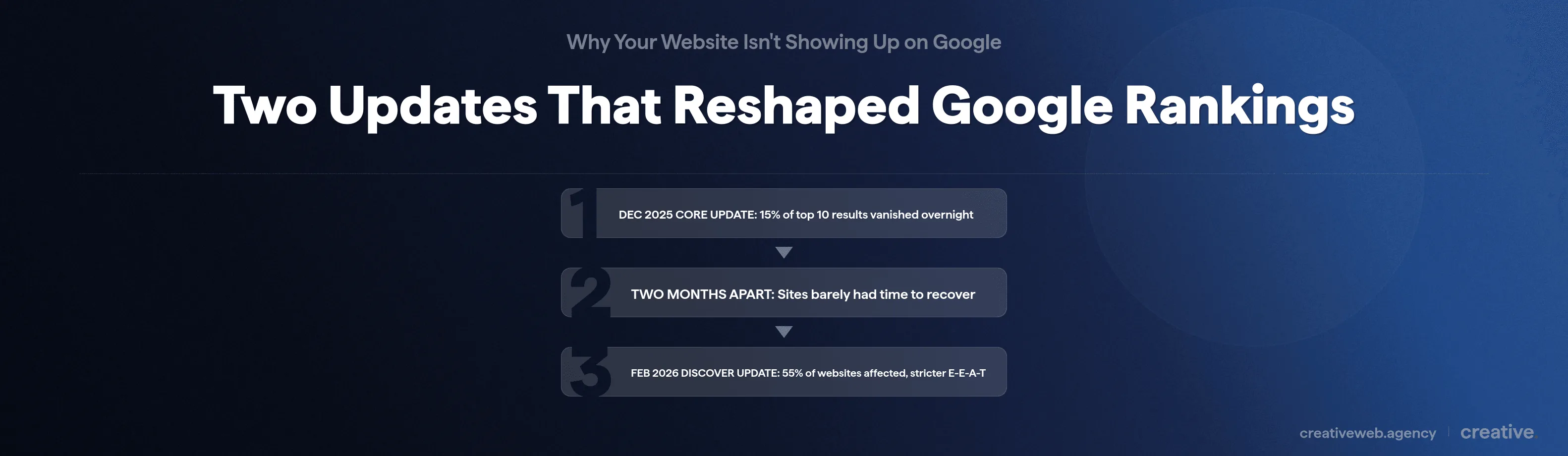
Two major updates hit in quick succession. The December 2025 core update saw 15% of top 10 results disappear from their previous positions, according to ranking volatility data tracked by Semrush Sensor. Then the February 2026 Discover Core Update affected an estimated 55% of websites, with notably stricter E-E-A-T evaluation and improved detection of AI-generated content.
We saw the impact across multiple client sites. Pages with thin content and no author attribution were hit hardest.
Pages with genuine expertise signals and clear authorship largely held their ground.
If your rankings dropped around December 2025 or February 2026, those updates are almost certainly why.
Hacked Sites and Security Compromises
A compromised site can destroy your rankings overnight. We’ve taken on clients whose entire sites were de-indexed because of a hack they didn’t even know about.
Google actively warns users about hacked websites and may remove them from search results entirely. Check Search Console for security issues, and run your URL through Google’s Safe Browsing tool to see if anything’s been flagged.
The 2026 Reality: AI Overviews Changed Everything
Here’s something most “why isn’t my site ranking” articles won’t tell you, and it’s something we discuss with every new client: even if you do everything right, ranking on Google in 2026 does not mean what it meant two years ago.
What AI Overviews Mean for Your Organic Traffic
According to Semrush’s 2026 AI Overview tracking, Google’s AI Overviews now appear on over 80% of informational search queries. They sit above the organic results and take up more than 1,200 pixels of screen space, pushing the first organic link below the fold on most devices.
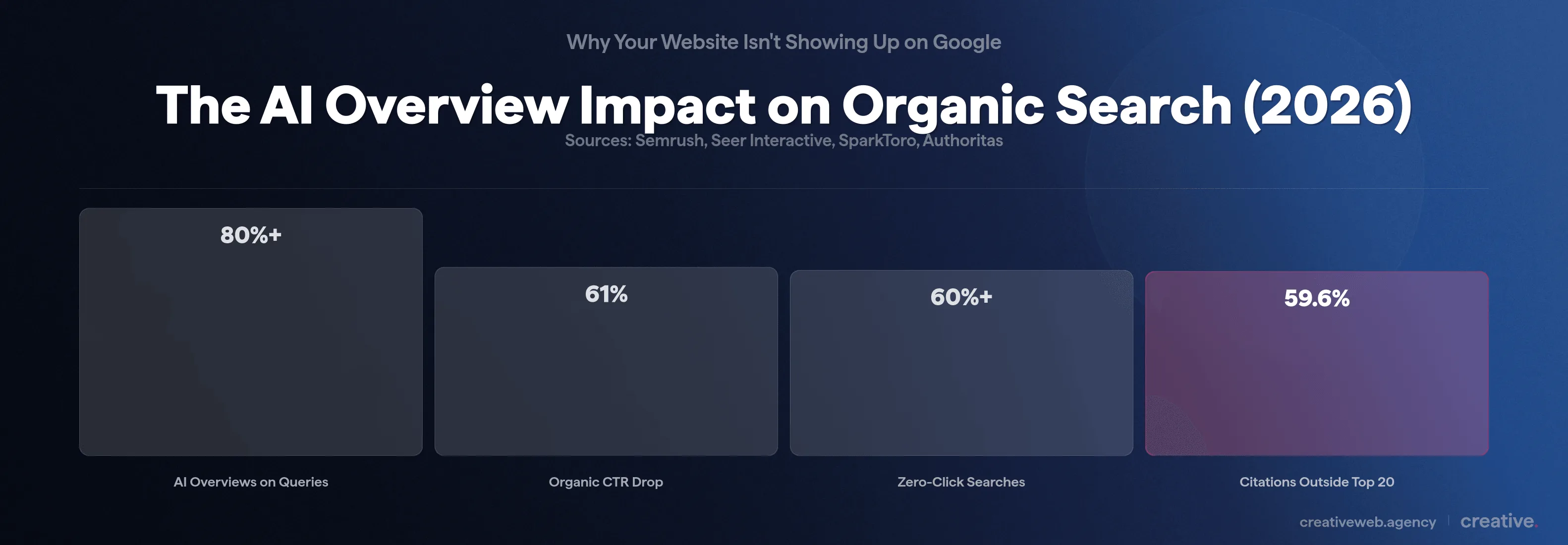
The numbers are sobering, and we’ve watched this play out across our own client data. Research from Seer Interactive found that organic click-through rates dropped by up to 61% for queries where AI Overviews appear. And according to SparkToro’s zero-click research, over 60% of Google searches are now zero-click: the searcher gets their answer without ever visiting a website.
In other words, Google answers the question itself and keeps the traffic. Cheers for that.
Being Cited Might Matter More Than Ranking
Here’s the flip side though (and this is genuinely interesting): research from Authoritas found that 59.6% of AI Overview citations come from pages that aren’t even in the top 20 organic results. Google’s AI doesn’t just pull from top-ranking pages. It pulls from pages that provide clear, structured, authoritative answers to specific questions.
So if you’re a smaller site that can’t realistically compete for position 1 organically, you might still get cited in the AI Overview. We’ve seen this work for several of our clients. The key is structuring your content with clear headings, direct answers, proper FAQ markup, and genuine expertise signals that AI systems can extract.
Zero-Click Search: When Ranking Well Still Doesn’t Bring Traffic
For purely informational queries (“what is SEO,” “how to check if Google indexed my site”), zero-click is now the default. The AI Overview answers the question and most searchers move on.
What does that mean in practice? We advise our clients to focus SEO efforts on queries where people still need to click: transactional queries (“web design agency near me”), complex topics that can’t be answered in a single paragraph, local searches where the reader needs your specific business, and queries where they need to take action on your site.
Your Diagnostic Action Plan: What to Fix First
You’ve worked through the diagnostic sections above. Here’s the action plan we give our clients, ordered by impact.
The Quick Wins (Do These Today)
- Run the site: check to confirm your pages are actually indexed
- Set up Google Search Console if you haven’t already (it’s free)
- Submit your XML sitemap through Search Console
- Claim your Google Business Profile (critical if you serve local customers)
- Check your robots.txt for accidental blocking directives
The Medium-Term Fixes (This Month)
- Audit your content against search intent: search each target keyword and honestly compare your page to what’s currently ranking
- Fix Core Web Vitals issues: run PageSpeed Insights and tackle anything flagged red
- Add author bios to all content pages (especially given the Feb 2026 update’s emphasis on E-E-A-T)
- Write compelling meta descriptions for your key pages (these show in search results and directly affect click-through rates)
- Review your internal linking: make sure strong pages link to the pages you want to rank
The Long Game (3-12 Months)
- Build topical authority with content clusters around your core services
- Earn quality backlinks through digital PR, industry involvement, and guest contributions
- Publish genuinely useful content regularly that answers real questions from your customers
- Monitor and update existing content as part of the ongoing process (content decay is real and it will catch up with you)
When to Get Professional Help
If you’ve worked through the quick wins and medium-term fixes and still aren’t seeing movement after a few months, it might be time to bring in a specialist. That’s where we come in for most of our clients.
Be cautious about who you hire. Legitimate SEO from a UK agency typically starts around £1,500 per month. If someone quotes you £200-300 a month and promises first-page rankings, that’s a red flag.
We’ve had businesses come to us after wasting thousands on cheap providers who delivered vanity metrics and zero actual results.
Some of this work genuinely requires specialist knowledge: comprehensive site audits, content strategy at scale, link building with real authority.
There is no shame in recognising when it’s beyond DIY. Our organic SEO services page covers what that looks like in practice.
Frequently Asked Questions
-
How long does it take for a new website to rank on Google?
-
Indexing can happen within days if you submit a sitemap through Google Search Console. Ranking takes longer: 3-6 months for low-competition keywords, 6-12+ months for competitive terms. Ahrefs found only 5.7% of pages reach the top 10 within a year. In 2026, AI Overviews also mean solid rankings may not deliver the traffic you’d expect.
Did this answer your question? YesThat’s great glad we could help! Start a ProjectNoNo problem, one of our experts can give you a more in-depth answer. Ask our Experts -
Can I pay Google to rank my website higher?
-
No. Organic rankings can’t be bought. Google Ads is a separate paid system where you bid on keywords and pay per click, but those ads are clearly labelled and do not influence your organic position at all. Be cautious of anyone claiming they can guarantee rankings for a fee.
Did this answer your question? YesThat’s great glad we could help! Start a ProjectNoNo problem, one of our experts can give you a more in-depth answer. Ask our Experts -
How do I check if Google has indexed my website?
-
Search site:yourdomain.com in Google. If your pages appear, they’re indexed. For more detail, use the URL Inspection Tool in Google Search Console to check specific pages and see exactly what issues Google has flagged.
Did this answer your question? YesThat’s great glad we could help! Start a ProjectNoNo problem, one of our experts can give you a more in-depth answer. Ask our Experts -
Why did my website suddenly stop appearing on Google?
-
Common causes in 2026: algorithm updates (particularly the December 2025 and February 2026 core updates), accidental technical changes (noindex tags, robots.txt blocks), hacking, or a manual action from Google. Check Search Console for notifications first.
Did this answer your question? YesThat’s great glad we could help! Start a ProjectNoNo problem, one of our experts can give you a more in-depth answer. Ask our Experts -
Does my website need backlinks to rank?
-
It depends on competition. For low-competition local keywords, strong content alone can sometimes be enough. For competitive national terms, you’ll almost certainly need quality backlinks. Focus on earning links through useful content and industry relationships rather than buying them.
Did this answer your question? YesThat’s great glad we could help! Start a ProjectNoNo problem, one of our experts can give you a more in-depth answer. Ask our Experts -
How do Google AI Overviews affect my website’s visibility?
-
AI Overviews appear on over 80% of informational queries and have cut organic click-through rates by up to 61%. But they also cite pages from outside the top 20, so structured authoritative content can gain visibility even without high rankings. Clear answers, proper headings, and strong E-E-A-T signals are key.
Did this answer your question? YesThat’s great glad we could help! Start a ProjectNoNo problem, one of our experts can give you a more in-depth answer. Ask our Experts -
Does website speed affect Google rankings?
-
Yes, directly. Google’s Core Web Vitals are confirmed ranking signals, and they measure how fast your site loads, how stable the layout is, and how quickly it responds to interactions. If your PageSpeed Insights report shows red flags, that’s hurting your rankings. It also affects whether visitors stay: over half of mobile users leave a site that takes more than 3 seconds to load.
Did this answer your question? YesThat’s great glad we could help! Start a ProjectNoNo problem, one of our experts can give you a more in-depth answer. Ask our Experts -
What are the most common reasons a small business website doesn’t rank?
-
From what we see in audits, the top three are: content that doesn’t match what people actually search for (intent mismatch), not enough content depth to compete with what’s already ranking, and weak or non-existent backlink profiles. Technical issues like slow page speed and missing HTTPS come next. For local businesses specifically, not having a Google Business Profile set up is a massive missed opportunity.
Did this answer your question? YesThat’s great glad we could help! Start a ProjectNoNo problem, one of our experts can give you a more in-depth answer. Ask our Experts -
My website is on Wix, Squarespace, or Shopify. Why isn’t it showing up on Google?
-
Platform-hosted sites can absolutely rank on Google. The most common issue is a settings toggle: Squarespace has a ‘hide site from search engines’ option that catches people out constantly. For all three platforms, make sure your SEO settings are enabled, submit your sitemap through Google Search Console, and check that your platform is not adding noindex tags to pages you want indexed. If your site is brand new, give it a few weeks to get indexed.
Did this answer your question? YesThat’s great glad we could help! Start a ProjectNoNo problem, one of our experts can give you a more in-depth answer. Ask our Experts
If any of this flagged something on your site, start with the 30-second site: check and work through the diagnostic map above. And if you’d rather skip the DIY and get a professional diagnosis, get in touch.