Website Hacked? Here’s Exactly What to Do (2026 UK Guide)

We wrote the first version of this article back in 2016. Ten years on, the one thing that hasn’t changed: security is still the last thing on anyone’s mind when they’re commissioning a website.
Clients come to us wanting great designs, smooth animations, clever JavaScript effects, interactive bits. In over 16 years of building and maintaining hundreds of websites for UK businesses, We can count on one hand the number of times someone has asked “what about security?” during a project brief.
What we’re dealing with, though? That’s changed massively. AI-powered attacks, supply chain compromises, credential stuffing from enormous data breaches.
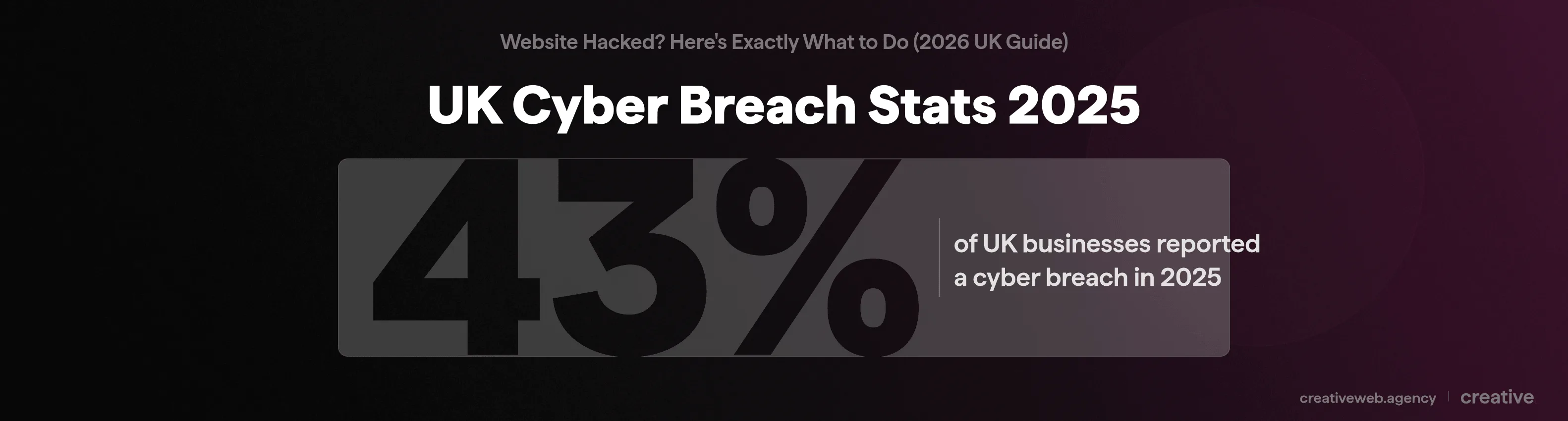
43% of UK businesses reported a cyber breach in 2025 (DCMS Cyber Security Breaches Survey). So I figured it was time for an update.
If your website’s been hacked (or you’re worried it might be), this is the guide I’d want you to read. Practical stuff, from someone who’s spent years cleaning up the mess.
Why Anyone Would Bother Hacking Your Website
The first question everyone asks: “why would anyone target MY website?”
Short answer: they didn’t.
Not specifically.
What Hackers Actually Want From Your Site
It is rarely an actual person sitting in a dark room targeting your business. Usually it’s a crawler (basically an automated bot) made by a programmer with too much time on their hands.
The crawler does what it says on the tin: scans the internet for specific vulnerabilities. A first-pass crawler identifies sites matching certain criteria (say, outdated WordPress installations). Your site gets added to a shortlist.
Then a second crawler goes through that list, attempting known exploits. If you’re running outdated software on insecure hosting, it’s a matter of time.
Take it from someone who’s had to monitor server logs: your website is constantly being probed for vulnerabilities. It’s not personal. It’s industrial.
So what are they after? Data theft is the big one: customer names, emails, payment details end up on trading sites where criminals buy and sell personal information in bulk. If you have an ecommerce site, you should be especially on top of this.
Then there’s redirect revenue (sending your visitors to dodgy sites selling performance-enhancing drugs and earning commission), SEO spam (hidden backlinks from your site to theirs: black hat SEO at its finest), and the newer additions: ransomware (encrypting your files and demanding payment) and cryptojacking (mining cryptocurrency using your server or your visitors’ devices in the background).
And sometimes? Pure malicious intent. But that’s the minority.
The Scale of the Problem in 2026
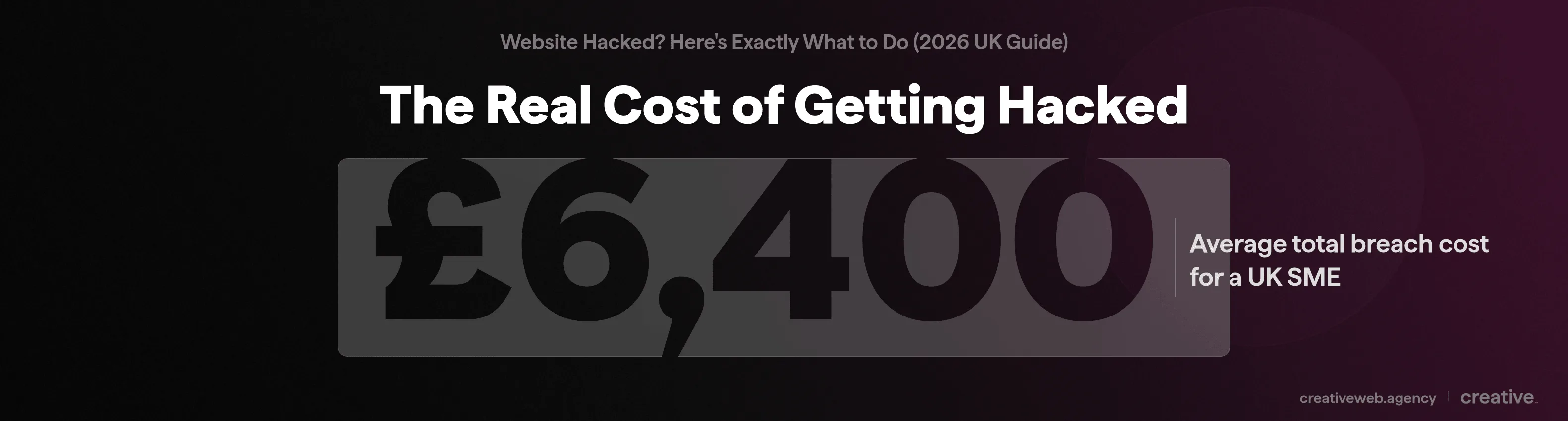
This isn’t a niche risk anymore. The numbers from the DCMS Cyber Security Breaches Survey 2025 paint a clear picture: 43% of UK businesses reported a breach, the average cost for a UK SME hit £6,400 per incident (up 52% from 2024), and a staggering 32% of UK SMEs have zero cybersecurity protections in place.
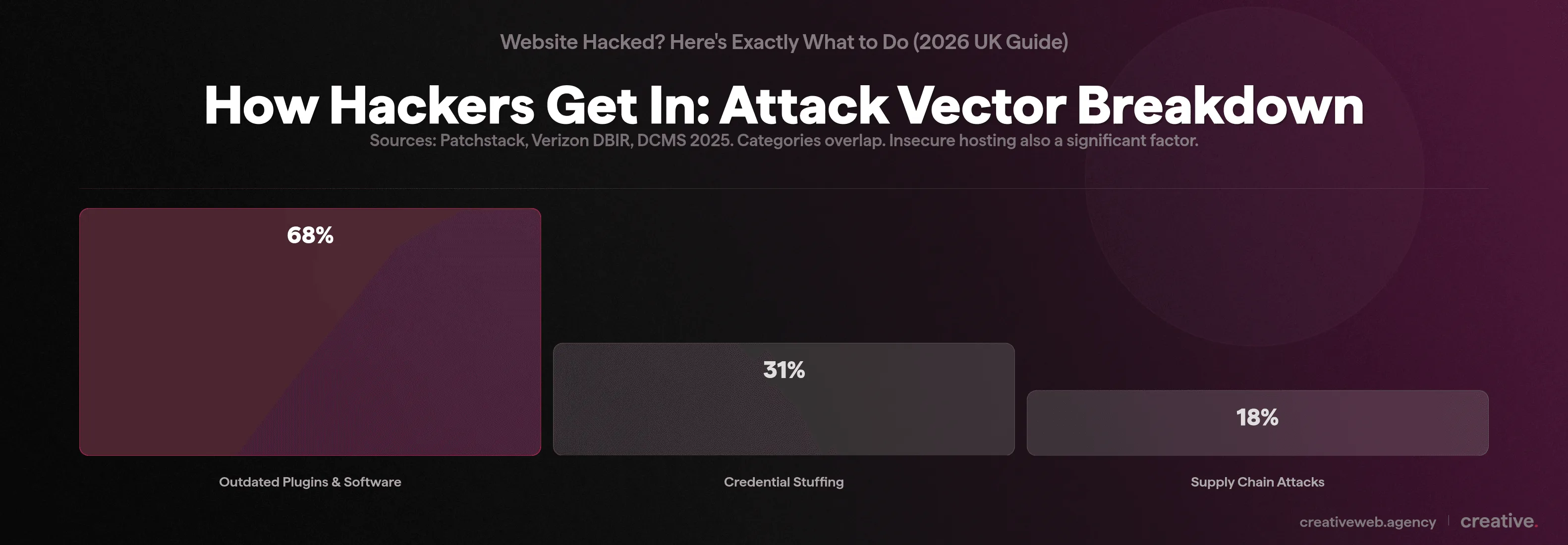
The attacks are getting smarter too. AI-powered phishing has increased by 400% (attackers using AI to craft convincing emails targeting site admins). Supply chain attacks (where a trusted third-party plugin gets compromised at the source) have doubled from 9% to 18% year on year.
And credential stuffing (using leaked passwords from previous breaches to try logging into your site) now accounts for 31% of all attacks (Verizon DBIR).
How to Tell If Your Website Has Been Hacked
Here’s something most people don’t realise: hacked websites rarely have a big sign plastered across their pages, advertising “this site has been hacked lolz.”
Often, the malicious code works quietly in the background. It’s not until Google’s malware check picks it up, or a customer’s antivirus flags it, that you become aware. By then, it’s usually far too late.
Warning Signs You Can Spot Yourself
The most obvious symptom we see: your site is redirecting visitors to spam or pharmacy pages (especially on mobile). You might also notice pages looking different or defaced, your browser showing a warning like “This site may harm your computer”, the site becoming dramatically slower, or customers telling you something looks wrong.
Sound familiar? If your website has been hacked and is redirecting to spam pages, that’s actually the most common visible symptom we see.
What Your Developer Will Find
The technical signs are less visible but more telling. Your developer should be checking for modified files (especially .htaccess, header.php, footer.php), rogue admin accounts that nobody created, outbound spam in the server logs, PHP files sitting in wp-content/uploads (these should only be images), and base64-encoded injections hidden in theme files. Also worth checking: the wp_options database table for changes to the siteurl and home values.
When Google Tells You Before You Notice
Sometimes the first sign comes from outside. Google Search Console sends security alerts if it detects suspicious content.
Your site might show a “This site may be hacked” warning in search results. In the worst case, Google blacklists your site entirely.
NB: If you’re not already using Google Search Console, set it up now. It’s free and it’s your earliest warning system.
How They Got In (And Why It Was Probably Preventable)
Good question. And often tricky to figure out, even after the fact.
But after cleaning up more hacked sites than I’d care to count: 99% of the time, it comes down to poor hosting or outdated software. That hasn’t changed in 16 years. What has changed are the specific methods attackers use to exploit those weaknesses.
Outdated Software and Plugin Vulnerabilities
In our experience, this is the number one attack vector. 68% of WordPress hacks exploit outdated plugins (Patchstack Annual Report). When you ignore that “update available” notification for six months, you’re basically leaving a window open.
And it’s not just WordPress core. Every theme, every plugin, every bit of third-party code is a potential entry point. Supply chain attacks have doubled because attackers now target the plugins themselves, compromising otherwise legitimate software.
Weak Passwords and Credential Stuffing
Credential stuffing works like this: attackers take leaked username and password combinations from previous data breaches (there are billions floating around: check Have I Been Pwned) and try them against your login page automatically. It accounts for 31% of all attacks. Brute force attacks targeting wp-login.php and xmlrpc.php are constant.
If your admin password is your business name followed by the year, we need to have a chat.
Insecure or Unmanaged Hosting
I began to type out a long paragraph on why hosting matters, but then remembered I’ve already written about the importance of good hosting. TLDR: shared hosting without firewalls or basic security prevention is asking for trouble.
If you’re not sure whether your hosting is up to scratch, drop us a line and we’ll take a look.
Your Website’s Been Hacked: Here’s What to Do Right Now
Right, this is the bit you’re probably here for.
Firstly: don’t panic. This is fixable. Come up with a plan, work through it methodically, and you’ll get your site back.
But you do need to move fast. Every hour your hacked site stays live, Google could blacklist it, visitors could be exposed to malware, and your legal obligations under GDPR start ticking.
Here’s how we think about the first 72 hours. Having a plan that covers the technical fix, the legal bits, and the business fallout all at once is what separates a bad week from a bad year.
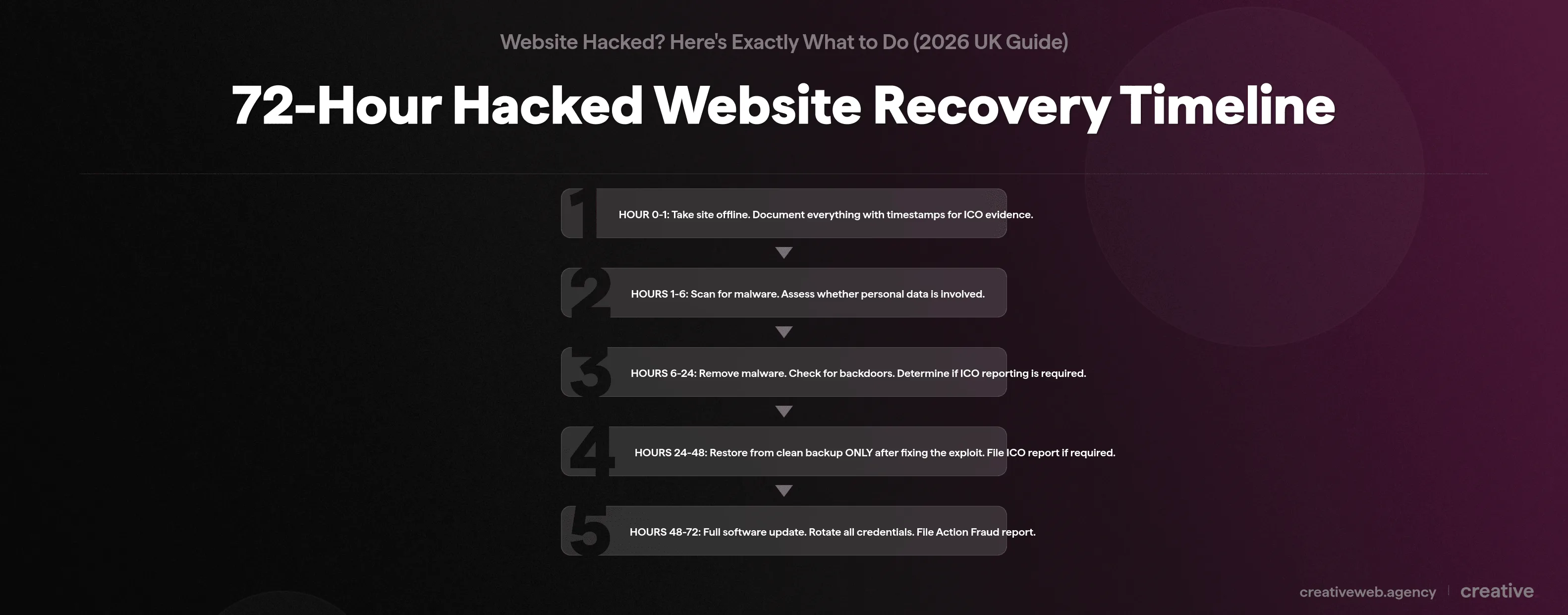
The 72-Hour Recovery Timeline
No other guide gives you this: a structured timeline that combines the technical fix, the legal requirements, and the business decisions into one framework. The GDPR 72-hour ICO reporting deadline drives the urgency.
| Time | Technical | Legal | Business |
|---|---|---|---|
| Hour 0-1 | Take site offline (maintenance mode). Screenshot everything. | Start documenting with timestamps (this is your ICO evidence). | Contact your developer or host immediately. |
| Hours 1-6 | Scan for malware. Check files for modifications. Identify the attack vector. | Assess: is personal data involved? (Contact forms, customer accounts, email addresses.) | Check if you have cyber insurance. |
| Hours 6-24 | Begin malware removal. Check for backdoors and rogue admin accounts. | Determine whether ICO reporting is required (personal data at risk to individuals). | Draft customer notification if needed. |
| Hours 24-48 | Restore from clean backup, but ONLY after fixing the exploit first. | File ICO report if required (you don’t need all the facts: submit what you know, update later). | Send customer notification if high risk to individuals. |
| Hours 48-72 | Full software update. Change every credential. Rotate wp-config secret keys. | Verify ICO deadline is met. File an Action Fraud report. | Request Google review in Search Console if blacklisted. |
| Day 4+ | Implement monitoring and prevention measures. | Update ICO report with findings if needed. | Begin SEO recovery. Schedule ongoing security reviews. |
If You’re the Website Owner (First 60 Minutes)
- Contact your web developer or hosting provider. Explain what you’ve noticed with specifics: “my site is redirecting to a pharmacy page” is more useful than “something’s wrong.”
- If you have access to WordPress: log in and activate a maintenance mode plugin. This stops visitors being exposed to malicious code and buys time.
- Change your passwords. All of them: CMS login, FTP, hosting panel, email, database. Strong and unique for each.
- Check your own computer. Run a thorough antivirus scan. Nasty viruses can hide from standard AV software (try something like RogueKiller as a second opinion).
- Document everything. Screenshots, timestamps, what you noticed and when. This becomes your evidence if you need to report to the ICO later.
If You’re the Developer or Host
Check the FTP first. Look at the latest file change dates to detect affected files. Do this before you move anything using FTP, or you’ll lose the last modified timestamps (and your best forensic evidence).
Take the code off the live environment and put up a maintenance page. Search for base64-encoded strings and obfuscated code in the files. It’s most likely a JavaScript frame injector you’re dealing with, so check headers and footers especially.
Check file permissions: make sure nothing is set to 777. Run ClamAV for a thorough server-side scan. If it’s WordPress, rotate the secret keys in wp-config.php and check the wp_users table for rogue admin accounts.
Top tip: Check for backdoor admin accounts before you do anything else. That’s how they get back in.
Why You Can’t Just Restore a Backup and Call It Done
This is the single most important piece of advice in this article, so I’ll say it clearly.
Do not just revert to a backup and re-launch your site. If you restore and go live without fixing the vulnerability that let them in, the crawler will re-infect your site again. Usually within a matter of hours. We’ve seen it happen repeatedly.
The backup is a clean copy of your vulnerable site. Not a fixed one. Identify and patch the exploit first, then restore, then update everything.
So what do you do if you don’t have a clean backup? Manual malware removal. It’s slower, but it’s the only option. And going forward: automated backups, stored offsite, with at least 30 days of rolling history.
WordPress Hacked: Why It’s the Biggest Target
WordPress powers roughly 43% of all websites globally. That makes it the single biggest target for automated attacks. If you’re running WordPress (and statistically there’s a good chance you are), this section is for you.
We work with WordPress sites every day, so we’ve seen first-hand where the vulnerabilities hide.
Where Hackers Hide in WordPress
After years of cleaning up hacked WordPress sites, these are the places we check first:
- wp-content/uploads: should only contain images and media. PHP files here means you’ve been compromised.
- Theme files (functions.php, header.php): the most common injection points for malicious code.
- wp-config.php: look for any code that shouldn’t be there (you’d be surprised how often this gets modified).
- .htaccess: check for redirect rules or base64-encoded strings.
- wp_options table: siteurl and home values might have been changed. Also check for injected JavaScript in post content.
- wp_users table: admin accounts nobody created.
Cleaning Up a Hacked WordPress Site
Start by downloading fresh WordPress core files from wordpress.org and comparing them against your installation (focus on wp-includes and wp-admin). Delete all inactive themes and plugins entirely: don’t just deactivate, delete.
Run a full scan with Wordfence or Sucuri. Reset file permissions to 755 for directories and 644 for files. Rotate your secret keys using the WordPress.org salt generator.
Scan the database for eval, iframe, and base64_decode strings. And remove any admin accounts you don’t recognise.
Rather Not Deal With This Alone?
Talk to Our TeamThe Legal Bit: GDPR, ICO, and Reporting in the UK
This is the section most guides skip entirely. And in our view, it is arguably the most important one for UK businesses.
If your hacked website held any personal data (and most business websites do: think contact forms, customer accounts, email addresses), you probably have legal obligations.
The 72-Hour Rule
Under UK GDPR (the Data Protection Act 2018), if personal data has been compromised and there’s a risk to individuals, you must report to the ICO within 72 hours of becoming aware.
That “becoming aware” bit matters: the clock starts when you have a reasonable degree of certainty that personal data has been compromised. Not from when the hack actually happened. You report through the ICO’s online reporting portal and include: the nature of the breach, categories of data affected, approximate numbers, likely consequences, and what measures you’ve taken.
Great, so do I need to report every time? Not necessarily. If no personal data was involved, or the data was encrypted, or the breach was contained with no risk to anyone, you don’t need to notify the ICO.
But you must document every breach regardless of whether you report.
When in doubt: report. The ICO is far more lenient towards organisations that report honestly and promptly than those that try to hide things. The maximum penalty is £17.5 million or 4% of annual global turnover, but the ICO issues proportionate fines for SMEs.
When to Tell Your Customers
If the breach poses a “high risk” to individuals (their payment details were exposed, for example), you must notify affected people directly. Be honest, be specific, be actionable: tell them what happened, what data was affected, what the consequences could be, and what they should do (change passwords, watch for phishing emails, contact their bank if relevant).
What not to say: a vague corporate non-apology. People can spot those instantly and they do more damage to trust than the breach itself.
Reporting to Action Fraud and NCSC
Beyond the ICO, report to Action Fraud (the UK’s cybercrime reporting centre). Don’t expect a police investigation for an individual website hack, but reports contribute to the national intelligence picture and help identify larger patterns.
The NCSC (National Cyber Security Centre) also has excellent free resources for small businesses. Worth bookmarking.
What a Hack Actually Costs Your Business
Most people think of the repair bill: £200 to £1,000 for basic malware removal, or up to £3,000 for a full agency recovery. That’s the cost you expect.
The Bill You Don’t See Coming
The hidden costs are what we’ve seen catch businesses out. Downtime alone is painful: the average SME takes 3-5 days to fully recover, and that’s 3-5 days of lost enquiries and damaged credibility.
If Google blacklists your site, it can take weeks to lift, and your rankings might not fully recover (we’ve seen businesses drop off page one and struggle for months). Factor in customer trust erosion, potential GDPR fines, and cyber insurance premium increases, and the total picture changes entirely.
The average total cost for a UK SME breach: £6,400 (DCMS, 2025). Compare that to professional website maintenance at £100-250 per month. The maths is fairly straightforward.
Can Visitors to Your Hacked Site Catch Something?
Yes.
And this is why taking a compromised site offline immediately matters so much.
Drive-by downloads can install malware on a visitor’s device without them clicking anything. Fake login overlays can harvest their credentials.
Cryptojacking scripts can use your visitors’ devices to mine cryptocurrency. All of this works on phones too (answering the “can my phone get hacked from a website?” question: yes, it can).
You have a duty of care to your website visitors under UK law. Every hour your site stays live while compromised, more people are potentially exposed.
How to Stop Your Website Getting Hacked Again
In the original version of this article, I wrote: “if you take one thing away, let it be that your website needs constant maintenance and good, secure hosting.”
That was true in 2016.
It’s true now.
The Non-Negotiables (Do These Today)
Here’s what we tell every client:
- Keep everything updated: CMS core, plugins, themes, PHP version. This alone stops the majority of WordPress attacks.
- Strong, unique passwords on every account plus 2FA: two-factor authentication should be on every admin login. No exceptions.
- Regular automated backups stored offsite: not on the same server. At least 30 days of rolling history. Test your restore process once in a while.
- SSL certificate: HTTPS everywhere. If you haven’t got this sorted in 2026, that’s a red flag.
- Limit admin accounts: only the people who genuinely need access should have it.
Worth the Investment
A web application firewall (WAF) adds an extra layer of protection between your site and the internet. We set these up for every client we manage. Cloudflare’s free tier is a decent starting point. Sucuri and Wordfence both offer solid options for WordPress.
If you’re on WordPress, I’d recommend disabling XML-RPC if you don’t need it (it’s a common brute force vector). Change the default login URL away from /wp-admin. Set correct file permissions (755 for directories, 644 for files). And remove inactive themes and plugins entirely.
The Ongoing Bit (Because a Website Is Never “Done”)
Don’t just leave your website alone and ignore it for six months. A website running a CMS needs maintenance and updates as part of the ongoing cost of having an online presence. If keeping on top of updates isn’t realistic for your team, a managed maintenance plan takes it off your plate.
Schedule monthly updates at minimum. Set up file integrity monitoring (Wordfence and Sucuri both include this). And if you want to demonstrate your security posture to clients and insurers, look at the Cyber Essentials certification: it’s a UK government scheme, affordable (starting around £300), and specifically designed for SMEs.
One more thing most guides don’t mention: a site that’s been cleaned up after a hack is at higher risk of being hacked again. The attacker already knows you were vulnerable. Post-recovery monitoring isn’t optional.
Frequently Asked Questions
-
How do I know if my website has been hacked?
-
The most common sign is your site redirecting visitors to spam pages, especially on mobile. But plenty of hacks work quietly in the background without any visible symptoms. Check for unexpected admin accounts in your CMS, strange files in your uploads folder, and set up Google Search Console if you haven’t already. It’s free and it’ll alert you to security issues before your customers notice.
Did this answer your question? YesThat’s great glad we could help! Start a ProjectNoNo problem, one of our experts can give you a more in-depth answer. Ask our Experts -
What’s the first thing I should do if my website is hacked?
-
Don’t panic, and don’t start deleting things randomly. Put the site into maintenance mode to stop visitors being exposed, then contact your developer or hosting provider with as much detail as you can. u0022My site is redirecting to a pharmacy pageu0022 is more useful than u0022something’s wrong.u0022 Change all your passwords immediately and start documenting everything with timestamps.
Did this answer your question? YesThat’s great glad we could help! Start a ProjectNoNo problem, one of our experts can give you a more in-depth answer. Ask our Experts -
Can a hacked website actually be fixed?
-
Yes, almost always. We’ve recovered hundreds of hacked websites over the years. The process involves identifying how the attacker got in, removing all malicious code and backdoor accounts, patching the vulnerability, and then restoring from a clean backup or manually cleaning the files. It takes work, but it’s fixable.
Did this answer your question? YesThat’s great glad we could help! Start a ProjectNoNo problem, one of our experts can give you a more in-depth answer. Ask our Experts -
How much does it cost to fix a hacked website?
-
Basic malware removal typically runs £200 to £1,000. A full agency recovery with forensic investigation can reach £3,000 or more. But the real cost is the hidden stuff: lost business during downtime, damaged search rankings, customer trust erosion, and potential GDPR fines. The average UK SME breach costs £6,400 in total when you factor everything in.
Did this answer your question? YesThat’s great glad we could help! Start a ProjectNoNo problem, one of our experts can give you a more in-depth answer. Ask our Experts -
Do I need to report a website hack to the ICO?
-
If personal data was compromised and there’s a risk to individuals, yes. You’ve got 72 hours from when you become aware of the breach. You don’t need all the facts upfront. Submit what you know and update the ICO later. If no personal data was involved, you don’t need to report, but you must document the breach internally regardless.
Did this answer your question? YesThat’s great glad we could help! Start a ProjectNoNo problem, one of our experts can give you a more in-depth answer. Ask our Experts -
How do hackers actually get into websites?
-
It’s almost never a person targeting your site specifically. Automated bots scan the internet for known vulnerabilities, especially outdated CMS plugins and weak passwords. In our experience, 99% of hacks come down to outdated software or poor hosting. Credential stuffing (using leaked passwords from other breaches) accounts for 31% of attacks globally.
Did this answer your question? YesThat’s great glad we could help! Start a ProjectNoNo problem, one of our experts can give you a more in-depth answer. Ask our Experts -
How do I fix a hacked WordPress website?
-
Start by downloading fresh WordPress core files from wordpress.org and comparing them against your installation. Delete all inactive themes and plugins completely. Scan with Wordfence or Sucuri. Reset file permissions (755 for directories, 644 for files). Rotate your secret keys in wp-config.php. Check the database for injected code. And critically, remove any admin accounts you don’t recognise before you do anything else.
Did this answer your question? YesThat’s great glad we could help! Start a ProjectNoNo problem, one of our experts can give you a more in-depth answer. Ask our Experts -
How do I stop my website being hacked in the first place?
-
Keep everything updated. Seriously, that alone prevents most attacks. Beyond that: strong unique passwords on every account, two-factor authentication on admin logins, regular automated backups stored offsite, and decent hosting with proper firewall protection. If you’re running WordPress, disable XML-RPC and change the default login URL. It’s not glamorous, but it works.
Did this answer your question? YesThat’s great glad we could help! Start a ProjectNoNo problem, one of our experts can give you a more in-depth answer. Ask our Experts -
Can my phone get hacked just from visiting a website?
-
Yes, it’s possible. Drive-by downloads can install malware without you clicking anything, and cryptojacking scripts can use your phone’s processing power to mine cryptocurrency in the background. This is exactly why taking a compromised website offline immediately matters so much. Every hour it stays live, more visitors are potentially exposed.
Did this answer your question? YesThat’s great glad we could help! Start a ProjectNoNo problem, one of our experts can give you a more in-depth answer. Ask our Experts -
Can I find out who hacked my website?
-
Honestly? Rarely. Most attacks are automated, so there’s no individual person to identify. Your server logs might show the IP addresses used, but these are usually proxied or from compromised machines themselves. Report to Action Fraud regardless. It contributes to the national intelligence picture even if they can’t investigate your individual case.
Did this answer your question? YesThat’s great glad we could help! Start a ProjectNoNo problem, one of our experts can give you a more in-depth answer. Ask our Experts
If you take one thing from this article, let it be this: your website needs regular maintenance and decent hosting. Not glamorous. Won’t win any awards. But it’s the difference between running a business and dealing with 3am emergency because your site is redirecting customers to a pharmacy in Eastern Europe.
If you’re worried about your website’s security, or if you think you’ve been compromised, get in touch. We’ve been doing this for over 16 years and we’re happy to help.