
Most articles about WooCommerce vs Shopify give you a feature checklist and let you figure it out. We’re not going to do that. We’ve spent years building complex e-commerce systems on WooCommerce, and we’ve got strong opinions about when it’s the right tool and when it isn’t.
So here’s our honest take: if you want a straightforward online shop, use Shopify. If you have a complex problem that needs solving, keep reading. We’ll cover the good stuff, the genuinely annoying stuff, and the projects where WooCommerce was the only option that made sense.
WooCommerce vs Shopify: The Simple Answer
WooCommerce powers over 6.5 million live websites globally and holds roughly 33% of the global e-commerce platform market. Shopify sits at around 26% but dominates in higher-value transactions and among stores that need minimal customisation.
Both are solid platforms. But they are built for different jobs.
If you have a standard product catalogue, basic checkout needs, and fewer than a few hundred SKUs, Shopify is almost certainly the right choice. It’s quick to set up, predictable on cost, and you don’t need a developer to manage it day to day. We’ll happily tell clients that (and we have done, plenty of times).
But most of our clients don’t come to us with “I want to sell things online.” They come to us with problems. And problems need solving, not a template.
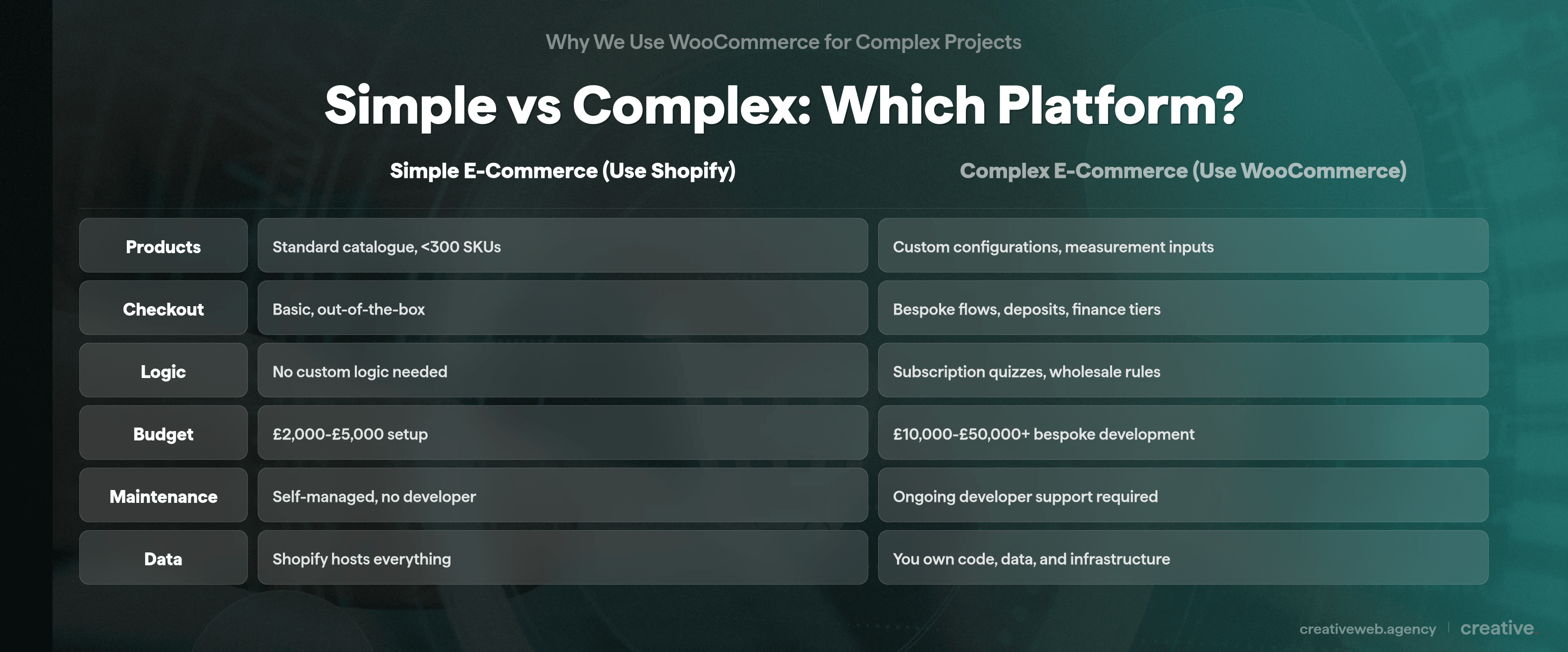
Shopify is built for selling products. WooCommerce is built for solving e-commerce problems that off-the-shelf platforms can’t handle.
What Custom Ecommerce Actually Means
Complex is not just “lots of products.” It’s custom product configurations where customers need to input measurements. It’s subscription logic where a quiz determines what someone gets shipped each month. It’s a checkout process that handles deposits, finance applications, and custom visual previews.
It is a database of 62 million records that needs to run quickly while offering a smooth buying experience.
That’s what we mean. And that’s where WooCommerce becomes the only realistic option (unless you want to build something entirely from scratch, which is usually a six-figure conversation).
Bespoke Ecommerce in Practice: Real Client Examples
Every comparison article online talks about WooCommerce’s flexibility in the abstract. “You can customise anything!” Sure, but what does that actually look like in practice?
If you go looking for other articles that show real client examples of complex WooCommerce builds, you won’t find any. Not one named project with technical details. So here are ours.
Subscriptions With Custom Logic
A few years back we built a coffee subscription site. Sounds simple enough, right?
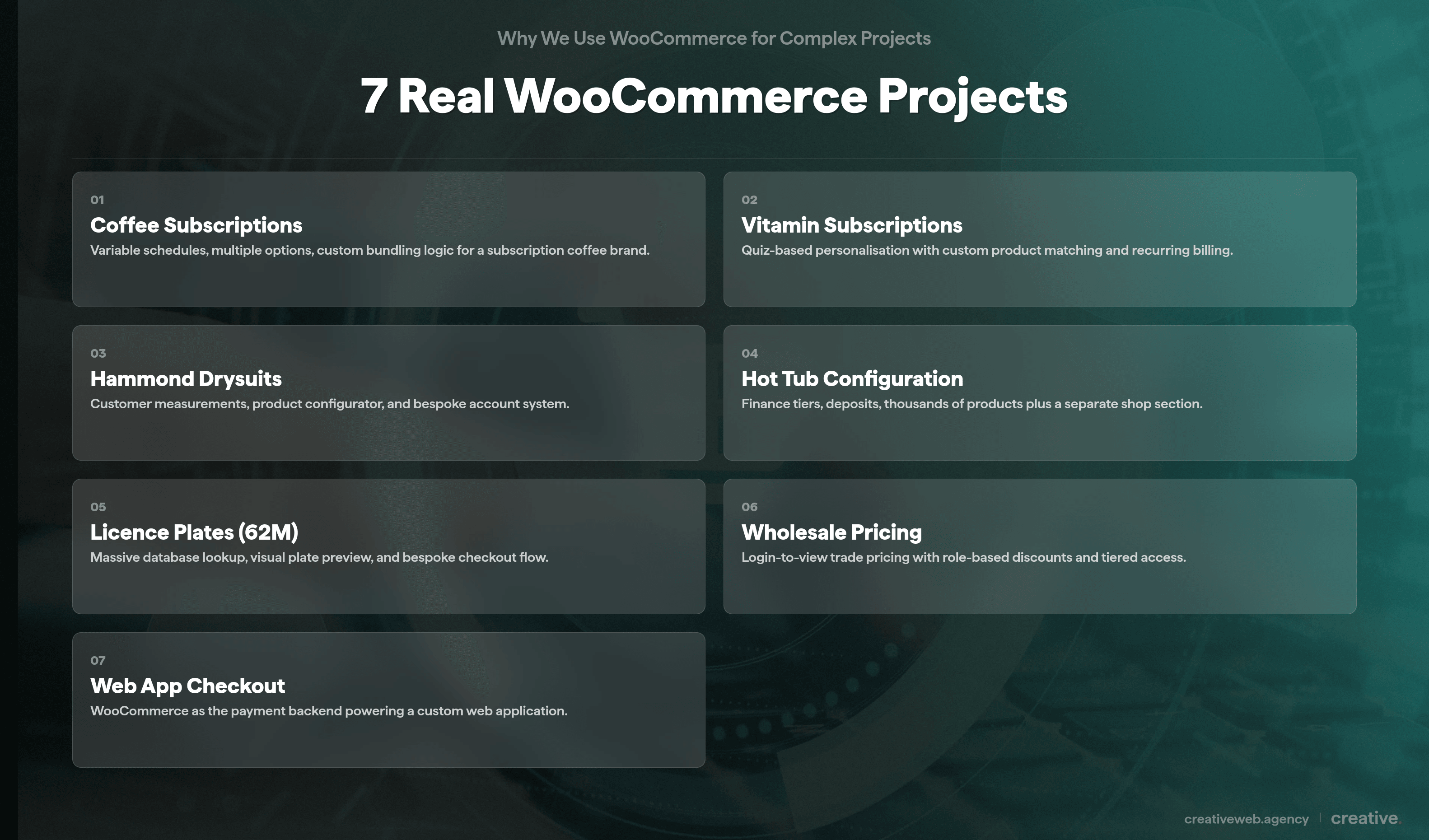
It wasn’t. The subscriptions had multiple product options, different quantities, and several scheduling frequencies that you (as a customer) could mix and match. Standard WooCommerce Subscriptions couldn’t handle that out of the box, so we built custom logic on top of it to manage the variable schedules and bundled options.
More recently, we built a vitamin subscription site with quiz-based logic. Customers answer questions about their health and lifestyle, and the system determines which minerals, vitamins, and supplements they need. The quiz generates a personalised subscription.
That’s completely custom: we had to build it because nothing off the shelf could do it. The WooCommerce Subscriptions plugin gave us the foundation (recurring billing, account management, schedule handling), but the quiz engine and product-matching logic were all bespoke development.
WooCommerce handles subscription billing out of the box, but complex subscription logic (quizzes, variable schedules, personalised bundles) requires custom development on top of it.
Measurement Systems and Product Configurators
Hammond drysuits is a good example of why we use WooCommerce. Customers need a measurement system with loads of options for their suit. On top of that there’s abandoned cart recovery, full account functionality, and a product configuration process that goes on for days (not literally, but it feels like it sometimes).
The account system alone could keep a developer busy for a week. We don’t think there’s another open-source e-commerce platform we could adapt to handle all of that without building something from scratch.
We also built a hot tub site recently. Some hot tubs have certain features, some have others. Some need configuration.
Some offer finance, but different levels of finance with different deposit requirements.
When you add a hot tub to your cart, the deposit amount adjusts based on the finance tier selected. There are thousands of products, and alongside the configurator there’s also a standard shop that works differently.
Product configurators with measurement inputs, multiple finance tiers, and deposit logic are exactly the kind of e-commerce complexity that WooCommerce was designed to support.
You can see why Shopify couldn’t handle that.
A 62-Million-Record Database With Custom Checkout
This one’s probably our most extreme example. A client came to us with a database of 62 million licence plates that needed to run quickly, with a checkout process allowing customers to choose a plate, preview how it would look with custom options, and go through a bespoke purchase flow.
The scale alone is a technical challenge, but the custom checkout with visual previews on top of it? That’s problem-solving territory, and that’s what we get paid to do.
WooCommerce’s open-source architecture means there’s no upper limit on database size or checkout complexity, provided you have the development capability to build it.
Wholesale and Login-to-View Pricing
We’ve also built wholesale functionality where approved trade customers log in and can see trade pricing that’s hidden from regular visitors. Standard WooCommerce doesn’t do this out of the box, but because it’s open source we can build role-based pricing, application workflows, and tiered discount structures on top of it.
Could you do this on Shopify? Technically, with Shopify Plus (which starts at $2,300/month), you can get some B2B features. But for a UK SME that needs wholesale alongside their regular shop, WooCommerce gives you that flexibility without the premium price tag.
WooCommerce as a Checkout Backend for Web Apps
Sometimes you need a completely bespoke web application with custom functionality that has nothing to do with WooCommerce. But then you still need a checkout system. Building payment processing from scratch is expensive, time-consuming, and you’d need to maintain every gateway integration yourself.
So we hook the checkout process into WooCommerce. It gives us something that updates regularly, supports dozens of payment gateways (Stripe, PayPal, Opayo, Worldpay, Apple Pay, Google Pay), and can be managed without writing custom code for each gateway. WooCommerce becomes the payment engine behind a completely custom front-end.
WooCommerce can serve as a standalone checkout and payment gateway layer for custom web applications, giving you access to hundreds of gateways without building payment infrastructure from scratch. It is a use case most people don’t think about, but it’s genuinely useful.
The Honest Downsides (What Nobody Tells You)
Ok, so here’s where we stop selling WooCommerce and start being honest about it. Because it does have real problems, and pretending otherwise helps nobody.
We think people who’ve used it with an out-of-the-box theme or paid someone a few thousand pounds for a basic Elementor WooCommerce build and then wondered why it’s a mess: they’ve got a point. It can be a mess.
Product Editing Is Cumbersome
This is the single biggest gripe you’ll hear from WooCommerce users (including us). If you want to manage a product, you go in, set the price, add the description and features, then navigate to attributes. There are 12 different toggles for the attributes, and the whole thing becomes this complex puzzle you need to fathom out every single time.
WordPress.org forums are full of complaints about this. Users report product edit pages taking 80+ seconds to load on large catalogues. It is not a niche problem: it’s the most common day-to-day frustration you’ll hit with the platform.
WooCommerce’s product editing interface is the platform’s single biggest usability weakness, with 12 attribute toggles per product and documented load times exceeding 80 seconds on large catalogues.
NB: This is not about WooCommerce being bad. It’s about the WordPress admin interface not being designed for rapid product data entry.
The underlying system is powerful. The interface for managing it is painful.
It Gets Slow at Scale
We have a client site with 50,000 products on it. It can be slow.
The maintenance we need to do keep it running quickly is significant. WooCommerce eats through server resources, and the root cause is architectural: the wp_postmeta table.
Every product in WooCommerce generates roughly 29 rows in the wp_postmeta database table. When you have 50,000 products, that’s over 1.4 million rows just for your product metadata.
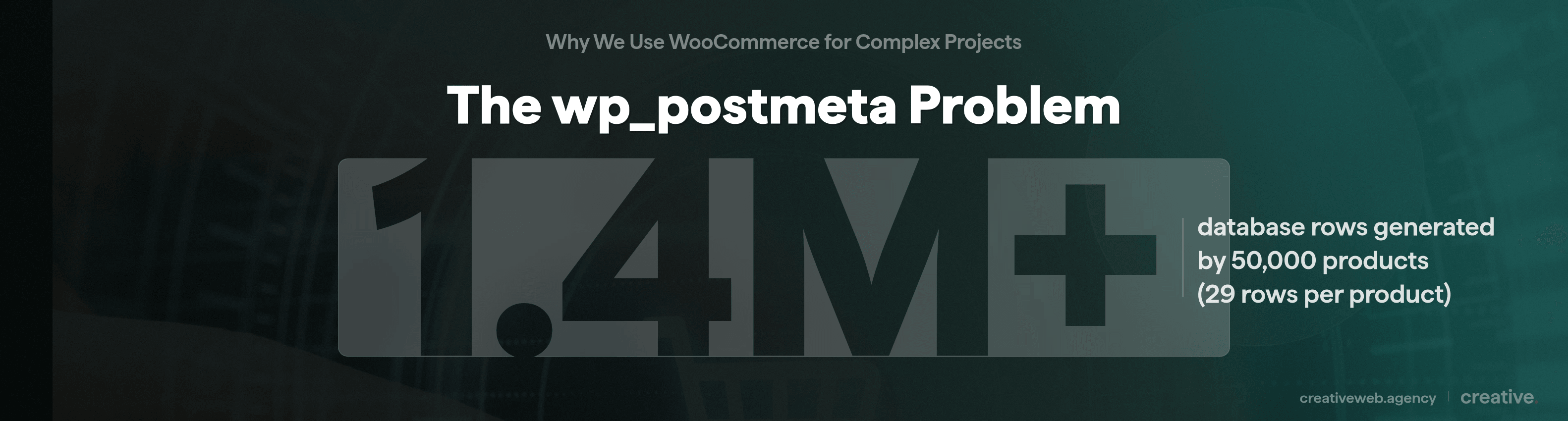
Queries against that table get expensive fast. Your site will start showing strain when wp_postmeta exceeds four or five million rows.
WooCommerce’s newer HPOS (High-Performance Order Storage) moved orders to dedicated tables, but products still use the old structure.
WooCommerce stores with 50,000+ products generate over 1.4 million wp_postmeta rows, making database optimisation essential for acceptable performance.
It is not unsolvable.
But you need to know about it before you commit to WooCommerce for a large catalogue.
The Checkout Needs Work
The default WooCommerce checkout isn’t great. It’s functional, but compared to Shopify’s checkout (which is genuinely excellent), it feels dated and clunky. Most of the time we end up customising the checkout for our clients rather than using what comes in the box.
Benchmark data from LitExtension shows Shopify pages load at around 309ms compared to WooCommerce’s 776ms. That’s a significant difference for your checkout, where every extra second costs you conversions. We’ve seen it firsthand: a slow checkout loses sales.
Shopify’s default checkout outperforms WooCommerce’s out of the box, but a custom-built WooCommerce checkout can match or exceed it with the right development.
How We’ve Solved These Problems
Every problem we just described? We’ve built a solution for it. That’s basically the difference between a team that installs WooCommerce and a team that develops with it.
Need a WooCommerce Store That Actually Works?
We build complex WooCommerce stores for UK businesses — from custom product configurators to bespoke checkout flows. If your e-commerce needs go beyond a standard template, we can help.
Get a Free Ecommerce ConsultationA Custom React Product Editor
We coded a custom product editing interface in React. Instead of loading the heavy WordPress admin (with all those toggles and metaboxes), our editor talks directly to the WordPress REST API and WP-CLI to make changes.
Load times are instant. You can edit product information, duplicate previous products, batch-edit across hundreds of items, and it’s all customised to each client’s specific needs. One client’s editor looks completely different from another’s because their products work differently.
A custom product editor built on the WordPress REST API bypasses WooCommerce’s slow admin interface entirely, cutting product editing time from minutes to seconds.
TLDR: rather than forcing clients to use an interface that wasn’t designed for their workflow, we built one that was.
The editor also connects into our CLI and AI integration, so we can use MCP-style connections to AI tools and have product changes done via prompts. If a client needs 200 product descriptions updated, we do not click through 200 product pages.
We run it through our tooling.
It’s great for us and great for our clients.
A Bespoke Checkout That Matches Shopify
We’ve built a custom checkout for our WooCommerce clients that includes everything Shopify’s checkout offers: Apple Pay, Google Pay, abandoned cart recovery, a clean single-page flow, and express checkout options. All built on WooCommerce so it integrates with the custom product logic, subscriptions, and payment gateways our clients already use.
So when people say “Shopify’s checkout is better,” our answer is: yes, the default WooCommerce checkout is worse. But ours isn’t.
If you want to work with a WooCommerce developer in the UK who’s actually solved these problems (rather than just acknowledging they exist), that’s what we do. You can see more about how we approach bespoke ecommerce website design on our service page.
WooCommerce vs Shopify: The Practitioner’s View
So should you pick WooCommerce or Shopify? Here’s how we actually think about it after years of building with both.
Flexibility and Ownership
WooCommerce is open source. You own the code, the data, and the hosting.
If you want to change how something works, you can. There’s no platform telling you what you can and can’t build.
Shopify is a hosted SaaS platform: you’re renting their infrastructure and building within their rules. For standard shops that’s fine (genuinely).
But for complex builds where you need to modify checkout flows, integrate with bespoke systems, or build custom product logic, ownership matters. We’ve had clients migrate from Shopify to WooCommerce specifically because they hit a wall with what Shopify would let them do.
WooCommerce gives you full ownership of your code, data, and infrastructure.
Shopify gives you convenience and speed at the cost of platform control.
The Real Cost Picture
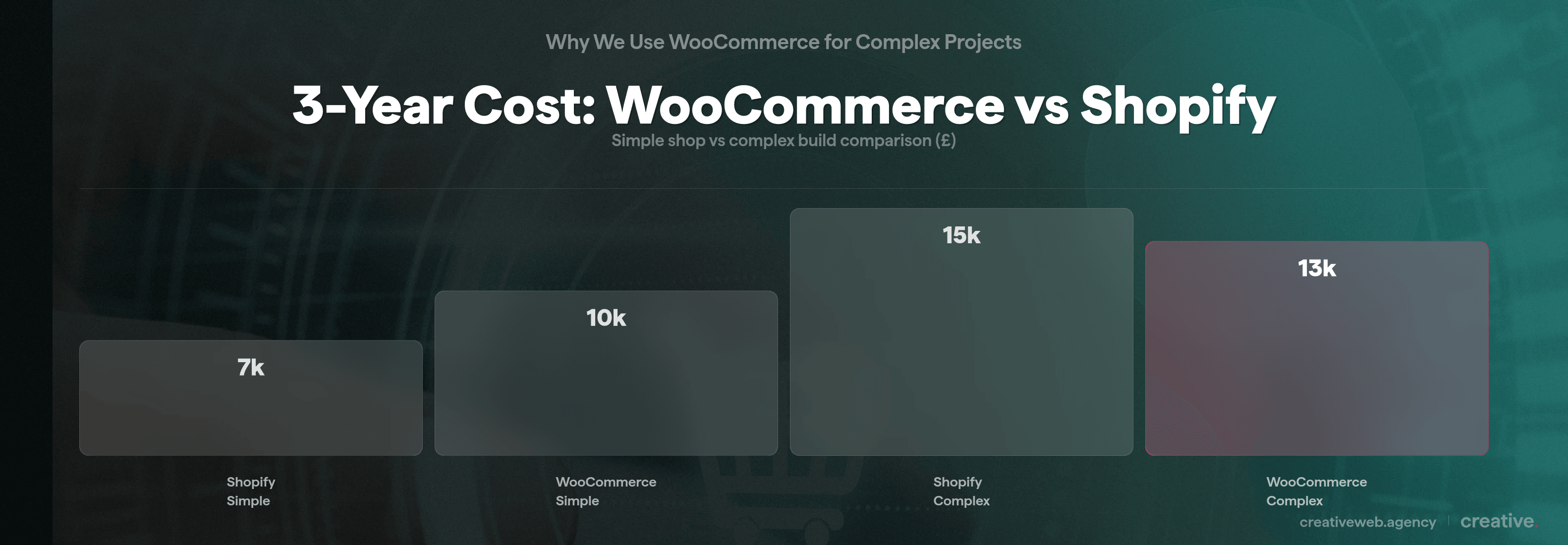
WooCommerce itself is free, but running it isn’t. You’ll need hosting (£20-£200+/month depending on your scale), plugins (WooCommerce Subscriptions alone costs $239/year), development time for anything custom, and ongoing maintenance. If you’re budgeting for an e-commerce build, Shopify is more predictable: £49-£349/month plus apps and transaction fees.
For a simple shop, Shopify is almost always cheaper for you.
For a complex build, WooCommerce can actually work out better over three to five years because you’re not paying platform transaction fees on every sale and you’re not locked into an app ecosystem where each feature costs you £30-£100/month.
We’ve written about website costs in more detail here: how much a website really costs.
| Factor | WooCommerce | Shopify |
|---|---|---|
| Platform cost | Free (open source) | £49-£349/month |
| Hosting | £20-£200+/month (self-managed) | Included |
| Transaction fees | None from WooCommerce (gateway fees only) | 0.5-2% on third-party gateways |
| Customisation | Unlimited (open source) | Limited by platform rules |
| Developer required? | Yes, for complex builds | No, for simple shops |
| Best for | Complex, bespoke projects | Standard online shops |
Payment Gateways and Transaction Fees
WooCommerce supports hundreds of payment gateways with no platform transaction fees. You pay your gateway’s processing fee and that’s it.
Shopify charges an additional 0.5-2% on every transaction if you use a third-party payment gateway instead of Shopify Payments. For businesses processing significant volume through multiple gateways, that adds up quickly.
If you’re processing £500,000 a year through a third-party gateway on Shopify’s Basic plan, that’s an extra £10,000 in platform fees on top of your gateway’s processing charges.
On WooCommerce, that fee simply doesn’t exist.

WooCommerce charges zero platform transaction fees regardless of which payment gateway you use, while Shopify adds 0.5-2% on top of gateway fees for third-party providers.
For UK businesses processing through multiple gateways (especially if you need Opayo, Worldpay, or other UK-specific providers alongside Stripe), that’s a significant saving.
When We Tell Clients to Use Shopify
Here’s the bit most WooCommerce developers won’t say: sometimes Shopify is the right answer.
If a client comes to us and says “I just want a bog-standard e-commerce site,” we’d say let’s go on Shopify. Genuinely. It’s faster to launch, cheaper to maintain, and you can manage it yourself without needing us on retainer.
And that’s fine. Shopify is great at what it does.
But there’s a difference between “I want a web presence and an online shop” and what most of our clients bring us.
A 62-million-record database that needs to run quickly. A subscription model with custom quiz logic. A product configurator with multiple finance tiers and deposit options.
Those are not Shopify problems. At that point, you need a team that solves problems, not a platform that sells templates.
For a standard online shop with fewer than a few hundred products and no custom logic, Shopify is faster to launch, cheaper to maintain, and easier to manage without a developer.
Budget and Timeline
If your budget is a few thousand pounds and you need to be live in weeks, a bespoke WooCommerce build is not the right answer. Shopify gets you selling faster and at lower upfront cost.
But if you have a complex requirement that needs custom development, investing in a WooCommerce build with a team who knows the platform will give you something Shopify simply can’t deliver.
Top tip: if you’re not sure whether your project is “simple” or “complex,” compare it to the client examples above. If your requirements look more like the coffee subscription or the licence plate database than a standard product catalogue, you probably need WooCommerce.
Frequently Asked Questions
-
Is WooCommerce good for large stores with 50,000+ products?
-
It can be, but it requires proper infrastructure and maintenance on your part (or your developer’s). WooCommerce’s wp_postmeta architecture creates performance challenges at scale. We manage a 50,000-product store and keep it running well, but it takes dedicated optimisation work: custom tooling, database management, and proper hosting. It is not a set-and-forget situation.
Did this answer your question? YesThat’s great glad we could help! Start a ProjectNoNo problem, one of our experts can give you a more in-depth answer. Ask our Experts -
Can WooCommerce handle complex subscription products?
-
Yes. We’ve built subscription systems with custom quiz logic (for vitamins) and variable schedules with multiple product options (for coffee). The WooCommerce Subscriptions plugin provides the foundation, but complex subscription logic requires custom development on top of it.
Did this answer your question? YesThat’s great glad we could help! Start a ProjectNoNo problem, one of our experts can give you a more in-depth answer. Ask our Experts -
What are the real disadvantages of WooCommerce?
-
Product editing is cumbersome for you and your team (12 attribute toggles, slow-loading edit pages), it gets slow at scale without proper maintenance, and the default checkout isn’t as polished as Shopify’s. These are solvable problems, but you should know about them before committing.
Did this answer your question? YesThat’s great glad we could help! Start a ProjectNoNo problem, one of our experts can give you a more in-depth answer. Ask our Experts -
Is WooCommerce free?
-
The plugin is free. Running it is not. You’ll need hosting, SSL, potentially premium plugins (WooCommerce Subscriptions is $239/year), and developer time for your setup and customisation. For a simple store you might spend £500-£2,000 to set it up. For a complex bespoke build, expect £10,000-£50,000+ depending on your requirements.
Did this answer your question? YesThat’s great glad we could help! Start a ProjectNoNo problem, one of our experts can give you a more in-depth answer. Ask our Experts -
When should I use WooCommerce instead of Shopify?
-
When your requirements go beyond what Shopify can do out of the box: custom product configurations, bespoke subscription logic, complex checkout flows, wholesale pricing, or integration with your existing systems. If you need to own your platform and data completely, WooCommerce gives you that. But if you have a straightforward product catalogue with standard checkout, Shopify is usually the better choice for you.
Did this answer your question? YesThat’s great glad we could help! Start a ProjectNoNo problem, one of our experts can give you a more in-depth answer. Ask our Experts -
Do I need a developer for WooCommerce?
-
For anything beyond a basic shop, yes. WooCommerce’s strength is its flexibility, but that flexibility requires someone who knows how to use it. A poorly built WooCommerce site (and we’ve inherited quite a few) is worse than a well-configured Shopify store. If you want to work with a WooCommerce agency in the UK that specialises in complex builds, that’s where we come in.
Did this answer your question? YesThat’s great glad we could help! Start a ProjectNoNo problem, one of our experts can give you a more in-depth answer. Ask our Experts -
Why is WooCommerce so slow?
-
Usually it’s the wp_postmeta database architecture. Each product creates roughly 29 rows in the postmeta table, and queries against millions of rows get expensive. Other common causes: plugin bloat (especially SEO plugins loading on product pages), underpowered hosting, and unoptimised themes. All fixable with the right approach, but they need attention.
Did this answer your question? YesThat’s great glad we could help! Start a ProjectNoNo problem, one of our experts can give you a more in-depth answer. Ask our Experts -
Can WooCommerce be used as a checkout system for a custom web app?
-
Yes, and we do this. We build completely bespoke web applications and hook WooCommerce in purely for checkout and payment processing. It gives us access to hundreds of payment gateways, regular security updates, and a battle-tested checkout system without building payment infrastructure from scratch.
Did this answer your question? YesThat’s great glad we could help! Start a ProjectNoNo problem, one of our experts can give you a more in-depth answer. Ask our Experts
WooCommerce is not the right tool for every project. But if you have a complex e-commerce problem that needs solving, it’s usually the right starting point.
If you have a project that looks anything like the examples we’ve described (subscriptions, configurators, wholesale, massive databases) and you want to talk it through, get in touch.
And if your project is straightforward? We’ll tell you to use Shopify. Honestly.